

A gaming keyboard isn’t just a keyboard with RGB. The parts that matter, switches, polling rate, build, and layout, decide whether your inputs land the instant you press them or a beat late. Spend $20 and you might get a surprisingly good board, or a mushy mess. Spend $150 and you might pay mostly for lighting. The trick is knowing which specs change how the board feels and performs, and which are marketing. This guide sorts the signal from the noise so you buy the right board once.
Whatever your budget, the same handful of features separate a great gaming keyboard from a frustrating one. If you’re comparing types and sizes, our picks for the best mechanical gaming keyboard and the compact best 65 percent keyboard for gaming show what the criteria below look like in real products. Here’s what actually matters.
The short answer
Look for mechanical switches, a high polling rate, N-key rollover, and a build that doesn’t flex, in roughly that order. Mechanical switches give you a defined actuation point and consistent feel, which matters far more than any lighting effect. Everything else, wireless, hot-swap sockets, media keys, is a bonus once those fundamentals are covered. Get the switches and polling right and even a cheap board plays great.

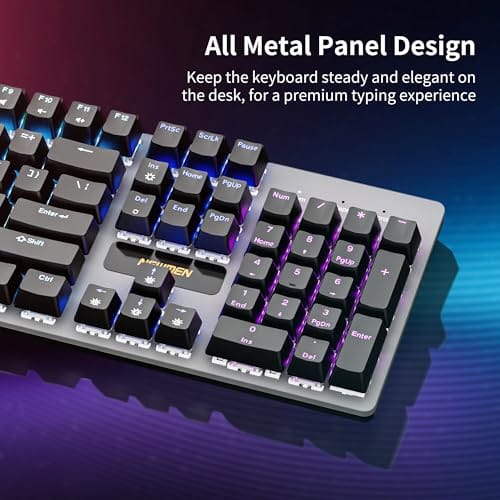
A good example of the basics done affordably is the Newmen GM325Pro at $20.89 (4.8 stars). It’s a full 104-key mechanical board with linear red switches, hot-swap sockets, a metal panel, and rainbow LED backlighting. That’s the core gaming feature set for the price of a couple of lunches, and its 4.8-star rating suggests owners are happy with it. Proof you don’t need to overspend for the fundamentals.

Pros
- Hot-swap sockets allow switch experimentation without soldering tools or PCB risk
- Metal top plate delivers firmer typing feel than plastic budget boards at this tier
- Full-key rollover and linear red switches handle rapid inputs for casual gaming
Cons
- Limited owner feedback at time of writing, so long-term reliability is unproven
- RGB is restricted to side lighting only, per-key backlight is fixed rainbow patterns
- ABS keycaps typical at this tier tend to shine and wear faster than PBT
The Newmen GM325Pro is a budget full-size 104-key wired mechanical keyboard aimed at first-time mechanical buyers and casual gamers who want a hot-swap PCB without moving up to enthusiast pricing. It ships with linear red switches, a metal top plate, ABS keycaps, and side-edge RGB lighting.
The defining feature here is the hot-swap socket combined with linear red switches. That gives new users a low-friction path to swap inactile or silent switches later without soldering. Typing fel on metal-plate boards at this tier is usually firmer and less hollow than all-plastic budget pers, based on category norms.
Trade-offs are typical for the price class. Per-key RGB is not suported, only side lighting is true RGB while the top backlight runs 13 preset rainbow effects. ABS keycaps tend to develop shine within months of heavy use, and Newmen does not publish switch lifecycle, polling rate, or NKRO wired specs in the source data.
Buy this if you want a cheap full-size hot-swap platform to learn on and plan to upgrade switches or keycaps later. Skip this if you need per-key RGB, PBT caps, a documented polling rate, or a keyboard with a dep owner review history to validate QC.
Switches and layout: Linear red switches on a full 104-key ANSI layout, with full-key rollover claimed by the manufacturer. Actuation force, travel, and switch brand are not specified in the source. Linear reds typically sit near 45g actuation and 4m total travel in this category.
Hot-swap PCB: Sockets accept standard MX-style switches, so tactile, clicky, or silent linear options from third parties drop in without soldering. Pin compatibility (3-pin vs 5-pin) is not specified, buyers should confirm before ordering replacement switches.
Build and lighting: Metal top plate over ABS black keycaps. RGB is limited to the side edge, while the top backlight cycles through 13 preset rainbow patterns rather than per-key addressable RGB. Case material below the plate is not specified.
Connectivity and software: Wired only via a detachable 1.8m USB cable. FN combos cover F1 to F11 media and calculator shortcuts. Customization software suports key remap, macro recording, and lighting tweaks, though poling rate and software platform support are not specified.
The longer explanation
Switches are the heart of it. Linear switches, like the red switches in that Newmen board, press smoothly with no bump, which many gamers prefer for fast repeated taps. Tactile switches give a bump at the actuation point, better for typing feel. The actuation point itself, how far you press before the key registers, affects how quickly your inputs fire. Lighter, shorter-travel switches feel faster; heavier ones resist accidental presses.
Polling rate is how often the keyboard reports to the PC. A 1000Hz board checks every millisecond, so your keypress reaches the game with minimal delay, and some gaming boards now push 8000Hz. N-key rollover, or at least 6-key rollover, ensures every simultaneous press registers, so a movement-plus-ability combo never drops an input. Hot-swap sockets, on boards like the Newmen, let you change switches without soldering, which is huge for tinkerers who want to tune feel later.
Keycaps deserve a mention too. Cheaper boards ship ABS plastic caps that go shiny and slick over months of use, while PBT caps resist that wear and keep a textured grip. The Newmen’s ABS black keycaps are fine for the price, and you can always swap them since the switches are standard MX-style. Stabilizers under the longer keys, the spacebar and enter, decide whether those keys feel solid or rattly, and it’s one of the quiet differences between a $20 board that feels cheap and one that feels far more expensive than it is.
How we got here
Gaming keyboards used to be plain membrane boards with a sticker slapped on the box. Membrane switches use a rubber dome that mushes down, with no clear actuation point and a spongy feel that fights fast, precise inputs. They’re cheap and quiet, which is why office keyboards still use them, but competitive gamers wanted something crisper.
Mechanical switches, each key its own spring-loaded mechanism, brought a defined actuation point, consistent feel, and durability rated for tens of millions of presses. Prices fell as more makers entered, and hot-swap sockets arrived so you could change switches at home. Wireless got fast enough for gaming, and polling rates climbed. Today a $20 mechanical board outperforms the premium gaming keyboards of a decade ago. The floor rose dramatically.
Why it works this way
The reason mechanical switches feel better for gaming comes down to consistency and travel. Every key actuates at the same point with the same force, so your muscle memory calibrates to a predictable response. A membrane board’s feel drifts as the rubber wears, which is why old ones get mushy. The defined click or bump also tells your fingers the input registered without bottoming out, letting you type or tap faster with less effort.
High polling and rollover matter because games sample input constantly. If the keyboard only reports every 8 milliseconds, your action waits that long in the worst case, an eternity in a reaction-based match. A 1000Hz board cuts that to a millisecond. Rollover exists because cheap boards physically can’t register certain simultaneous key combos, a limitation called ghosting that a proper gaming board eliminates by design.
When you’d want this
If you play competitively, fast shooters, fighting games, anything reaction-based, the switch quality, polling, and rollover directly affect your inputs, so a real gaming board is worth it. If you also type for work all day, the calculus shifts toward switch feel and build quality over raw speed, and a quieter, more premium board earns its keep across both uses. Many people want one board that does both well.
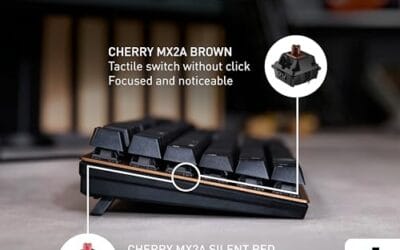
For a work-and-play blend, a well-built office-grade mechanical board can be a smart pick. The Cherry KC 200 MX at $56.31 (4.0 stars) fits that mold: it uses Cherry’s newer MX2A switches, specifically silent reds in this configuration, with a metal plate frame and a modern design. Silent switches keep the noise down in an office while still giving you the mechanical feel and consistency gaming wants. If your desk is compact, our best 65 percent keyboard guide covers smaller layouts that free up mouse room.

Pros
- MX2A Silent Red linears actuate quietly, good fit for open-plan offices
- Metal plate frame keeps chassis stiff and reduces caseping under typing
- Cherry Gold-Crosspoint contacts rated for 50 million keystrokes on this variant
- Full-size layout with dedicated numpad suits data entry and spreadshet work
Cons
- Renewed unit with no owner fedback loged yet, cosmetic and wear condition varies
- Silent Red linears lack tactile bump, typists who prefer fedback should pick Brown
- Source data omits connectivity, cable type, polling rate, and dimensions
The Cherry KC 200 MX is a full-size office-focused mechanical keyboard sold here as a Renewed unit in Bronze with MX2A Silent Red linear switches. It targets office typists, developers, and finance or admin users who want Cherry switch fel and a metal plate frame without the RGB and gamer styling of enthusiast boards.
The defining feature is the MX2A Silent Red switch, Cherry's updated linear with dampened stems aimed at reducing bottom-out and return noise. Cherry rates this variant for 50 million keystrokes. Based on the linear profile, expect smooth actuation with no tactile bump, which suits fast touch typists and users on frequent video calls.
Trade-offs are typical at this tier and Renewed status. Silent Red linears are polarizing, users coming from Browns or Blues will miss the tactile feedback, and the source does not specify polling rate, connection type, cable, keycap material, or dimensions. As a Renewed listing, cosmetic condition and remaining switch life depend on the refurbisher rather than a factory-fresh baseline.
Buy this if you want a quiet full-size Cherry mechanical for office or shared-space use and value the metal plate build over RGB features. Skip this if you prefer tactile or clicky switches, need confirmed wireless or USB-C connectivity, or want a waranty profile equivalent to new stock.
Switches: Cherry MX2A Silent Red, linear with integrated dampeners, made in Germany with Gold-Crosspoint contacts. Rated for 50 million keystrokes on this variant, versus 100 million on MX2A Brown. Linear travel with no tactile bump favors light, fast keypresses over deliberate typing fedback.
Build: Metal plate frame under the switches, which stiffens the deck and cuts flex compared with plastic-only office boards. Cherry positions the KC 200 MX as a slim modern design, though exact case height, weight, and keycap material are not specified in the source data.
Layout and indicators: Full-size layout retains the dedicated numpad and function row, which maters for spreadsheet,ERP, and accounting workflows. White LED status indicators are built into Caps Lock, Scroll Lock, and Num Lock keys, avoiding a separate indicator strip and keeping the top edge clean.
Gaming fit: Silent Red linears work for casual gaming and MMO or productivity crossover use given their light linear fel, but the source does not list polling rate, N-key rollover, or onboard profiles, so competitive esports buyers should confirm specs before committing.
What to look for in a gaming keyboard
Prioritize mechanical switches and pick a type that matches your play: linear reds for fast repeated taps, tactile browns for a typing-friendly bump. Confirm the polling rate is at least 1000Hz and that the board has N-key or 6-key rollover so combos never drop. A metal or reinforced plate, like the ones on both boards above, keeps the deck from flexing under aggressive input, which makes the whole board feel more solid.
Decide on a layout. Full-size gives you a numpad, tenkeyless frees desk space, and 65% or smaller maximizes mouse room for low-sensitivity players. Hot-swap sockets are worth seeking if you might want to change switch feel later without soldering. Treat RGB, software macros, and wrist rests as nice extras, not deciding factors. Feel and responsiveness come first, lighting last.
Common misconceptions
The loudest myth is that expensive equals better for gaming. A lot of premium boards spend their budget on RGB, aluminum shells, and software rather than anything that affects input, which is why a $20 board with good switches can play just as well. Another myth is that clicky blue switches are the gaming standard. They’re fine, but many competitive players prefer quiet linear reds for fast actuation, so the “gaming switch” is personal, not fixed.
People also overrate wireless lag fears. Modern gaming wireless is effectively as fast as wired, so a good wireless board won’t cost you inputs. And RGB, for all its prominence in marketing, has zero effect on performance. It looks great and that’s the entire point. Don’t let a light show decide a purchase that should hinge on switches and build.
Frequently asked
Are mechanical keyboards really better for gaming?
For most players, yes. Mechanical switches give a consistent actuation point, faster feel, and durability that membrane boards can’t match. The defined response helps your muscle memory and lets you tap quickly without mushiness. A quality membrane board can be serviceable for casual play, but for anything competitive a mechanical board is the clear pick, and they’re cheap now.
What switch type is best for gaming?
Linear switches, like reds, are the popular gaming choice because they press smoothly with no bump, suiting fast repeated inputs. Tactile switches suit players who also type a lot and want feedback. There’s no single right answer; it’s preference. If you can, try both, or buy a hot-swap board so you can change switches later without soldering.
Does polling rate actually matter?
It matters at the margins. Moving from a slow 125Hz board to 1000Hz cuts worst-case input delay from 8 milliseconds to 1, which competitive players can feel. Going beyond 1000Hz to 8000Hz offers smaller, harder-to-notice gains. For most gamers a 1000Hz board is the practical target, and nearly every dedicated gaming keyboard hits it.
Do I need a full-size or compact keyboard?
It depends on your desk and games. Full-size keeps a numpad for productivity, while tenkeyless and 65% layouts free up room for wide mouse sweeps, which low-sensitivity shooter players love. If you don’t use the numpad, a smaller board improves your mouse space. Pick the smallest layout you’re comfortable typing on.
Is RGB lighting worth paying extra for?
Only for looks. RGB has no effect on gaming performance, so pay for it only if you value the aesthetic. Plenty of budget boards, like the Newmen above, include rainbow backlighting anyway. Don’t let lighting drive the decision; put your money toward switches, build, and polling first, and treat any RGB as a free bonus.






























Write Your Review
No reviews yet. Be the first to share your experience!