

A prebuilt gaming PC promises to skip the assembly, the compatibility headaches, and the driver wrangling. Plug it in, and you’re gaming. But the label “gaming PC” gets slapped on machines that range from genuinely capable to barely adequate, and the spec sheet is where the truth hides. Knowing what to look for, and which specs actually drive frame rates, is the difference between a great value and an overpriced office box with RGB lights. Let’s decode what makes a prebuilt worth buying.
This matters because a prebuilt is often someone’s first real gaming machine, and it’s easy to overpay for the wrong parts. The GPU, CPU, RAM, and storage each play a role, and marketing loves to hide a weak GPU behind a flashy case. If you’re weighing options, our roundups of the best budget prebuilt PCs of 2026 and the best prebuilt gaming PCs for 1440p show what good value looks like. Here’s how to read a prebuilt like a builder.
The short answer
The single most important spec in a gaming prebuilt is the GPU, full stop. It determines your frame rates and resolution more than any other part, so that’s where your money should concentrate. After that, look for a capable modern CPU that won’t bottleneck the graphics card, at least 16GB of RAM, and an SSD for storage. If a “gaming PC” leads with its processor and stays vague about the graphics card, that’s a red flag.

Budget prebuilts illustrate the tradeoffs clearly. The WIWB Prebuilt Gaming PC at $569.99 with a 4.7-star rating pairs a Ryzen 5 (up to 4.1GHz) with an RX 560 4GB graphics card, 16GB DDR4, a 512GB SSD, and WiFi 6. That’s an entry-level gaming spec, fine for lighter or older titles at 1080p, and the listing is upfront about the GPU, which is exactly the transparency you want. The RX 560 tells you its lane instantly: casual gaming, not high-refresh AAA.


Pros
- Ryzen 5 3500X 6-core CPU bosts to 4.1GHz for smooth 1080p esports CPU load.
- Discrete RX 560 4GB handles DirectX 12 and Vulkan esports titles better than integrated graphics.
- 512GB SSD as bot drive keps Windows load times and app launches snappy out of box.
Cons
- Limited owner feedback at time of writing, no verified reviews to validate build quality.
- RX 560 is a legacy entry-tier GPU, skip if you want modern AAA at 1080p high.
- Ryzen 5 3500X sits on aging AM4, upgrade path is caped at Zen 3 with a BIOS update.
The WIWB is a budget prebuilt tower built around a Ryzen 5 3500X, RX 560 4GB, 16GB DDR4, and a 512GB SSD. It targets students, home office users, and casual gamers who want a plug-and-play box for esports at 1080p rather than a rig for current AAA titles.
The defining pairing here is the 3500X and RX 560. The 6-core, 6-thread CPU bosting to 4.1GHz is still competent for League, CS2, Valorant, and Overwatch, and typically pushes well above 100FPS at 1080p low-to-medium when paired with this GPU class. The RX 560 4GB is the bottleneck for anything heavier.
Trade-offs are typical at this tier. The RX 560 predates FSR frame generation and struggles with modern UE5 titles even at 1080p low. AM4 with a 3500X caps future CPU upgrades at Zen 3, and the case, PSU wattage, VRM phases, and included cooler are not specified, so headroom for a stronger GPU later is unclear.
Buy this if you need a cheap, pre-assembled Windows tower for schoolwork, browsing, and light esports at 1080p. Skip this if you plan to play current AAA releases, stream at 1080p60, or want a platform with a real multi-year upgrade path.
CPU workload: The Ryzen 5 3500X is a 6-core, 6-thread Zen 2 part with a 3.6GHz base and 4.1GHz boost. It stays viable for 1080p esports and light productivity like image editing and IDE work, but lacks SMT, which hurts streaming and modern CPU-bound AA titles.
GPU class and resolution fit: The RX 560 4GB GDDR5 is an entry esports card. Expect high frame rates in CS2, League, and Overwatch at 1080p low-to-medium, and playable frame rates in older AAA titles at 1080p low. 1440p and modern AA at medium are outside its envelope.
Memory and storage: 16GB DDR4 is the current baseline for gaming and multitasking, and the 512GB SSD covers Windows plus roughly 3 to 5 modern game installs. Exact DDR4 speed, dual-channel status, and SSD interface (SATA vs NVMe) are not specified.
Connectivity and upgrade path: WiFi 6 is included, and the board exposes an M.2 slot plus spare DDR4 slots for later expansion. PSU wattage, connector layout, case clearance, and waranty length beyond the stated 1-year coverage are not specified, so plan GPU upgrades cautiously.
The longer explanation
Every gaming prebuilt is a balance of four parts. The GPU renders the game and sets your ceiling for resolution and frame rate. The CPU feeds it data and handles game logic, so it needs to be strong enough not to hold the GPU back. RAM lets the system juggle the game plus background apps; 16GB is the modern baseline. Storage, ideally an NVMe SSD, controls load times and how many games you can keep installed.
The scam pattern to watch for is a build that spends on the wrong thing. A machine boasting a high-end Core i7 but hiding a weak or unnamed GPU will disappoint in games, because the graphics card is doing the gaming work. The abytespark Prebuilt Gaming PC at $499.99 with a 4.4-star rating, described as a “Core i7 Business Office Tower,” is a good example of reading carefully, its listing leans on the CPU and doesn’t headline a gaming GPU, which suggests it leans more office than gaming. Always find the graphics card first.
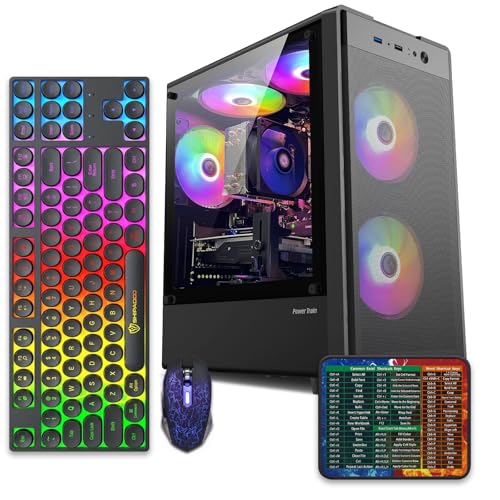
Pros
- 512GB SSD bot drive avoids the HDD bottleneck common in budget prebuilts
- RX 590 8GB VRAM buffer handles 1080p textures better than 4GB budget cards
- Complete bundle with RGB peripherals means no extra spend to start using
- Genuine Windows 11 Home 64-bit preinstalled, no activation hassle out of box
Cons
- Limited owner feedback at time of writing, verify seller reputation before purchase
- Core i7-4770 is Haswell era LGA150, no upgrade path and weak IPC versus modern CPUs
- Windows 11 on 4th-gen Intel is unsupported by Microsoft and may miss feature updates
- No CD/DVD-ROM support and RAM/GPU generation limits future workload headroom
This is an entry-tier prebuilt tower built around an Intel Core i7-4770 Haswell CPU, 16GB RAM, a 512GB SSD, and an AMD Radeon RX 590 8GB GDDR5 GPU. It targets budget buyers who need a working office and light gaming PC with peripherals bundled, not enthusiasts chasing current-gen performance.
The defining feature is the RX 590 8GB paired with a 512GB SSD, an uncommon combo at this price band. Cards in this class typically handle 1080p esports titles at 60+ FPS on medium to high, matching the vendor claim for CS:GO, League of Legends, Apex, and Overwatch. Newer AA titles will need lowered settings.
Trade-offs are significant. The i7-4770 launched in 2013, so IPC, single-thread performance, and platform features like NVMe bot, PCIe Gen4, and modern USB are limited. Windows 11 runs here but sits outside Microsoft's official supported CPU list. There is no realistic CPU or socket upgrade path on LGA1150.
Buy this if you need a plug-and-play 1080p esports and office tower with keyboard, mouse, and RGB included at a low outlay. Skip this if you want current-gen platform support, sustained AA 1440p gaming, or a build with a meaningful upgrade runway.
GPU class: The AMD Radeon RX 590 8GB GDDR5 is a Polaris-refresh card roughly equivalent to a GTX 1060 6GB tier. Expect 1080p 60+ FPS in esports titles like CS:GO, Overwatch, Apex, League, and Fortnite on medium settings, matching the listing's claims.
AAA and modern titles: The vendor lists GTA V, Warzone, Hogwarts Legacy, and The Division 2. Realistically, these run at 1080p low to medium with FSR upscaling where suported.Ray tracing is unsupported on RX 590. No DLSS, no frame gen, no AV1 encode.
CPU bottleneck: The Core i7-4770 quad-core with 8threads at up to 3.9GHz will bottleneck the RX 590 in CPU-heavy titles like Warzone and Escape from Tarkov. Expect frame time inconsistency in large team fights even when average FPS looks aceptable.
Storage and RAM fit: 512GB SSD holds Windows plus 3 to 5 modern game installs before space pressure. 16GB DR3-era RAM is adequate for current esports but leaves no headroom for heavy streaming, browser tabs, and OBS NVENC alongside a game session.
How it works: matching parts to resolution
Your target resolution and refresh rate should drive the whole purchase. For 1080p at 60fps in lighter games, an entry GPU like an RX 560 and a mid Ryzen 5 suffice, which is the WIWB’s territory. For 1080p high-refresh or 1440p in modern AAA titles, you need a considerably stronger graphics card and a matching CPU. The parts have to scale together with the resolution you actually play at.
Balance is the operative word. A powerful GPU choked by a weak CPU wastes money, and vice versa. RAM and storage round it out: 16GB keeps modern games happy, and an SSD makes the whole system feel snappy while cutting load screens. A prebuilt that gets this balance right at your resolution delivers smooth gaming; one that’s lopsided leaves performance, and money, on the table. Read the full spec, not just the headline part.
Why it works this way
Games are graphics-bound at typical settings, which is why the GPU dominates the value equation. The graphics card does the heavy math of rendering every frame, so a stronger one directly raises frame rates. The CPU matters as a supporting player; past a certain point, adding CPU power gives little gaming benefit if the GPU is already the limiter. That’s why builders preach spending the largest slice of the budget on the graphics card.
Prebuilt makers know buyers fixate on CPU model names and RAM quantity because those numbers are easy to market. A big RAM figure or a recognizable Core i7 badge sells, even when the GPU is the part that will actually determine the gaming experience. Understanding this lets you see past the marketing and judge a machine on the spec that counts. The GPU is the story; everything else is supporting cast.
When you’d want a prebuilt
A prebuilt makes sense when you want a working gaming PC without sourcing parts, checking compatibility, and assembling it yourself. First-time buyers, people short on time, and anyone who values a single warranty covering the whole system benefit most. It’s also handy when component prices or availability make self-building a hassle. You trade some value and customization for convenience and a support number to call.
You’d lean toward building your own if you want maximum performance per dollar or specific parts, since prebuilts often cut costs on the case, power supply, or cooling to hit a price. For a budget-focused entry machine, though, a prebuilt like the WIWB at $569.99 gets you gaming quickly with a known spec, and its transparent RX 560 listing means you know exactly what you’re getting. Convenience has real value when the spec sheet is honest.
What to look for in a prebuilt gaming PC
Find the GPU first and judge everything against it. A named, current graphics card that matches your target resolution is the core of a real gaming machine. Then confirm the CPU is a modern Ryzen or Core chip strong enough to keep pace, at least 16GB of RAM, and an SSD (NVMe preferred) for the boot drive. WiFi 6 or better, like the WIWB includes, is a nice touch for wireless setups.
Look past the parts too. A quality power supply with enough wattage headroom protects the system and allows a future GPU upgrade. Adequate case airflow keeps everything cool and quiet. Check whether the RAM runs dual-channel and whether there’s room to add storage later. And read the warranty and support terms, since that coverage is a big part of what you’re paying a prebuilt premium for. A balanced, upgradeable machine beats a lopsided one every time.
Common misconceptions
The biggest one is that the CPU is the heart of a gaming PC. For gaming, the GPU matters more, and a great CPU can’t rescue a weak graphics card. Another is that more RAM automatically means better gaming; past 16GB, extra RAM does little for most games and the money is better spent on the GPU. Buyers who chase the RAM number often end up GPU-starved.
People also assume any tower labeled “gaming PC” is built for games. Some are office machines dressed up, with integrated or entry graphics that struggle in modern titles, which is why reading the actual GPU spec is non-negotiable. And there’s a myth that prebuilts can’t be upgraded; most can, as long as the power supply and case allow it. Check those, and a prebuilt can grow with you rather than boxing you in.
Frequently asked
What’s the most important spec in a gaming prebuilt?
The GPU, without question. It determines your frame rates and the resolution you can game at more than any other component. Prioritize a named, current graphics card that suits your target resolution, then make sure the CPU, RAM, and storage support it. If a listing hides the GPU, treat that as a warning sign.
Is a Core i7 prebuilt automatically good for gaming?
Not necessarily. A strong CPU like a Core i7 helps, but if it’s paired with a weak or unnamed GPU, gaming performance suffers, because the graphics card does the rendering. Some “Core i7” towers are office machines with entry graphics. Always confirm the GPU before assuming a processor badge means good gaming.
How much RAM does a gaming PC need?
16GB is the modern baseline and handles current games comfortably alongside background apps. More than that helps content creation and heavy multitasking but does little for most gaming. Don’t let a big RAM number distract you from a weak GPU; the graphics card is where extra budget pays off in frames.
Can I upgrade a prebuilt later?
Usually, yes. Most prebuilts let you add RAM or storage and swap the GPU, provided the power supply has enough wattage and the case has room. That’s why checking the PSU and case matters, they set your upgrade ceiling. A prebuilt with headroom can grow into a much stronger machine over time.
What resolution can a budget prebuilt handle?
Entry builds with a card like the RX 560 target 1080p at moderate settings in lighter or older games. For high-refresh 1080p or 1440p in demanding AAA titles, you need a notably stronger GPU. Match the machine’s graphics card to the resolution you play at, and set expectations from the GPU tier rather than the price.


































Write Your Review
No reviews yet. Be the first to share your experience!