

You booted up, smelled something faintly plastic, and found a scorched brown patch on the 12VHPWR plug feeding your graphics card. That sinking feeling is real, and you’re not alone. Melting on the 16-pin 12VHPWR connector (and its refined 12V-2×6 successor) has followed high-wattage GPUs like the RTX 4090 and the newer 50-series since they landed, and most of the reported cases trace back to a handful of causes you can actually control. This guide walks through what makes these connectors cook, how to spot the warning signs early, and which fixes hold up.
A melted connector is a power-delivery problem first and a GPU problem second, so a lot of the real solution lives at the power supply. If your unit is older or borderline on wattage, it’s worth reading our roundups of the best 1000W power supply options and the best modular PSU for a gaming PC in 2026 before you order a replacement plug and call it done. And if you’re running a Ryzen chip alongside a hungry card, the best PSU for the 9800X3D writeup covers headroom that matters here too.
First check the obvious (the 30-second check)
Before you assume the card is dead, power down, unplug the system, and look closely at both ends of the cable. Is the connector fully seated? A partially inserted 12VHPWR plug is the single most common trigger. It should click, sit flush against the GPU’s socket housing, and show no gap along the top edge. Wiggle it gently. If it shifts or you see even a millimeter of space, that’s your smoking gun.

Next, sniff and feel. A warm plug after gaming is normal. A plug that’s too hot to hold, discolored, or gives off that acrid burnt-plastic smell needs immediate attention. Don’t just re-seat a visibly melted connector and keep playing. Damaged pins carry higher resistance, and higher resistance means more heat, which loops right back into more melting. Shut it down and work through the causes below.

While the panel is off, glance at both the GPU side and the PSU side of the cable. Owner reports show melting can start at either end, and a plug that looks pristine at the card can hide a scorched pin where it meets the power supply. A quick two-minute inspection now tells you if you’re chasing a seating problem, a cable problem, or a supply that can’t keep up. That distinction shapes every fix that follows.
Cause #1: Improper seating and partial insertion
This is the big one. The 12VHPWR standard packs six 12-volt pins into a tight footprint, and each pin needs full metal-to-metal contact to share the load evenly. When the plug isn’t pushed all the way home, one or two pins end up carrying current meant for six. That concentrated current heats the undersized contact, the plastic housing softens, and the melt spreads. Nvidia and connector maker Molex both pointed at insertion depth as a leading factor in the early 4090 reports.
The physics here are unforgiving. A 600-watt card pulls roughly 50 amps across those six pins, so each pin should shoulder around 8 amps. Force three pins to carry the whole load and you’re pushing 16 amps or more through contacts rated for far less, which is exactly how a plug goes from warm to molten. That’s why a plug that’s off by even a fraction of a millimeter behaves so differently from one seated fully. It’s not a gentle slope, it’s a cliff.
The fix is unglamorous but effective. Disconnect the cable, inspect the pins for any that look pushed back or bent, then reinsert firmly until you hear and feel a positive click. Give it a light tug afterward to confirm it’s locked. If your GPU sits close to a side panel, route and seat the cable before you slide the panel on, because pressure from the glass can tilt the plug just enough to break contact. A properly clicked connector is the cheapest insurance you’ll find.
One habit worth building: seat the connector with the card already mounted in the case, not on your bench. Cards flex slightly once the mounting screws pull them tight against the PCIe bracket, and that flex can shift a plug that felt perfect a minute earlier. Seat it last, tug it, then close up. If you’ve handled the card recently for a repaste or fan swap, treat the reconnection as its own careful step rather than an afterthought.
Cause #2: Tight cable bends and side-panel pressure
Even a fully seated plug can fail if the cable bends hard right at the connector. Sharp bends within roughly 35mm of the plug tug the individual wires unevenly, which levers some pins out of alignment inside the housing. That partial lift recreates the same uneven-load problem from Cause #1, except this time the connection looked fine when you built the machine. Compact cases with tempered-glass panels make this worse because the panel physically shoves the cable sideways.
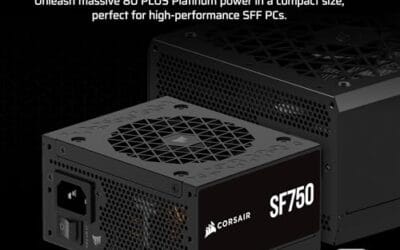
Give the cable breathing room. Leave at least a 35mm straight run out of the connector before any bend, and if your case is cramped, a native cable from a quality ATX 3.1 unit routes far more cleanly than a bulky third-party adapter. The Corsair SF750 is a good example for small-form-factor builds: it’s a fully modular SFX unit, 80 Plus Platinum rated, ATX 3.1 compliant and PCIe 5.1 ready, and it ships with the bracket you need to fit it into a standard case. Around $159.99 with a 4.1 rating, it gives compact builders a native 12V-2×6 cable instead of a daisy-chained adapter stack.
If you can’t avoid a bend, at least make it a gentle sweeping curve rather than a hard kink, and support the cable’s weight so it isn’t hanging off the connector. Some builders add a small cable comb or a strip of Velcro an inch or two down the run to hold the shape without stressing the plug. It’s a two-minute mod. The goal is simple: keep sideways force off those pins so all six stay evenly loaded.

Pros
- ATX 3.1 compliant with PCIe 5.1 support, resists transient spikes from RTX 50 and RX 9000 series GPUs.
- Zero RPM Mode eliminates fan noise at low and medium loads, a real advantage in acoustically sensitive SFF builds.
- Fully modular design with short SFX cables reduces cable management friction in sub-10-liter cases.
- 105 degree C Japanese capacitors indicate quality component selection typical of high-tier SFX units.
Cons
- Limited owner feedback at time of writing; real-world noise, ripple, and transient performance are unverified by community data.
- Short SFX cables are unsuitable for mid-tower or full-tower cases without aftermarket cable extensions.
- 750W ceiling may fall short for extreme SFF builds pairing a 300W-plus TGP GPU with a high-core-count CPU.
The Corsair SF750 (2024) is a high-end SFX PSU targeting SFF builders who need substantial wattage in a compact footprint. With 80 Plus Platinum certification and ATX 3.1 compliance, it sits at the upper tier of the SFX market, aimed at builders pairing it with current-gen discrete GPUs inside sub-10-liter cases.
The most defining specification here is ATX 3.1 compliance combined with PCIe 5.1 readiness. This means the unit is rated to handle the sharp transient power spikes that RTX 50 and RX 9000 series GPUs can produce, where non-compliant PSUs may trigger overcurrent protection. At 750W, it covers most single-GPU SFF configurations without derating concerns.
The honest trade-off is the review data gap. At time of writing, no substantial owner feedback exists to validate Corsair's noise and ripple claims under real load. The Zero RPM Mode claim and 92mm fan acoustics are based on spec sheets only. Buyers should also note that SFX cable lengths are intentionally short and will not reach connectors in mid-tower or larger cases without extensions.
Buy this if you are building an SFF PC around a single high-TGP GPU and need confirmed ATX 3.1 compliance in a modular SFX unit. Skip this if you want a large ATX case build, need more than 750W for a dual-component high-wattage system, or require extensive owner testing before purchasing.
Form Factor and Mounting: This is a standard SFX form factor PSU, not SFX-L. Verify your case specifies SFX compatibility before purchasing. An SFX-to-ATX bracket is included, allowing installation in ATX-footprint cases, though short cable lengths will require extensions in anything larger than a compact SFF enclosure.
Power Standard and Connector: ATX 3.1 compliant with PCIe 5.1 readiness. The unit supports the 12V-2x6 connector standard, relevant for RTX 40 and RTX 50 series GPUs as well as AMD RX 7000 and RX 9000 cards with high transient draw. Non-ATX 3.1 units can trigger OCP shutdowns above 150 percent peak load spikes.
Efficiency and Thermal Operation: 80 Plus Platinum certification indicates roughly 92 percent efficiency at 50 percent load under 115V. The 92mm PWM fan uses a fluid dynamic bearing and Zero RPM Mode activates at low loads, which in SFF cases where airflow is restricted can noticeably reduce system acoustic output.
GPU Wattage Pairing: At 750W, this PSU pairs appropriately with GPUs up to approximately 300W TGP when combined with a mid-range CPU. For a 320W-plus TGP GPU alongside a 65W-plus CPU, headroom becomes tight and a higher-wattage SFX unit should be considered instead.
Cause #3: Adapters, aging PSUs, and marginal wattage
The bundled 8-pin-to-12VHPWR adapters that came with early cards work, but they add junction points, and every junction is another place for resistance to creep up. Owner reports lean heavily toward native cables over adapters for long-term reliability. Beyond the cable itself, an older PSU that predates the ATX 3.0 spec has no real headroom for the sharp transient power spikes a modern GPU throws, sometimes double its rated draw for milliseconds. Those spikes stress the connector every time they hit.
If your unit is a few years old or you’re pairing a 300-watt-plus card with a 650W supply, upgrading to a modern ATX 3.1 PSU with a native 12V-2×6 connector removes two failure points at once. The be quiet! Pure Power 13 M 1000W is a strong pick here. It’s 80 Plus Gold certified, ATX 3.1 with PCIe 5.1 support, uses a single rail with LLC technology, and runs a semi-passive 120mm fan that stays quiet at idle. At $139.90 and a 4.8 rating, its 1000 watts give a high-end card real transient headroom, and the native cable skips the adapter mess entirely.

Pros
- Native 12V-2x6 connector on ATX 3.1 platform ready for RTX 40 and PCIe 5.1 GPUs.
- Handles power excursions up to 2000W transient, headroom for RTX 4080 and 4090 class spikes.
- Semi-passive zero-RPM mode below moderate load keps idle acoustics near inaudible.
- LLC topology with single 12V rail delivers stable voltage regulation for overclocked GPUs.
Cons
- Limited independent owner feedback available at time of writing, riple and hold-up data unverified.
- Only four PCIe 6+2-pin connectors, tight for legacy multi-GPU or high-CPU-EPS custom lop builds.
- 80 PLUS Gold trails Platinum and Titanium units at similar wattage on sustained efficiency.
The be quiet! Pure Power 13 M 1000W is a high-end ATX 3.1 PSU aimed at builders pairing a Ryzen 7000/9000 or Core Ultra CPU with an RTX 4070Ti Super,4080 Super, 4090, or RX 7900 XTX class GPU. It targets buyers who want native 12V-2x6 wiring and transient headroom without stepping up to Platinum-tier pricing.
The defining trait is ATX 3.1 compliance with power excursion handling up to double the rated 1000W, meaning brief 2000W spikes from modern GPUs should not trip OCP. Combined with the single 12V rail and LLC topology, this suits overclocked GPUs where transient behavior, not average draw, tends to triger shutdowns on older units.
Trade-offs are typical at this tier. 80 PLUS Gold is eficient but not Platinum, soustained heavy loads generate more heat than a higher-rated unit. Four PCIe 6+2-pin connectors is standard, though builders running EATX boards with dual EPS plus a 4x8-pin GPU adapter should verify cable counts against the modular panel before buying.
Buy this if you are building a single-GPU gaming or content rig around a 250-450W TGP card and want native 12V-2x6 without paying Platinum prices. Skip this if you need sub-audible acoustics under sustained full load, or if you already own a workingATX 3.0 unit with a 12VHPWR pigtail.
ATX standard: Full ATX 3.1 compliance with native 12V-2x6 connector integration, which corects the sense-pin issue found on early 12VHPWR cables. Supports PCIe 5.1 GPUs at spec, and handles transient power excursions up to 2000W, roughly double the 1000W continuous rating.
GPU pairing: Comfortable for GPUs in the 250W to 450W TGP range, including RTX 4080 Super (320W) and RTX 4090 (450W) with headroom for overclocking. Four PCIe 6+2-pin outputs cover legacy 8-pin GPUs; the native 12V-2x6 removes the need for a 4x8-pin adapter dongle.
Efficiency and cooling: 80 PLUS Gold rated up to 94.4% at optimal load, typically around 50% utilization. The 120mm be quiet! fan runs semi-passive with zero-RPM below a load threshold not specified by the manufacturer, so idle and light workloads should remain silent.
Cabling: Fully modular design, leting builders omit unused SATA and Molex leads. Exact cable lengths and connector counts beyond the four PCIe 6+2-pin and single 12V-2x6 are not specified in source material, verify against your case routing before purchase.
Preventive maintenance
Once things run cool again, keep them that way. Re-check the connector seating any time you move the PC, swap a component, or transport the case, since travel vibration loosens plugs. Every few months, pop the side panel and confirm the plug still sits flush and shows no discoloration. Keep the cable’s exit path clear of the panel, and blow dust off the connector housing so debris doesn’t wedge between pins. Small habits. They add up to years of trouble-free power delivery.
If you like data, a cheap infrared thermometer or a clamp meter turns guesswork into numbers. Point the IR gun at the connector after a 30-minute gaming session; a healthy 12V-2×6 plug usually reads well under 70C, and anything climbing past that is a warning worth acting on before it becomes a melt. You don’t need lab gear. A $20 thermometer catches a developing problem weeks before your nose does, and that early warning is worth every cent on a card that costs hundreds.
When to call a pro vs DIY
Re-seating a cable, swapping to a native lead, or installing a new PSU are all within reach for anyone comfortable opening their case. If you find melted plastic, though, stop treating it as a DIY reseat. A connector that has already melted usually damaged the GPU’s socket too, and that’s an RMA conversation, not a home repair. Contact your card’s manufacturer, describe the damage, and let their warranty process handle a scorched socket. Forcing a new cable into a melted port just melts the new cable.
There’s a middle ground too. If the plug is only lightly discolored and the pins still look straight, a competent DIYer can safely replace the cable and monitor temps closely before trusting the card again. But once you see deformed housing, blackened pins, or a socket that’s warped, hand it to a pro or the RMA queue. The cost of a replacement cable is trivial next to the cost of guessing wrong on a card that carries a warranty you’d forfeit by cutting corners.
Tools and parts needed
You won’t need much. A Phillips screwdriver to open the case, a flashlight to inspect pins, and a can of compressed air cover the diagnosis. For the fix, the main part is a proper native 12V-2×6 or 12VHPWR cable, ideally the one that ships with a modern ATX 3.1 power supply rather than a generic adapter. If you’re replacing the unit outright, match the wattage to your card with real headroom to spare. Our guides to the best 1000W PSU in 2026 break down which models include clean native cabling.
Common questions
Is the 12V-2×6 connector safer than the original 12VHPWR?
Yes, generally. The 12V-2×6 revision shortened the sense pins and lengthened the power pins so the card can detect an improperly seated plug and refuse to draw full power until it’s fully inserted. It’s the same physical footprint, so cables cross-compatible, but the redesign directly targets the partial-insertion problem behind most melting reports. It’s not a license to skip a firm click, though.
Can I keep using my GPU after a small melt spot?
No, don’t. Even minor discoloration means a pin ran hot enough to deform plastic, and that pin now has higher resistance than its neighbors. Keep running it and the damage compounds fast. Power down, document the damage with photos, and start a warranty claim. Running a compromised connector risks the card, the cable, and in a worst case the PSU.
Does a higher-wattage PSU prevent connector melting?
Indirectly. Wattage alone doesn’t stop a badly seated plug, but a modern ATX 3.1 unit with generous headroom, like a quality 1000W supply, handles a GPU’s transient spikes without stressing the connector, and its native cable removes adapter junctions. Pair that with a firm, straight-seated connection and you’ve addressed the real root causes rather than just one of them.






























Write Your Review
No reviews yet. Be the first to share your experience!