

Spend $115 on the Noctua NH-D15, or spend $35 on the Thermalright Peerless Assassin 120, and you get within a couple of degrees of the same cooling on most mainstream CPUs. That price gap is roughly 3x for a thermal difference many owners struggle to feel. So the real question isn’t which cools better, it’s whether Noctua’s tax buys you enough to matter. If you’re still weighing air against liquid first, our guides to the best CPU air coolers and the best AIO liquid coolers frame that decision before you pick a brand.
Matchup at a glance
These two dual-tower air coolers sit at opposite ends of the value curve. The Noctua NH-D15 is the long-reigning flagship, a heavy 165mm-tall block with two NF-A15 fans, a six-year warranty, and Noctua’s SecuFirm2 mounting that reviewers keep calling the easiest in the business. The Thermalright Peerless Assassin 120 is the budget disruptor that stunned enthusiasts by matching flagship-class cooling for roughly a third of the price. Six heat pipes, twin 120mm fans, and a low-ish 155mm height that clears more cases.
On raw performance the two trade blows within 2 to 4 degrees Celsius on a stock or lightly overclocked Ryzen or Core chip. Where they diverge is the stuff around the heatsink: fan acoustics, mounting hardware, RAM clearance, warranty length, and how much you value a brand that resells for real money years later. That’s the whole fight. Not thermals, but everything else.
It’s worth being honest about why this comparison exists at all. A few years ago the NH-D15 had almost no rival at the top of air cooling, and paying a premium felt justified because nothing else came close. The Peerless Assassin changed that overnight. It didn’t just undercut Noctua on price, it did so while landing close enough on temperature that the conversation shifted from performance to preference. So most buyers aren’t really choosing a cooler here. They’re choosing how much refinement is worth to them.
Spec sheet showdown
| Spec | Noctua NH-D15 | Thermalright Peerless Assassin 120 | Why it matters | Edge |
|---|---|---|---|---|
| Street price | ~$115 | ~$35 | Total build budget | Thermalright |
| Height | 165mm | 155mm | Case fit | Thermalright |
| Heat pipes | 6 | 6 | Heat transfer | Tie |
| Fans | 2x NF-A15 (140mm) | 2x TL-C12 (120mm) | Airflow vs noise | Noctua |
| Warranty | 6 years | Limited, shorter | Long-term peace of mind | Noctua |
Read that table twice. The heat pipe count is identical, and both use nickel-plated copper bases. The gap you’re paying for lives in the fans, the mount, and the warranty, not in the core physics of the heatsink.
The other hidden spec is case behavior. A cooler that wins by 2 degrees on an open bench can lose that edge in a case with a choked front panel, weak exhaust, or a GPU dumping 300 watts of heat upward. In those builds, fan quality and case airflow matter as much as fin mass. That’s why the NH-D15 feels calmer in a quiet case, while the Peerless Assassin still makes more sense in a budget case where every saved dollar can fund another intake fan.
Noctua NH-D15 strengths
Noctua’s reputation is built on the boring details, and the NH-D15 shows why. Its NF-A15 fans move a lot of air at low RPM, which means the cooler stays quiet under load where cheaper fans start to whine. Owner reports consistently praise the acoustic tuning, and the included Low-Noise Adapters drop RPM further if you want a near-silent build. The SecuFirm2 mounting system uses a spring-loaded backplate and two thumb-friendly screws, and reviewers repeatedly call it the most foolproof installation they’ve done.
Then there’s the ownership experience. Six years of warranty, a company that ships free mounting kits for new sockets, and resale value that holds up years later. The two knocks are height and clearance. At 165mm it won’t fit every mid-tower, and the front fan can crowd tall RAM unless you raise it. It’s premium hardware with a premium footprint, and you feel both.
Thermalright Peerless Assassin 120 strengths
The Peerless Assassin’s headline is simple: it cools like a cooler that costs three times as much. Six heat pipes and a dense fin stack pull flagship-adjacent numbers, and at 155mm it slips into cases the NH-D15 can’t. Its 120mm fans and slimmer towers also leave more room over the RAM slots, so tall memory kits fit without shuffling fans around. For a $35 part, the mounting hardware is genuinely decent, if a half-step fussier than Noctua’s.
The compromises are the ones you’d expect at this price. The stock fans are good but not Noctua-quiet, and they can get audible near full tilt on a hot chip. Warranty coverage is shorter and support is less hand-holding. None of that changes the core value story. You’re getting maybe 95 percent of the flagship for a third of the money, and reinvesting the difference elsewhere. One upgrade worth that saved cash: a better thermal compound, since the paste in any budget box is rarely the best you can run.

Pros
- Non-conductive chemistry safer for novices repasting near exposed CPU or GPU capacitors.
- 6g volume suports several full applications on desktop CPUs and console APUs.
- Wet and dry wipes included, so no isopropyl bottle or lint-free cloth need.
Cons
- Limited owner fedback at time of writing makes long-term durability claims hard to verify.
- Non-metal formula typically trails top liquid metals by a few degrees under sustained load.
- Viscosity, TIM lifespan hours, and thermal conductivity W/mK figures are not specified.
Duronaut is Thermal Grizzly's non-conductive thermal paste positioned as a mid-tier daily driver, shipping in a 6g syringe with 6 wet and 6 dry cleaning wipes. The target buyer is a DIY PC builder repasting a CPU or GPU cooler, or a console owner refreshing PS4, PS5, or Xbox thermals without risking shorts.
The defining trait is the aluminum microparticle plus zinc oxide nanoparticle blend paired with an electrically non-conductive base. Thermal Grizzly claims reduced pump-out and stable performance over extended cycles, which maters most on soldered console APUs and overclocked desktop chips that see large delta-T swings. Exact W/mK conductivity is not specified in the source.
Trade-offs are typical for non-conductive pastes at this tier. Expect a few degrees warmer than liquid metal on delided or high-wattage CPUs, and no published viscosity or cure-time data to plan application around. Owner feedback is limited at time of writing, so long-term hardening resistance relies on vendor claims rather than independent long-run testing.
Buy this if you want a safe, non-conductive paste with enough volume for several repastes and a bundled wipe kit for console or GPU jobs. Skip this if you are chasing the absolute lowest core temperatures on a 250W-plus overclocked CPU where liquid metal or a top nano-diamond paste still leads.
Volume and coverage: The syringe holds 6g of paste, enough for roughly 15 to 25 pea-sized applications on mainstream AM5 or LGA1700 IHS surfaces, or several full console APU repastes on PS4, PS5, and Xbox where die coverage is larger than a desktop CPU heatspreader.
Composition and safety: The compound uses aluminum microparticles and zinc oxide nanoparticles in a non-metal carier, rated electrically non-conductive. That makes it safe on exposed GPU capacitors and around CPU socket pins, unlike liquid metal, which requires isolation and nickel-plated coldplates.
Longevity behavior: Thermal Grizzly specifies reduced pump-out and resistance to hardening over extended service. Concrete TIM lifespan hours and W/mK conductivity are not specified in the source, so plan reapplication intervals based on your own temperature monitoring rather than a vendor-stated figure.
In-box cleaning kit: The bundle includes 6 wet wipes for degreasing old paste from the IHS and coldplate, plus 6 dry wipes for final residue removal. Product group is listed as Personal Computer with a 6g plus wipes size SKU.
Real-world scenarios
Small mid-tower with tall RAM
Here the Peerless Assassin wins on fit alone. Its 155mm height and 120mm fans clear more chassis and rarely conflict with tall memory heatsinks. The NH-D15 fits many cases, but you’ll want to check the manual’s clearance figure first. Measure twice, then confirm.
Silent build near the desk
This is Noctua’s home turf. If the PC sits an arm’s length away and noise bothers you, the NF-A15 fans and Low-Noise Adapters give the NH-D15 a real acoustic edge under sustained load. That’s the clearest reason to pay up.
Budget gaming rig on a Ryzen 7
Pairing either cooler with a chip like the 7800X3D, both keep temperatures well in check, and our cooler picks for the 7800X3D back that up. The Thermalright saves roughly $80 you could put toward a faster GPU. For most gamers, that trade is a no-brainer.
Long-term keeper you’ll reuse
If you move coolers between builds every couple of years, Noctua’s six-year warranty, free socket kits, and resale value change the math. The NH-D15 is the one you keep. The Peerless Assassin is the one you happily leave in the old rig.
Pricing and availability
Street pricing tells the story. The Peerless Assassin 120 floats around $35 and is widely stocked, while the NH-D15 sits near $115 and rarely discounts hard. Noctua’s newer NH-D15 G2 pushes higher still. Both brands are easy to find at major retailers, and both regularly appear across our best air CPU cooler roundup. The Thermalright’s low price does mean occasional stock gaps on specific colorways, so grab the standard black or white version when you see it. Cooler listings shift fast, so compare socket support and included brackets before checkout.
Which to buy
Buy the Thermalright Peerless Assassin 120 if you want flagship-class cooling for $35 and you’d rather spend the savings on a better GPU, more storage, or faster RAM. For the vast majority of stock and mildly overclocked builds, it’s the smarter money. It cools within a few degrees of the NH-D15 and fits more cases. That’s the value pick, plain and simple.
Buy the Noctua NH-D15 if near-silent acoustics, the easiest mounting hardware around, a six-year warranty, and strong resale matter to you, and your case has the clearance. It’s the refinement pick, not the performance pick. And if you’re upgrading from the little bundled heatsink that shipped with an older Intel chip, either of these is a night-and-day change from that tiny stock unit.

Pros
- Native LGA 1150, 1155, and 1156 socket support covers three legacy Intel generations
- 4-pin PWM connector enables proper fan curve control via BIOS
- OEM-style aluminum heatsink footprint keps RAM and VRM clearance predictable
- Push-pin mount installs without removing the motherboard from the case
Cons
- Zero owner fedback available at time of writing, real-world thermals unverified
- Aluminum-only heatsink with no heatpipes struggles with overclocked or unlocked K-series CPUs
- Restricted to obsolete Intel sockets, no path forward to LGA 1200, 1700, or AM5
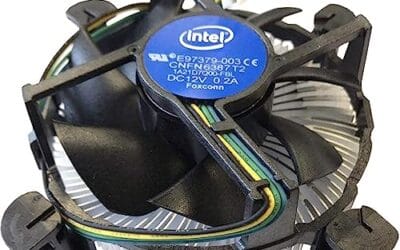
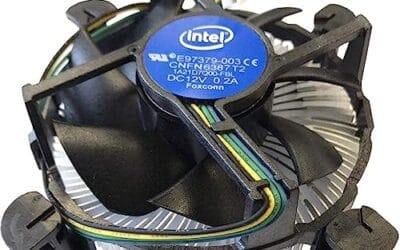
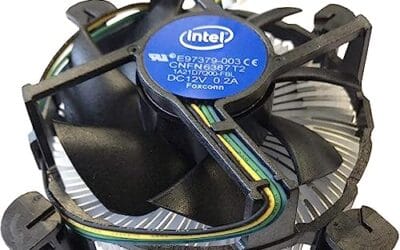
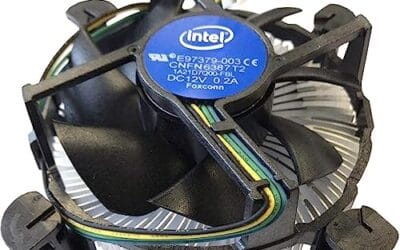
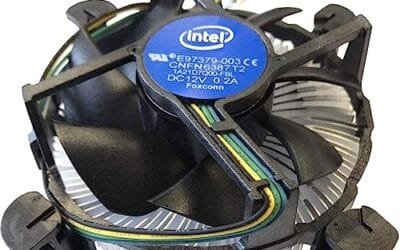
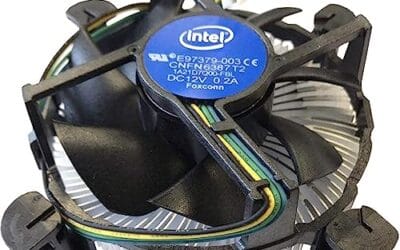
The Intel E97379-003 is an OEM-style stock CPU cooler built for LGA 1150, 1155, and 1156 boards, covering Core i3, i5, and i7 chips from the Sandy Bridge through Haswell era. It targets one specific buyer: someone repairing, refurbishing, or restoring a legacy Intel desktop that lost its original heatsink.
The defining feature is compatibility, not performance. A 3.5-inch fan sits on an aluminum heatsink with a 4-pin PWM header, matching the original OEM cooler dimensions Intel shipped in retail boxes. Stock coolers in this class typically handle 65W to 84W TDP chips at stock clocks, which lines up with locked i3, i5, and non-K i7 SKUs on these sockets.
Trade-offs are typical for a boxed-style cooler. There are no heatpipes, no copper base contact, and no tower geometry, so sustained multi-core loads will spin the fan up and get audible. Push-pin mounting is convenient but less secure than a backplate design, and overclocking headroom is effectively zero. Owner feedback is not available at time of writing.
Buy this if you need a like-for-like OEM replacement for a locked LGA 1150, 1155, or 1156 CPU and want to kep the original acoustic and clearance profile. Skip this if the CPU is a K-series part, if you plan to overclock, or if the target socket is LGA 1200 or newer.
Socket coverage: Native mounting for LGA 150, 1155, and 1156 only. That spans 2nd, 3rd, and 4th generation Core i3, i5, and i7 desktop chips. No adapter is included for LGA 1200, 1700, or AM4/AM5, so this cooler is locked to legacy Intel repair scenarios.
Heatsink and fan: Aluminum radial-fin heatsink with a 3.5-inch axial fan on a 4-pin PWM connector. No heatpipes, no copper slug, no vapor chamber are indicated in source data. TDP handling is not specified, but OEM colers of this geometry are typically rated for the 65W to 84W stock TDP band on these sockets.
Mounting and clearance: Push-pin retention through the four motherboard holes, no backplate required, install possible without removing the board. Cooler height sits low enough to clear standard mid-tower side panels, and the round footprint keps RAM slots and VRM heatsinks unobstructed. Exact height in mm is not specified.
Acoustics and headroom: Noise level in dBA is not specified. Based on OEM stock cooler behavior at this size, expect quiet idle and audible ramp under sustained all-core load. Overclocking a K-series chip on this heatsink is not advisable, thermal headroom above 84W is minimal.
Common questions
Does the Peerless Assassin really match the NH-D15?
On most mainstream CPUs it lands within about 2 to 4 degrees Celsius under load, which is inside the margin many owners can’t feel. The NH-D15 pulls a small lead on the hottest, highest-wattage chips and stays quieter doing it. For everyday gaming and productivity, they’re effectively neck and neck.
Will either cooler fit my case?
The Peerless Assassin is 155mm tall and the NH-D15 is 165mm, so check your case’s listed CPU cooler clearance before buying. Most full-size mid-towers handle both, but slimmer or more compact cases may only clear the Thermalright. RAM height is the other thing to verify.
Do I need to replace the thermal paste?
Both coolers include usable paste in the box, so you can install right away. Upgrading to a high-conductivity compound can shave a degree or two and helps most on overclocked or high-heat chips. It’s an inexpensive tweak, not a requirement.
Is air cooling still worth it over an AIO?
For most builds, yes. A good dual-tower air cooler like these two rivals many 240mm liquid coolers on temperature while avoiding pump noise and long-term leak worries. Liquid still makes sense for extreme overclocks or tight, fan-limited layouts.
Which is quieter?
The Noctua NH-D15 is the quieter of the two, thanks to its NF-A15 fans and included low-noise adapters. The Peerless Assassin is far from loud, but its fans can become audible near full load on a hot CPU. If silence is your priority, that’s the Noctua’s strongest argument.




























Write Your Review
No reviews yet. Be the first to share your experience!