

Ask this question in any build thread and you’ll get twenty confident answers, half of them wrong. An AIO (all-in-one) liquid cooler looks impressive sitting behind a glass side panel, and plenty of gamers assume the RGB pump and radiator are doing something magical to their frame rates. They’re not. Cooling doesn’t add performance the way a faster GPU does. What it does is protect the performance you already paid for, and that distinction matters more than most first-time builders realize.
So does an AIO cooler actually matter for gaming? The honest answer is: sometimes a lot, sometimes barely at all. It depends on your CPU, your case airflow, and how hard your games push the chip. Before you drop money on a 360mm radiator, it helps to understand what liquid cooling really changes. If you’re weighing options, our roundup of the best AIO liquid coolers for 2026 and the best air CPU coolers cover the hardware side. This guide covers the why.
The short answer
For most 1080p and 1440p gamers running a mid-range CPU, an AIO cooler does not meaningfully change your gaming experience. Games rarely load all cores the way rendering or compiling does, so a decent air cooler keeps a Ryzen 5 or Core i5 well within safe temperatures. Where an AIO starts to matter is with hot, high-core-count chips, small cases with poor airflow, or anyone who streams and games at the same time. That’s when the extra heat capacity earns its keep.
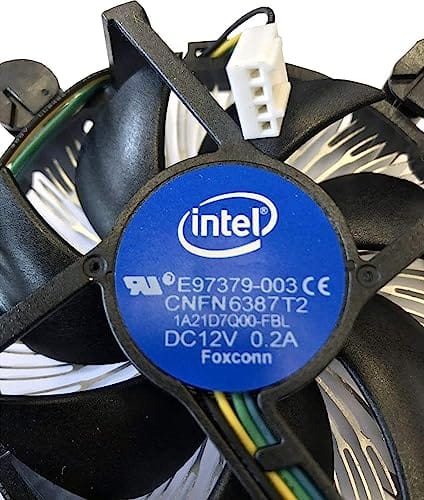
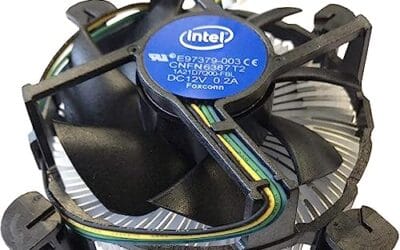
Here’s the part people skip. A cheap stock cooler can bottleneck a modern CPU under sustained load, letting it thermal-throttle before it hits full boost clocks. The little Intel bundled heatsink below shows what you’re often starting from. It’s fine for light desktop work and older sockets, but it won’t tame a power-hungry gaming chip for long.

Pros
- Native LGA 1150, 1155, and 1156 socket support covers three legacy Intel generations
- 4-pin PWM connector enables proper fan curve control via BIOS
- OEM-style aluminum heatsink footprint keps RAM and VRM clearance predictable
- Push-pin mount installs without removing the motherboard from the case
Cons
- Zero owner fedback available at time of writing, real-world thermals unverified
- Aluminum-only heatsink with no heatpipes struggles with overclocked or unlocked K-series CPUs
- Restricted to obsolete Intel sockets, no path forward to LGA 1200, 1700, or AM5
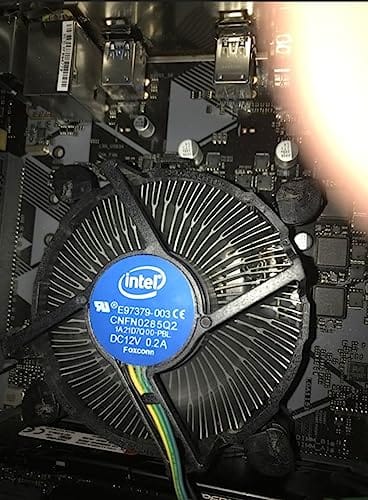
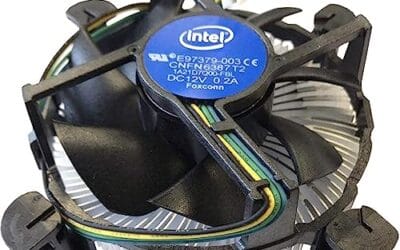
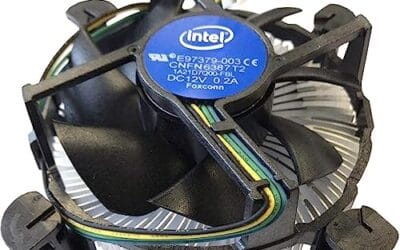
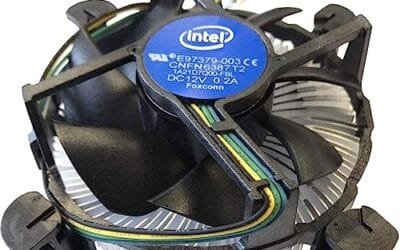
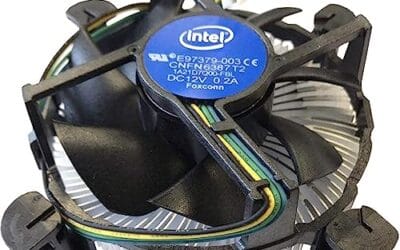
The Intel E97379-003 is an OEM-style stock CPU cooler built for LGA 1150, 1155, and 1156 boards, covering Core i3, i5, and i7 chips from the Sandy Bridge through Haswell era. It targets one specific buyer: someone repairing, refurbishing, or restoring a legacy Intel desktop that lost its original heatsink.
The defining feature is compatibility, not performance. A 3.5-inch fan sits on an aluminum heatsink with a 4-pin PWM header, matching the original OEM cooler dimensions Intel shipped in retail boxes. Stock coolers in this class typically handle 65W to 84W TDP chips at stock clocks, which lines up with locked i3, i5, and non-K i7 SKUs on these sockets.
Trade-offs are typical for a boxed-style cooler. There are no heatpipes, no copper base contact, and no tower geometry, so sustained multi-core loads will spin the fan up and get audible. Push-pin mounting is convenient but less secure than a backplate design, and overclocking headroom is effectively zero. Owner feedback is not available at time of writing.
Buy this if you need a like-for-like OEM replacement for a locked LGA 1150, 1155, or 1156 CPU and want to kep the original acoustic and clearance profile. Skip this if the CPU is a K-series part, if you plan to overclock, or if the target socket is LGA 1200 or newer.
Socket coverage: Native mounting for LGA 150, 1155, and 1156 only. That spans 2nd, 3rd, and 4th generation Core i3, i5, and i7 desktop chips. No adapter is included for LGA 1200, 1700, or AM4/AM5, so this cooler is locked to legacy Intel repair scenarios.
Heatsink and fan: Aluminum radial-fin heatsink with a 3.5-inch axial fan on a 4-pin PWM connector. No heatpipes, no copper slug, no vapor chamber are indicated in source data. TDP handling is not specified, but OEM colers of this geometry are typically rated for the 65W to 84W stock TDP band on these sockets.
Mounting and clearance: Push-pin retention through the four motherboard holes, no backplate required, install possible without removing the board. Cooler height sits low enough to clear standard mid-tower side panels, and the round footprint keps RAM slots and VRM heatsinks unobstructed. Exact height in mm is not specified.
Acoustics and headroom: Noise level in dBA is not specified. Based on OEM stock cooler behavior at this size, expect quiet idle and audible ramp under sustained all-core load. Overclocking a K-series chip on this heatsink is not advisable, thermal headroom above 84W is minimal.
The longer explanation
An AIO is a sealed loop: a pump sits on the CPU, pulls heat into liquid coolant, moves that liquid through tubes to a radiator, and fans blow the heat out of the case. Nothing gets refilled, nothing gets mixed. Compare that to an air cooler, which uses heat pipes and a big aluminum fin stack to shed heat right above the socket. Both work. They just move heat differently.
The reason an AIO can pull ahead comes down to thermal mass and surface area. A 240mm or 360mm radiator has far more area to dump heat than most air towers, and the coolant buffers sudden temperature spikes. During a long gaming session with steady load, that buffer keeps the CPU cooler and quieter. During a five-second shader-compile burst? Air and liquid land close together, because the spike ends before the radiator’s advantage kicks in.
How it works in a gaming rig
Picture a busy afternoon of gaming. Your CPU boosts hard when a new area loads, drops back during quiet moments, then boosts again. The cooler’s job is to keep the chip below its throttle point through all of that. Modern CPUs boost based on available thermal headroom, so a cooler that holds lower temps can let the chip sustain higher clocks a bit longer. On paper that’s a few extra megahertz. In practice, most games are GPU-bound, so you rarely see those clocks translate into more frames.
The bigger real-world win is noise and consistency. An air cooler fighting a hot chip ramps its fan to a whine. A 360mm AIO spreads the same heat across three quieter radiator fans, so your rig stays calmer during long sessions. If you play in a quiet room or record audio, that difference is easy to hear.
Think about the worst-case scenario too, a hot summer room, a poorly ventilated case, and a four-hour session in a demanding open-world game. That’s where a marginal cooler shows its limits. The chip creeps toward its thermal ceiling, boost clocks sag, and the fan noise climbs to compensate. A larger cooling solution simply has more margin to absorb that heat before anything throttles. For folks in tight cases, our notes on the best AIO liquid cooler for small form factor builds show how a slim radiator can rescue a chassis that a tall air tower would never clear.
Why it works this way
Heat always flows from hot to cold, and the rate depends on surface area and temperature difference. That’s basic physics, not marketing. An AIO wins on surface area because its radiator is large and sits in the airflow path, usually at the top or front of the case. An air cooler wins on simplicity: no pump to fail, no coolant to slowly evaporate over the years.
There’s also mounting pressure and contact quality. No matter which cooler you pick, the thermal interface between the CPU lid and the cold plate decides how much heat actually transfers. A great AIO with a sloppy paste application can lose to a well-mounted air cooler. That’s why the boring details, flat contact, even pressure, fresh paste, matter as much as the radiator size on the box.
When you’d want an AIO
Reach for liquid cooling when your CPU runs hot and your workload is heavy. A Core i9 or high-end Ryzen chip pulls real wattage under load, and those chips genuinely benefit from a 280mm or 360mm radiator. Same goes for anyone chasing an overclock, or streamers whose encoder hammers the CPU while the game runs. If you’re building in that space, our picks for the best AIO liquid cooler for overclocking are worth a look.
Whichever route you go, don’t skimp on the interface material. Reseating an AIO or swapping in a new cooler, either way, a quality thermal paste keeps contact clean and conductive. The Thermal Grizzly Duronaut below is a solid pick at $24.99, rated 4.4, and the 6-gram tube with 12 cleaning wipes covers plenty of remounts.

Pros
- Non-conductive chemistry safer for novices repasting near exposed CPU or GPU capacitors.
- 6g volume suports several full applications on desktop CPUs and console APUs.
- Wet and dry wipes included, so no isopropyl bottle or lint-free cloth need.
Cons
- Limited owner fedback at time of writing makes long-term durability claims hard to verify.
- Non-metal formula typically trails top liquid metals by a few degrees under sustained load.
- Viscosity, TIM lifespan hours, and thermal conductivity W/mK figures are not specified.
Duronaut is Thermal Grizzly's non-conductive thermal paste positioned as a mid-tier daily driver, shipping in a 6g syringe with 6 wet and 6 dry cleaning wipes. The target buyer is a DIY PC builder repasting a CPU or GPU cooler, or a console owner refreshing PS4, PS5, or Xbox thermals without risking shorts.
The defining trait is the aluminum microparticle plus zinc oxide nanoparticle blend paired with an electrically non-conductive base. Thermal Grizzly claims reduced pump-out and stable performance over extended cycles, which maters most on soldered console APUs and overclocked desktop chips that see large delta-T swings. Exact W/mK conductivity is not specified in the source.
Trade-offs are typical for non-conductive pastes at this tier. Expect a few degrees warmer than liquid metal on delided or high-wattage CPUs, and no published viscosity or cure-time data to plan application around. Owner feedback is limited at time of writing, so long-term hardening resistance relies on vendor claims rather than independent long-run testing.
Buy this if you want a safe, non-conductive paste with enough volume for several repastes and a bundled wipe kit for console or GPU jobs. Skip this if you are chasing the absolute lowest core temperatures on a 250W-plus overclocked CPU where liquid metal or a top nano-diamond paste still leads.
Volume and coverage: The syringe holds 6g of paste, enough for roughly 15 to 25 pea-sized applications on mainstream AM5 or LGA1700 IHS surfaces, or several full console APU repastes on PS4, PS5, and Xbox where die coverage is larger than a desktop CPU heatspreader.
Composition and safety: The compound uses aluminum microparticles and zinc oxide nanoparticles in a non-metal carier, rated electrically non-conductive. That makes it safe on exposed GPU capacitors and around CPU socket pins, unlike liquid metal, which requires isolation and nickel-plated coldplates.
Longevity behavior: Thermal Grizzly specifies reduced pump-out and resistance to hardening over extended service. Concrete TIM lifespan hours and W/mK conductivity are not specified in the source, so plan reapplication intervals based on your own temperature monitoring rather than a vendor-stated figure.
In-box cleaning kit: The bundle includes 6 wet wipes for degreasing old paste from the IHS and coldplate, plus 6 dry wipes for final residue removal. Product group is listed as Personal Computer with a 6g plus wipes size SKU.
What to look for in an AIO cooler
Radiator size is the headline spec. A 240mm handles most mid-range chips, a 280mm gives extra margin, and a 360mm suits the hottest CPUs or a near-silent build. Check that your case actually supports the size before you buy. Pump noise and fan quality matter too, since a cheap AIO can buzz at idle. Look at warranty length as well, because a pump is a moving part that can fail years down the line. And confirm socket support for your CPU, whether that’s an AM5 Ryzen or a current Intel platform.
A few smaller details separate a good AIO from a frustrating one. Tube length decides whether the radiator reaches your mount point without kinking, so measure your case first. Software control lets you tune the pump and fan curves, which is how you get near-silence at idle and full cooling under load. And don’t ignore mounting hardware. A cooler that ships with a proper backplate and clear brackets saves you an hour of fiddling. If you’ve settled on air instead, it’s the same checklist minus the pump, and a well-reviewed tower will serve a gaming chip for years.
Common misconceptions
Myth one: liquid cooling boosts FPS. It doesn’t, not directly. It prevents throttling, and only a throttling CPU costs you frames. Myth two: AIOs are risky and leak constantly. Modern sealed units rarely leak, and a good air cooler and a good AIO both last for years. Myth three: bigger is always better. A 360mm radiator in a cramped case with dead airflow can underperform a 240mm in a well-ventilated one. Case airflow feeds the cooler, so the two work together or not at all.
Frequently asked
Does an AIO cooler increase gaming FPS?
Not in any way you’ll notice on most builds. Games are usually limited by the GPU, so cooling the CPU better rarely adds frames. The exception is a CPU that was thermal-throttling under a weak cooler. Fix that, and you recover the frames you were already losing, but you won’t gain performance beyond the chip’s rated ceiling.
Is an air cooler good enough for gaming?
For most gamers, yes. A solid dual-tower air cooler handles a Ryzen 5, Ryzen 7, Core i5, or Core i7 through long gaming sessions without breaking a sweat. You’d only really need an AIO for the hottest high-end chips, a heavy overclock, or a small-form-factor case where a tall tower won’t fit.
How long does an AIO cooler last?
Most quality AIOs run five to seven years, and many carry warranties in that range. The pump is the wear part, since it’s the only moving component in the loop. Air coolers can outlive that easily because they’ve got nothing to wear out but the fan, which is cheap to replace.
Does thermal paste matter more than the cooler?
Not more, but it’s the link that makes the cooler work. A great cooler with a bad paste job runs hotter than a modest cooler mounted well. You don’t need to reapply often, but a fresh, even layer of quality paste during install pays off in a few degrees of headroom.
Should I pick 240mm or 360mm?
Match the radiator to your CPU’s heat, not your budget. A 240mm covers most mid-to-upper chips. Step up to 360mm for a Core i9, a top Ryzen, an overclock, or if you simply want the quietest possible fan curve. Just confirm your case has the clearance first, since a radiator that doesn’t fit helps nobody.




























Write Your Review
No reviews yet. Be the first to share your experience!