

Keyboard not typing after a Windows update feels random, but it usually traces back to driver changes, power settings, firmware behavior, or a device that was already marginal. Start simple, because the fastest fix is often a cable, port, or rollback rather than a full replacement. For buying context, see best mechanical keyboard for typing and best wireless mechanical keyboard for typing.
First check the obvious
Restart once, shut down fully once, and disconnect extra USB devices. Check Device Manager for warning icons, then confirm Windows Update did not install an optional driver that replaced the vendor driver. Quick pass. No drama.

Also check temperatures, cable seating, and power plans. Updates can reset sleep behavior, USB selective suspend, fan profiles, or background indexing. If the symptom started right after the update, change one variable at a time so you know what fixed it.
Cause #1: Driver or firmware conflict
Windows may replace a HID, USB, or Bluetooth stack component during an update. The keyboard can still light up while key input fails, which makes the issue look worse than it is.
Roll back the device driver if Windows offers the option, or reinstall the vendor package from the PC maker. Do not stack three random utilities on top of one another. One clean driver path is easier to diagnose.

Pros
- MX2A Silent Red linears actuate quietly, good fit for open-plan offices
- Metal plate frame keeps chassis stiff and reduces caseping under typing
- Cherry Gold-Crosspoint contacts rated for 50 million keystrokes on this variant
- Full-size layout with dedicated numpad suits data entry and spreadshet work
Cons
- Renewed unit with no owner fedback loged yet, cosmetic and wear condition varies
- Silent Red linears lack tactile bump, typists who prefer fedback should pick Brown
- Source data omits connectivity, cable type, polling rate, and dimensions
The Cherry KC 200 MX is a full-size office-focused mechanical keyboard sold here as a Renewed unit in Bronze with MX2A Silent Red linear switches. It targets office typists, developers, and finance or admin users who want Cherry switch fel and a metal plate frame without the RGB and gamer styling of enthusiast boards.
The defining feature is the MX2A Silent Red switch, Cherry's updated linear with dampened stems aimed at reducing bottom-out and return noise. Cherry rates this variant for 50 million keystrokes. Based on the linear profile, expect smooth actuation with no tactile bump, which suits fast touch typists and users on frequent video calls.
Trade-offs are typical at this tier and Renewed status. Silent Red linears are polarizing, users coming from Browns or Blues will miss the tactile feedback, and the source does not specify polling rate, connection type, cable, keycap material, or dimensions. As a Renewed listing, cosmetic condition and remaining switch life depend on the refurbisher rather than a factory-fresh baseline.
Buy this if you want a quiet full-size Cherry mechanical for office or shared-space use and value the metal plate build over RGB features. Skip this if you prefer tactile or clicky switches, need confirmed wireless or USB-C connectivity, or want a waranty profile equivalent to new stock.
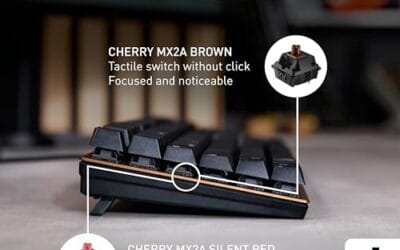
Switches: Cherry MX2A Silent Red, linear with integrated dampeners, made in Germany with Gold-Crosspoint contacts. Rated for 50 million keystrokes on this variant, versus 100 million on MX2A Brown. Linear travel with no tactile bump favors light, fast keypresses over deliberate typing fedback.
Build: Metal plate frame under the switches, which stiffens the deck and cuts flex compared with plastic-only office boards. Cherry positions the KC 200 MX as a slim modern design, though exact case height, weight, and keycap material are not specified in the source data.
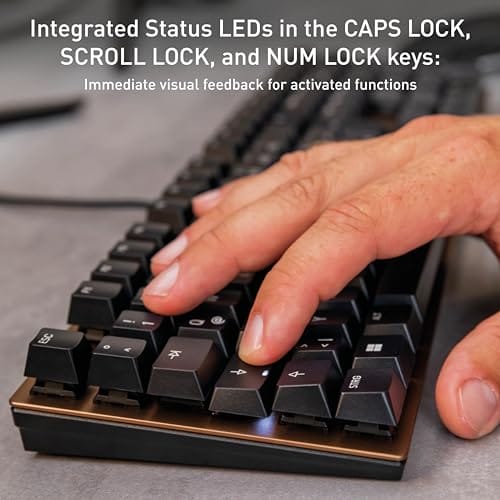
Layout and indicators: Full-size layout retains the dedicated numpad and function row, which maters for spreadsheet,ERP, and accounting workflows. White LED status indicators are built into Caps Lock, Scroll Lock, and Num Lock keys, avoiding a separate indicator strip and keeping the top edge clean.
Gaming fit: Silent Red linears work for casual gaming and MMO or productivity crossover use given their light linear fel, but the source does not list polling rate, N-key rollover, or onboard profiles, so competitive esports buyers should confirm specs before committing.
Cause #2: Power management changed
USB selective suspend, fast startup, and Bluetooth power saving can all change behavior after an update. A board that wakes slowly may appear dead until the port is reset.
Open advanced power settings and disable aggressive sleep behavior for the affected device class. On mini PCs, also check BIOS fan modes. On keyboards, check USB selective suspend and fast startup. Small toggles can cause big symptoms.
Cause #3: Hardware was already marginal
Switch wear, a damaged cable, or a failing wireless receiver can look like an update problem because the timing is suspicious. Verify the keyboard in BIOS or on another PC.
If the device works in BIOS or another machine but fails in Windows, software is likely. If it fails everywhere, replacement is more likely. That split saves time.

Pros
- Hot-swap sockets allow switch experimentation without soldering tools or PCB risk
- Metal top plate delivers firmer typing feel than plastic budget boards at this tier
- Full-key rollover and linear red switches handle rapid inputs for casual gaming
Cons
- Limited owner feedback at time of writing, so long-term reliability is unproven
- RGB is restricted to side lighting only, per-key backlight is fixed rainbow patterns
- ABS keycaps typical at this tier tend to shine and wear faster than PBT
The Newmen GM325Pro is a budget full-size 104-key wired mechanical keyboard aimed at first-time mechanical buyers and casual gamers who want a hot-swap PCB without moving up to enthusiast pricing. It ships with linear red switches, a metal top plate, ABS keycaps, and side-edge RGB lighting.
The defining feature here is the hot-swap socket combined with linear red switches. That gives new users a low-friction path to swap inactile or silent switches later without soldering. Typing fel on metal-plate boards at this tier is usually firmer and less hollow than all-plastic budget pers, based on category norms.
Trade-offs are typical for the price class. Per-key RGB is not suported, only side lighting is true RGB while the top backlight runs 13 preset rainbow effects. ABS keycaps tend to develop shine within months of heavy use, and Newmen does not publish switch lifecycle, polling rate, or NKRO wired specs in the source data.
Buy this if you want a cheap full-size hot-swap platform to learn on and plan to upgrade switches or keycaps later. Skip this if you need per-key RGB, PBT caps, a documented polling rate, or a keyboard with a dep owner review history to validate QC.
Switches and layout: Linear red switches on a full 104-key ANSI layout, with full-key rollover claimed by the manufacturer. Actuation force, travel, and switch brand are not specified in the source. Linear reds typically sit near 45g actuation and 4m total travel in this category.
Hot-swap PCB: Sockets accept standard MX-style switches, so tactile, clicky, or silent linear options from third parties drop in without soldering. Pin compatibility (3-pin vs 5-pin) is not specified, buyers should confirm before ordering replacement switches.
Build and lighting: Metal top plate over ABS black keycaps. RGB is limited to the side edge, while the top backlight cycles through 13 preset rainbow patterns rather than per-key addressable RGB. Case material below the plate is not specified.
Connectivity and software: Wired only via a detachable 1.8m USB cable. FN combos cover F1 to F11 media and calculator shortcuts. Customization software suports key remap, macro recording, and lighting tweaks, though poling rate and software platform support are not specified.
Preventive maintenance
Keep vendor firmware, chipset drivers, and BIOS updates in a known folder before major Windows releases. Clean dust, keep cables strain-free, and write down working settings. You do not need a lab notebook. Just enough notes to undo a bad change.
When it is not fixable: what to replace
Replace the part only after the same failure appears across ports, safe mode, BIOS, or another PC. For complete mini PC failures, a new tower may be more realistic than board-level repair. For keyboards, a spare wired board is the easiest sanity check.
Tools and parts needed
You may need a known-good USB cable, compressed air, a small screwdriver, vendor drivers, and a spare input device. The supplied products should be treated as replacement options, not magic fixes.
The timing after an update can be misleading. Windows may be busy for 20 to 60 minutes after a feature install, and that background work can make a small PC hotter or make USB devices wake strangely. Give the machine one clean reboot after updates finish, then check the symptom again. If it disappears, you probably saw a migration hiccup rather than permanent damage.
Device Manager is your next stop. Expand the relevant section, open the device properties, and check the driver date. If the rollback button is available, use that before hunting for random downloads. If rollback is not available, install the vendor driver package from the system maker or device maker. Keep it boring. Boring is repeatable.
Power settings matter more than people expect. Fast startup can preserve a bad device state across shutdowns, and USB selective suspend can make an input device or receiver look dead. On compact PCs, a quiet fan profile can allow heat soak under loads that used to be fine. Disable the suspicious setting, restart, and recheck. One change at a time.
Hardware checks should be physical and direct. Try a different USB port, another cable, another wall outlet, and another known-good device. For a mini PC, remove dust from vents and confirm the fan spins. For a keyboard, confirm it works in BIOS or on a second computer. That split tells you whether Windows is the likely culprit.
If replacement becomes necessary, match the replacement to the failure. A full prebuilt tower is a drastic answer for a mini PC that only needs cleaning, but it may make sense if the compact unit overheats constantly and cannot be serviced. A new keyboard is reasonable if the old one fails outside Windows too. Do not replace good hardware just because the update arrived on the same day.
After you fix the issue, write down the working driver version, power setting, and port used. That tiny note can save you next month when another update changes the same setting again. Not glamorous. Very useful.
Safe mode is another useful divider. If the symptom disappears in safe mode, a startup app, driver helper, or optional device package may be involved. If it continues in safe mode, look harder at firmware, power, cabling, heat, or the device itself. This keeps the diagnosis from turning into random toggling.
Do not keep repeating forced shutdowns during the process. For overheating, that can stress the machine further. For input problems, it can corrupt updates that were still finalizing. Use normal restarts whenever possible and give the system enough time to finish pending configuration steps.
A good way to make the final call is to imagine the first hour after delivery. If the part installs cleanly, matches the listed support, and fixes the issue you named before shopping, it belongs on the shortlist. If you have to explain away a missing adapter, blocked mount, weak capacity, or unclear compatibility line, pause and compare again. That small pause prevents most returns.
We also like to leave room in the budget for the unglamorous pieces: cables, brackets, paste, dust filters, heatsinks, or a better fan layout. These do not look exciting on a product page, but they often decide how clean the build feels after a month. The main component gets attention. The supporting details keep it working.
Finally, do not let a rating replace your own fit check. A product can be well liked and still wrong for your case, motherboard, console, desk, or workload. Match the product title to your exact need, confirm the physical requirement, then use price and rating to break the tie. That order is slower by a few minutes and cheaper by a lot of hassle.
If you are buying for someone else or maintaining several PCs, write the chosen spec in plain language before ordering. For example: low-clearance DDR5 32GB kit, PS5-ready M.2 2280 drive with heatsink, compact PC replacement tower, or keyboard that works in BIOS and Windows. That plain phrase keeps the search from drifting toward products that share a keyword but solve a different problem.
The same discipline helps after installation. Keep the receipt, save the driver or manual link, and note which port, slot, or header you used. If something acts up later, you will know what changed. Not fancy. It is the kind of habit that separates a smooth build from a weekend of guessing.
A good way to make the final call is to imagine the first hour after delivery. If the part installs cleanly, matches the listed support, and fixes the issue you named before shopping, it belongs on the shortlist. If you have to explain away a missing adapter, blocked mount, weak capacity, or unclear compatibility line, pause and compare again. That small pause prevents most returns.
We also like to leave room in the budget for the unglamorous pieces: cables, brackets, paste, dust filters, heatsinks, or a better fan layout. These do not look exciting on a product page, but they often decide how clean the build feels after a month. The main component gets attention. The supporting details keep it working.
Finally, do not let a rating replace your own fit check. A product can be well liked and still wrong for your case, motherboard, console, desk, or workload. Match the product title to your exact need, confirm the physical requirement, then use price and rating to break the tie. That order is slower by a few minutes and cheaper by a lot of hassle.
If you are buying for someone else or maintaining several PCs, write the chosen spec in plain language before ordering. For example: low-clearance DDR5 32GB kit, PS5-ready M.2 2280 drive with heatsink, compact PC replacement tower, or keyboard that works in BIOS and Windows. That plain phrase keeps the search from drifting toward products that share a keyword but solve a different problem.
The same discipline helps after installation. Keep the receipt, save the driver or manual link, and note which port, slot, or header you used. If something acts up later, you will know what changed. Not fancy. It is the kind of habit that separates a smooth build from a weekend of guessing.
A good way to make the final call is to imagine the first hour after delivery. If the part installs cleanly, matches the listed support, and fixes the issue you named before shopping, it belongs on the shortlist. If you have to explain away a missing adapter, blocked mount, weak capacity, or unclear compatibility line, pause and compare again. That small pause prevents most returns.
We also like to leave room in the budget for the unglamorous pieces: cables, brackets, paste, dust filters, heatsinks, or a better fan layout. These do not look exciting on a product page, but they often decide how clean the build feels after a month. The main component gets attention. The supporting details keep it working.
Finally, do not let a rating replace your own fit check. A product can be well liked and still wrong for your case, motherboard, console, desk, or workload. Match the product title to your exact need, confirm the physical requirement, then use price and rating to break the tie. That order is slower by a few minutes and cheaper by a lot of hassle.
If you are buying for someone else or maintaining several PCs, write the chosen spec in plain language before ordering. For example: low-clearance DDR5 32GB kit, PS5-ready M.2 2280 drive with heatsink, compact PC replacement tower, or keyboard that works in BIOS and Windows. That plain phrase keeps the search from drifting toward products that share a keyword but solve a different problem.
The same discipline helps after installation. Keep the receipt, save the driver or manual link, and note which port, slot, or header you used. If something acts up later, you will know what changed. Not fancy. It is the kind of habit that separates a smooth build from a weekend of guessing.
A few more questions
Should I uninstall the Windows update first?
Only after basic checks. If a driver rollback fixes it, removing the whole update may be unnecessary.
Can this be a BIOS issue?
Yes, especially on compact PCs with custom fan curves or USB wake behavior. Check the vendor support page before changing firmware settings.
How do I know replacement is the right move?
If the same failure appears outside Windows and on another machine, hardware is more likely. If it only appears after login, keep working through drivers and power settings.

































Write Your Review
No reviews yet. Be the first to share your experience!