

A quiet PC is a strange luxury until you’ve had one. Then the constant fan drone of your old build becomes unbearable. The thing is, silence doesn’t come from one magic part. It comes from a chassis that manages airflow and vibration well, fans that spin slow under light load, and enough room to fit a big cooler that never has to scream. The case is where all of that starts, so picking the right one does more for noise than any single upgrade.
We researched cases and enclosures to find options that support a genuinely quiet setup in 2026, and we’re going to be straight about what each one is and isn’t. Our two picks span a $124.99 mid-tower and a $279.99 rugged transport case, and they serve very different needs. If you want a wider selection of chassis, our guide to the best mid-tower case for 2026 lays out more layouts, and builders chasing raw cooling should read our best PC case for airflow piece, since airflow and quiet are two sides of the same coin. Here’s what we vetted, with real prices and specs.

Pros
- Patented three-panel tempered glass exposes front, top, and left views of the build.
- Native back-connect motherboard support for hiden 24-pin, EPS, and PCIe cabling.
- Second chamber hides side-mounted AIO tubing for a cleaner primary compartment.
- Swappable top mesh panel suports a 360mm AIO when thermals take priority over glass.
Cons
- Limited owner feedback at time of writing makes long-term reliability signal thin.
- Full specs (GPU length, cooler height, fan count) not published in source data.
- Back-connect layout requires a compatible motherboard, narowing part selection.
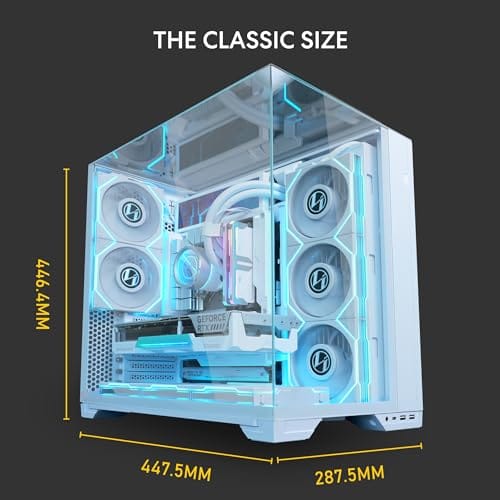
The Lian Li O11Vision Compact is a mid-range ATX mid-tower positioned as a smaller sibling to the O11 Dynamic line, developed in collaboration with the PCMasterRace community. It targets showcase builders who want a dual-chamber layout, tempered glass on three sides, and native support for back-connect motherboards in a tighter footprint.
The defining feature is the patented three-panel tempered glass design covering the front, top, and left side. Paired with the second-chamber cable routing and back-connect motherboard compatibility, the front compartment stays visually clean. Builders wanting a 360mm AIO can swap in the included top mesh panel, trading a glass top for airflow.
Trade-offs are typical at this tier. Back-connect support only pays off if you buy a compatible board from ASUS, MSI, GIGABYTE, or similar, which narrows part selection and can raise motherboard cost. Concrete specs like GPU clearance, CPU cooler height, radiator sites, and included fan count are not specified in the source data, so verify against the official manual before finalizing parts.
Buy this if you want O11-family aesthetics with hidden cabling via a back-connect board and a side or top 360mm AIO. Skip this if you need a documented GPU length ceiling, bundled fans, or a traditional cable-visible motherboard build.
Motherboard support: The chassis accepts standard ATX boards and ads native routing for back-connect variants such as ASUS BTF, MSI Project Zero, and GIGABYTE Project Stealth. Cable cutouts on the tray align with rear-side connectors, keping the 24-pin, EPS, and PCIe cables out of the main chamber view.
Radiator and AIO: A swappable top mesh panel is included specifically to enable a 360mm AIO in the rof. When the AIO is mounted on the side instead, the dual-chamber layout routes the tubing into the second compartment, keeping the front-facing glass view unobstructed. Exact side radiator thickness limits are not specified.
Glass and panel layout: Three tempered glass panels cover the front, top, and left side. The top glass panel is the one you swap out when a 360mm radiator is installed, so builders choosing air cooling or a bottom-mounted AIO retain the full three-panel glass look.
Not specified in source: GPU length clearance, CPU cooler height, drive bay count, included fan count, front I/O (USB-C, USB-A), PSU length, and case dimensions are not listed in the provided data. Confirm these against the Lian Li O11VPW official spec sheet before finalizing parts.
Pros
- IP67 seal with air-lock valve keeps kit dry during rain, dust, or airline handling
- Pick-and-pluck foam in four layers adapts to cameras, lenses, tools, or medical gear
- Dual padlock holes on the latches allow TSA locks for checked-luggage transport
Cons
- No verified owner fedback at time of writing, so long-term wheel and latch durability is unproven
- Case with foam weighs 32.73 lb empty, which pushes loaded weight near airline checked limits
- Standard-density pluck foam is less protective than custom cut foam for heavy optics or precision instruments
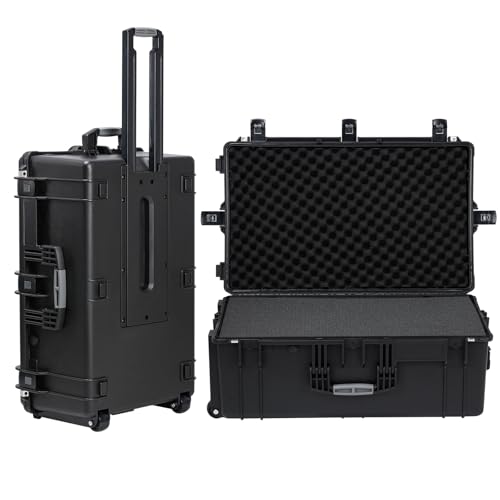
The Regetek Rolling Hard Case is a mid-size wheeled transport case in the Pelican-style category, measuring 32.5 by 20.5 by 13 inch externally with a 28.94 by 17.72 by 9.65 inch usable interior. It targets photographers, drone operators, field service techs, and musicians who need airline-checkable protection for fragile gear.
The defining feature is the IP67 rating paired with a full-length steel hinge and double-latch closure. Cases at this size and seal class typically survive shallow submersion to about 3.3 ft, and the air-lock valve equalizes pressure after altitude changes so the lid does not vacuum shut. Owner feedback is unavailable, so real-world seal longevity cannot be confirmed.
Trade-offs are typical at this tier. The 32.73 lb empty weight with foam eats into airline allowances before gear is loaded, and standard-density pick-and-pluck foam is a compromise between adaptability and impact absorption compared with custom cut foam. Wheels and retractable handles on cases in this class are also the most common long-term failure points.
Buy this if you need a lockable, waterproof rolling case sized for a full mirrorless kit, mid-size drone, or field tolset. Skip this if your payload exceeds the28.94 inch interior length, or if you need documented drop-test certification for professional broadcast use.
Dimensions and weight: Exterior measures 32.5 by 20.5 by 13 inch with an internal usable volume of 28.94 by 17.72 by 9.65 inch. Total weight with foam is 32.73 lb, which is consistent with rotomolded polymer cases in this size class and leaves useful payload room for airline checked baggage.
Sealing and ingress protection: The case is rated IP67 with an O-ring gasket, watertight buckles, and an air-lock pressure equalization valve. Manufacturer states safe submersion to 3.3 ft, and the valve prevents lid suction after temperature or altitude changes during air transit.
Foam configuration: Interior includes four pick-and-pluck layers of standard density foam, one top egg-crate layer, and one bottom pad. The pluck grid lets you shape custom cavities without a knife, though density is not specified in pounds per cubic foot.
Structure and security: Shell uses high-impact polymer with one full-length steel hinge instead of two-point hinges, a double-latch system, dual padlock holes for redundant locking, a heavy-duty top handle, integrated whels, and a retractable pull handle. Waranty is stated at 2 years including replacement parts.
Who this guide is for
This guide is for anyone tired of a loud desk. Maybe you work from home and the whir of your tower competes with video calls. Maybe you game at night and the fan noise carries through the house. Maybe you record audio and every stray hum shows up in the track. If a hushed machine sounds like the upgrade you actually want, you’re the reader we had in mind. It’s also for builders planning a fresh rig who want to design for low noise from the start rather than fighting it later.
What this guide skips: the idea that any single case makes your PC silent on its own. Noise is a system property. A great chassis paired with a screaming stock cooler and unmanaged fan curves will still be loud. We also skip the smallest form factors, where cramped space forces high fan speeds and quiet becomes a fight. Our focus is on enclosures that give your components room to run cool and calm, plus one protective case for people who need to move gear safely.

What to look for in a quiet PC case
Two philosophies exist here, and they pull in opposite directions. One is the sound-dampened approach, with solid panels lined with foam that physically block noise from escaping. The other is the airflow approach, with open panels and clean internal paths that let components run so cool the fans never need to spin fast in the first place. Both can deliver a quiet result, but they get there differently. Dampened cases hide noise, while airflow cases prevent it.
Beyond panels, look at radiator and cooler clearance, since a big 360mm AIO or a tall air tower can move heat slowly and silently. Check fan mounting count, because more fans spinning slowly beat fewer fans spinning fast for noise. Cable management and a clean internal layout help airflow stay smooth. Vibration matters too, so a rigid steel frame, stable feet, and fewer loose drive cages cut down on resonance. The best quiet case gives you cooling headroom, room for a large cooler, and a body that doesn’t buzz.
How we evaluated
We researched these products through public specifications, manufacturer listings, owner reports, and star ratings rather than claiming any bench runs of our own. For each one we noted the real listed price, the aggregate rating, the build materials, and the dimensions printed in the listing. We weighted build quality and cooling headroom, since a rigid case with room for slow, large fans is the foundation of a quiet PC.
We also refused to pretend a product is something it’s not. One of our two picks is a traditional PC chassis, and the other is a rugged rolling transport case for carrying gear, not a motherboard enclosure. We flagged that difference clearly so nobody buys the wrong thing. Ratings cited below come directly from the listings. Review counts weren’t published for these items, so we don’t quote any numbers we can’t back up. Where a case leans toward showcase airflow rather than sealed silence, we say so.
Our top picks
Best Overall Chassis: Lian Li O11 Vision Compact
The Lian Li O11 Vision Compact runs $124.99 with a 4.4 rating, and it’s the pick we’d build a quiet-leaning rig around. This is a white steel and tempered-glass ATX mid-tower with back-connect motherboard support, which is the standout feature. Back-connect routing hides every cable behind the tray, so the main chamber stays open and airflow moves in cleaner paths. Smooth airflow is quiet airflow, since turbulence around messy cables is part of what makes a build hum.
Here’s the honest framing. The O11 Vision Compact is a showcase and airflow case, not a foam-lined silence box. It won’t muffle noise the way a sealed, dampened chassis does. What it gives you instead is enough space and ventilation to run large fans and a big cooler slowly, so the fans rarely need to ramp up. Pair it with a quality 240mm or 360mm AIO, set a gentle fan curve, and it can run genuinely hushed under normal load. The tempered glass is gorgeous but does nothing for sound insulation. For a builder who wants a cool, clean, quiet-capable ATX platform at a fair price, it’s an easy recommendation.
Best Quiet-Capable Showcase Build: Lian Li O11 Vision Compact
The same Lian Li case also earns the showcase role because quiet cases don’t have to look like black office equipment anymore. The white steel and tempered-glass design is built to show off clean hardware, RGB strips, and tidy cable runs, but it doesn’t force you to trade style for sanity. Back-connect support helps here again. With the cable bundle hidden, you can lower fan speeds without worrying that a loose wire is blocking a fan or hanging into the GPU intake.
The weakness is that glass reflects your component choices back at you. If the graphics card uses an aggressive fan profile, you’ll hear it. If the power supply has a clicky fan bearing, the case won’t hide that either. So this is best for builders willing to tune the system after assembly. Set motherboard fan curves based on coolant or CPU temperature, avoid tiny high-RPM fans when possible, and use rubber washers if any panel or bracket vibrates. Do that, and the O11 Vision Compact becomes a polished, low-noise showpiece rather than just a pretty box.
Best for Transport and Protection: Regetek Rolling Hard Case
The Regetek Rolling Hard Case costs $279.99 with a strong 4.6 rating, and it earns a spot here with a big honesty note attached. This is not a PC chassis. You do not mount a motherboard in it. It’s a rugged, wheeled, shockproof and waterproof hard case measuring 32.5 by 20.5 by 13 inches on the outside, with a foam-lined interior of roughly 28.94 by 17.72 by 9.65 inches. It has a retractable handle and wheels for hauling heavy equipment safely.
So why include it in a quiet PC case guide? Because plenty of people searching for a case actually need to move a finished build or sensitive gear without damage, and a foam-lined hard case does that job better than anything. If you take a compact rig to events, transport recording equipment, or need to store a system where it stays dust-free and protected, this is the enclosure for that. The thick foam also helps prevent gear from rattling during travel, which matters if you hate the sound of hardware knocking around in a car trunk. It’s pricey at $279.99, and it’s overkill if all you want is a desktop tower. But for protecting and hauling valuable hardware, its shockproof, waterproof build is exactly right. Just know what you’re buying.
Best for Gear Storage: Regetek Rolling Hard Case
The Regetek also makes sense as a storage pick for builders with spare hardware, capture gear, microphones, small networking devices, or a compact PC that doesn’t live on the desk full time. The foam interior is the key spec. Hard plastic or metal bins let equipment slide, scratch, and rattle, while foam supports the shape of the item and limits movement. The listed inner space, 28.94 by 17.72 by 9.65 inches, gives you enough room for a lot of electronics as long as you check your exact gear measurements first.
It’s not subtle, and it’s not cheap, but it solves a problem that a normal mid-tower cannot. If you build quiet systems for audio, streaming, or events, transport noise and impact damage matter too. A computer that arrives with a cracked glass side panel or loosened cooler is not useful, no matter how quiet it was at home. The Regetek’s wheels and retractable handle make it realistic to move heavier gear without dragging or dropping it. For stationary desktops, skip it. For road gear, it makes sense.
Best Value Choice: Pick the case that matches the job
With only two products in the pool, the value call is less about a single winner and more about avoiding a mismatch. The Lian Li O11 Vision Compact is the value pick for a quiet PC build because it costs less than half the Regetek and is the only true ATX tower here. At $124.99, it leaves budget for better fans, a quieter CPU cooler, and maybe a more efficient power supply. Those extra parts often reduce noise more than spending the whole budget on the case alone.
The Regetek is the value pick only if transport or protection is the point. If your hardware travels, one cracked panel, bent PCIe slot, or dented audio interface can cost more than the case. That’s where its $279.99 price begins to make sense. For most desktop builders, though, the answer is simple. Buy the Lian Li, spend the savings on slow fans, and tune the curves. Quiet builds are won with balance, not one expensive box.
Buying mistakes to avoid
The biggest mistake is assuming the case alone makes your PC quiet. It doesn’t. A well-ventilated chassis with a poorly tuned fan curve is still loud, and even a foam-lined case can’t hide a jet-engine GPU. Quiet is a system built from the case up, so plan the cooler, the fans, and the fan control together. The second mistake is confusing case types entirely, which is why we flagged that the Regetek is a transport case and not a motherboard enclosure. Read the product description before you assume.
Other slip-ups: buying a tiny case then wondering why the cramped fans are loud, ignoring vibration and letting a spinning hard drive buzz against a thin steel panel, and picking a solid-front dampened case then stuffing it with hot components that force the fans to ramp anyway. Match the case to your goal. If you want showcase airflow with quiet potential, the O11 Vision Compact fits. If you need to protect and move gear, the Regetek fits. Buying the wrong category is the costliest error of all.
Bottom line
For a quiet desktop build in 2026, the Lian Li O11 Vision Compact at $124.99 is the clear pick of these two. Its back-connect cable routing and open airflow layout let you run large fans and a big cooler slowly, which is the real path to a hushed PC. It won’t muffle sound like a foam-lined silence case, so the quiet comes from cool components and gentle fan curves, not from sealed panels. Set it up right and it disappears into the background.
The Regetek Rolling Hard Case at $279.99 is a different tool for a different job. If you need to transport or protect gear rather than house a motherboard, its shockproof, waterproof, foam-lined build is excellent and the 4.6 rating backs that up. But it’s not the answer for someone who just wants a quiet tower on their desk. Decide which problem you’re solving first. For most readers here, that’s a quiet build, and the O11 Vision Compact paired with a good cooler and smart fan control is the way there.
Common questions
Does an airflow case like the O11 Vision Compact make a quiet PC?
It can, indirectly. An airflow case with open routing keeps components cool, and cool components let fans spin slowly, which is quiet. It won’t block noise the way a foam-lined dampened case does. So the quiet comes from good cooling and a gentle fan curve rather than sound insulation. Pair the O11 Vision Compact with a large slow-spinning cooler and it can run hushed.
Is the Regetek Rolling Hard Case a PC case?
No. This is important to understand. The Regetek is a rugged rolling transport case with foam and wheels, built to carry and protect equipment, cameras, and tools. You do not mount a motherboard in it. It’s in this guide for readers who actually need to move or store hardware safely, not for someone building a desktop tower. For that, choose the Lian Li chassis instead.
Dampened panels or airflow for the lowest-noise build?
Both approaches work, and they suit different priorities. Dampened solid panels physically block noise from escaping, which helps if you can’t avoid a loud component. Airflow keeps everything so cool that fans never need to ramp, preventing noise at the source. Many builders favor airflow because a cool part is naturally a quiet part. The O11 Vision Compact takes the airflow route.
How big a cooler can I fit in the O11 Vision Compact?
As an ATX mid-tower with back-connect support, it’s designed to take large air towers or multi-fan liquid coolers, which is exactly what a quiet build wants. A bigger cooler moves the same heat at lower fan speeds, so it’s quieter under load. Check the exact clearance figures against your chosen cooler before buying, but the open layout is built to give slow, silent cooling room to breathe.
What else besides the case affects PC noise?
Plenty. Your fan curve is the biggest lever, since fans set to ramp aggressively will roar even in a great case. The CPU cooler size matters, because a larger cooler runs slower and quieter. GPU fans, a noisy power supply, and a vibrating hard drive all add up too. A quiet PC is the sum of the whole system, so tune the fans, pick a big cooler, and use an SSD to cut mechanical drive noise.


































Write Your Review
No reviews yet. Be the first to share your experience!