

Mini PC vs full desktop sounds like a size debate, but the bigger split is power budget, upgrade room, and what $500 to $570 actually buys. A tiny box can be great for office work, Plex, HTPC duty, and light esports, which is why guides like best mini PC for office and best mini PC for HTPC exist. A full tower uses more desk or floor space, yet it can fit a discrete graphics card, standard memory, standard storage, and cooling that doesn’t have to fight a shoebox-sized enclosure. We researched the tradeoff using two budget prebuilt desktops: the $499.99 abytespark Core i7 office tower and the $569.99 WIWB Ryzen 5 tower with RX 560 4GB graphics, 16GB DDR4, 512GB SSD, and Wi-Fi 6.
Matchup at a glance
A mini PC wins when silence, low power draw, and clean placement matter more than graphics horsepower. Many mini PCs use laptop-class CPUs, integrated graphics, soldered or cramped parts, and external power bricks. That’s not a flaw. It’s the point. For a small desk, TV cabinet, dorm shelf, or always-on home server, a mini PC can feel invisible in a way a tower never will.

A full desktop wins when you want standard parts and a longer upgrade path. Even a modest tower can hold a larger CPU cooler, a real PCIe graphics card, extra drives, and case fans that move air at lower noise levels. The WIWB tower’s RX 560 4GB and 16GB DDR4 make it a better casual gaming candidate than most mini PCs in this price tier, while the abytespark Core i7 business tower leans toward office workloads where CPU responsiveness matters more than GPU muscle. Bigger box. More options.

Spec sheet showdown
| Spec | Typical mini PC | abytespark Core i7 tower | WIWB Ryzen 5 tower | What it means |
|---|---|---|---|---|
| Street price in this comparison | Often $300 to $700 | $499.99 | $569.99 | The towers sit in the same budget band as many higher-end mini PCs. |
| CPU class | Usually laptop-style or low-power desktop silicon | Intel Core i7 business office tower | Ryzen 5 up to 4.1GHz | Full desktops tend to have more cooling headroom under long jobs. |
| Graphics | Usually integrated graphics unless it is a niche gaming mini PC | Not specified in the product title | RX 560 4GB graphics card | A discrete GPU matters for casual gaming and older AAA titles. |
| Memory and storage | Often 16GB RAM and 512GB SSD at this price | Not specified in the product title | 16GB DDR4 RAM, 512GB SSD | The WIWB listing gives clearer upgrade and workload expectations. |
| Connectivity | Good USB, HDMI, and Wi-Fi for the size | Business tower focus | Wi-Fi 6, tower chassis | Mini PCs are tidy, but towers are easier to expand later. |
Mini PC strengths
The mini PC’s best argument is not raw speed. It’s efficiency per inch. A compact machine can sit behind a monitor, mount under a desk, or disappear next to a TV. For browsing, spreadsheets, streaming boxes, light photo sorting, and server chores, that footprint matters every day. You don’t have a mid-tower pulling visual attention from the setup, and you usually don’t need to manage a nest of internal power cables, SATA leads, and unused drive bays.
Mini PCs also make sense when the workload is predictable. If you’re building a Plex box, a document station, or a quiet family-room PC, you probably care about idle noise, USB ports, Wi-Fi reliability, and power draw more than PCIe slots. That’s why a tiny system can beat a full desktop for certain roles even when the desktop is faster on paper. Not flashy. Very useful. The catch is upgrade flexibility: RAM may be limited, storage may be a single M.2 slot, and adding a real GPU usually isn’t realistic without moving to a specialty enclosure.
Full desktop strengths
A full desktop’s advantage starts with breathing room. More internal volume means bigger heatsinks, larger fans, more stable boost clocks, and less panic when dust builds up. The $569.99 WIWB prebuilt is a good example of why towers still matter: its product title lists a Ryzen 5 up to 4.1GHz, RX 560 4GB graphics, 16GB DDR4, 512GB SSD, Wi-Fi 6, and a white tower chassis. That isn’t a high-end gaming rig, but it gives you a discrete GPU and standard desktop expectations at a price only $70 above the abytespark office tower.
The $499.99 abytespark Core i7 business office tower is less detailed in its listing, yet the tower format still matters. If the motherboard and case follow standard layouts, future service is easier: swap a drive, replace a fan, clean the cooler, add a PCIe card, or move the system into a better case. You won’t always get that freedom from budget prebuilts, so buyers should check photos and seller details carefully, but the full desktop category gives you a path mini PCs usually don’t. That’s the core trade.

Pros
- Ryzen 5 3500X 6-core CPU bosts to 4.1GHz for smooth 1080p esports CPU load.
- Discrete RX 560 4GB handles DirectX 12 and Vulkan esports titles better than integrated graphics.
- 512GB SSD as bot drive keps Windows load times and app launches snappy out of box.
Cons
- Limited owner feedback at time of writing, no verified reviews to validate build quality.
- RX 560 is a legacy entry-tier GPU, skip if you want modern AAA at 1080p high.
- Ryzen 5 3500X sits on aging AM4, upgrade path is caped at Zen 3 with a BIOS update.
The WIWB is a budget prebuilt tower built around a Ryzen 5 3500X, RX 560 4GB, 16GB DDR4, and a 512GB SSD. It targets students, home office users, and casual gamers who want a plug-and-play box for esports at 1080p rather than a rig for current AAA titles.
The defining pairing here is the 3500X and RX 560. The 6-core, 6-thread CPU bosting to 4.1GHz is still competent for League, CS2, Valorant, and Overwatch, and typically pushes well above 100FPS at 1080p low-to-medium when paired with this GPU class. The RX 560 4GB is the bottleneck for anything heavier.
Trade-offs are typical at this tier. The RX 560 predates FSR frame generation and struggles with modern UE5 titles even at 1080p low. AM4 with a 3500X caps future CPU upgrades at Zen 3, and the case, PSU wattage, VRM phases, and included cooler are not specified, so headroom for a stronger GPU later is unclear.
Buy this if you need a cheap, pre-assembled Windows tower for schoolwork, browsing, and light esports at 1080p. Skip this if you plan to play current AAA releases, stream at 1080p60, or want a platform with a real multi-year upgrade path.
CPU workload: The Ryzen 5 3500X is a 6-core, 6-thread Zen 2 part with a 3.6GHz base and 4.1GHz boost. It stays viable for 1080p esports and light productivity like image editing and IDE work, but lacks SMT, which hurts streaming and modern CPU-bound AA titles.
GPU class and resolution fit: The RX 560 4GB GDDR5 is an entry esports card. Expect high frame rates in CS2, League, and Overwatch at 1080p low-to-medium, and playable frame rates in older AAA titles at 1080p low. 1440p and modern AA at medium are outside its envelope.
Memory and storage: 16GB DDR4 is the current baseline for gaming and multitasking, and the 512GB SSD covers Windows plus roughly 3 to 5 modern game installs. Exact DDR4 speed, dual-channel status, and SSD interface (SATA vs NVMe) are not specified.
Connectivity and upgrade path: WiFi 6 is included, and the board exposes an M.2 slot plus spare DDR4 slots for later expansion. PSU wattage, connector layout, case clearance, and waranty length beyond the stated 1-year coverage are not specified, so plan GPU upgrades cautiously.
Real-world scenarios
Small desk, office apps, and school work
Pick a mini PC if the machine will mostly run Chrome, Office, Zoom, Discord, and cloud storage. A compact box keeps the desk clean, and integrated graphics are fine for monitors, video calls, and ordinary multitasking. If you need a tower anyway because you want easy drive access or a familiar internal layout, the abytespark Core i7 business tower at $499.99 is the more office-minded of the two listed desktops.
1080p casual gaming
A full desktop is the safer buy here. Most mini PCs rely on integrated graphics, while the WIWB tower lists an RX 560 4GB graphics card, 16GB DDR4, and a Ryzen 5 up to 4.1GHz. That’s a better fit for esports, older games, and lower-detail 1080p play than a typical compact office box. If you’re shopping specifically for tiny gaming builds, compare against a focused guide like best mini PC for 1080p gaming.
Home server or Plex box
Mini PCs often win server duty because they sip power, fit on a shelf, and don’t need a full ATX footprint. A tower can still make sense if you’ll add multiple drives or a capture card, but for a simple media server, low idle draw is hard to ignore. You’ll also want to think about fan access, dust filters, and BIOS behavior after power loss before leaving any machine running 24/7.
Long-term upgrades
Buy the tower if you want room to change your mind. More RAM, a bigger SSD, a different GPU, or a replacement power supply are all more plausible in a full desktop. Mini PCs can be upgraded, but usually within a narrow lane: one or two memory sticks, one M.2 drive, maybe a 2.5-inch bay. That’s fine for a fixed job, not great for a hobby PC.
Pricing and availability
The two tower listings here are close enough in price that the spec list should drive the decision. The abytespark Core i7 business office tower is listed at $499.99 with a 4.4 rating, while the WIWB Ryzen 5 tower is listed at $569.99 with a 4.7 rating and a clearer component list: RX 560 4GB, 16GB DDR4, 512GB SSD, and Wi-Fi 6. Since review counts weren’t available in the provided data, don’t treat the ratings as a complete reliability picture.
Mini PC pricing moves fast because small systems are often built around mobile chips, short production runs, and changing barebones platforms. A $400 mini PC can be a tidy office machine; a $700 mini PC can still lose to a tower if graphics are the priority. Check current stock, warranty language, and return terms before buying either style, especially from lesser-known brands. Tiny doesn’t always mean cheaper.
Which to buy
Choose a mini PC if the system has one clear job: office work, HTPC use, Plex, a light home server, or a clean desk setup. You’ll give up GPU upgrades and some repair flexibility, but you’ll gain a machine that’s easier to place and easier to ignore. For many non-gaming households, that’s the better ownership experience. You don’t need a tower just to open 30 browser tabs and stream 4K video.
Choose a full desktop if you want gaming headroom, standard parts, and a box you can service over time. Between the two provided desktops, the WIWB Ryzen 5 tower is the more complete all-rounder because the listing gives concrete specs, including RX 560 4GB graphics, 16GB DDR4, 512GB SSD, Wi-Fi 6, and a $569.99 price. The abytespark Core i7 tower can still make sense as a business PC at $499.99, but its title reveals fewer component details, so we’d verify storage, RAM, power supply, and GPU information before purchase.
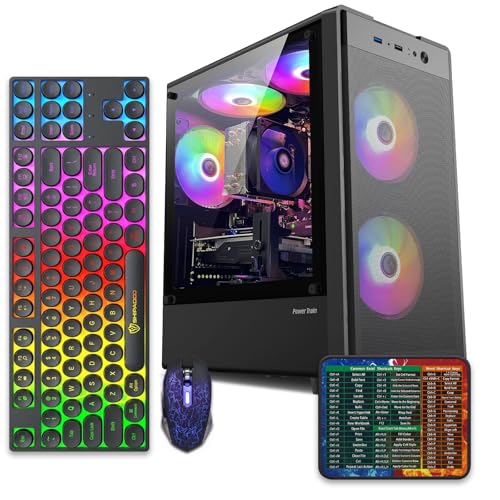
Pros
- 512GB SSD bot drive avoids the HDD bottleneck common in budget prebuilts
- RX 590 8GB VRAM buffer handles 1080p textures better than 4GB budget cards
- Complete bundle with RGB peripherals means no extra spend to start using
- Genuine Windows 11 Home 64-bit preinstalled, no activation hassle out of box
Cons
- Limited owner feedback at time of writing, verify seller reputation before purchase
- Core i7-4770 is Haswell era LGA150, no upgrade path and weak IPC versus modern CPUs
- Windows 11 on 4th-gen Intel is unsupported by Microsoft and may miss feature updates
- No CD/DVD-ROM support and RAM/GPU generation limits future workload headroom
This is an entry-tier prebuilt tower built around an Intel Core i7-4770 Haswell CPU, 16GB RAM, a 512GB SSD, and an AMD Radeon RX 590 8GB GDDR5 GPU. It targets budget buyers who need a working office and light gaming PC with peripherals bundled, not enthusiasts chasing current-gen performance.
The defining feature is the RX 590 8GB paired with a 512GB SSD, an uncommon combo at this price band. Cards in this class typically handle 1080p esports titles at 60+ FPS on medium to high, matching the vendor claim for CS:GO, League of Legends, Apex, and Overwatch. Newer AA titles will need lowered settings.
Trade-offs are significant. The i7-4770 launched in 2013, so IPC, single-thread performance, and platform features like NVMe bot, PCIe Gen4, and modern USB are limited. Windows 11 runs here but sits outside Microsoft's official supported CPU list. There is no realistic CPU or socket upgrade path on LGA1150.
Buy this if you need a plug-and-play 1080p esports and office tower with keyboard, mouse, and RGB included at a low outlay. Skip this if you want current-gen platform support, sustained AA 1440p gaming, or a build with a meaningful upgrade runway.
GPU class: The AMD Radeon RX 590 8GB GDDR5 is a Polaris-refresh card roughly equivalent to a GTX 1060 6GB tier. Expect 1080p 60+ FPS in esports titles like CS:GO, Overwatch, Apex, League, and Fortnite on medium settings, matching the listing's claims.
AAA and modern titles: The vendor lists GTA V, Warzone, Hogwarts Legacy, and The Division 2. Realistically, these run at 1080p low to medium with FSR upscaling where suported.Ray tracing is unsupported on RX 590. No DLSS, no frame gen, no AV1 encode.
CPU bottleneck: The Core i7-4770 quad-core with 8threads at up to 3.9GHz will bottleneck the RX 590 in CPU-heavy titles like Warzone and Escape from Tarkov. Expect frame time inconsistency in large team fights even when average FPS looks aceptable.
Storage and RAM fit: 512GB SSD holds Windows plus 3 to 5 modern game installs before space pressure. 16GB DR3-era RAM is adequate for current esports but leaves no headroom for heavy streaming, browser tabs, and OBS NVENC alongside a game session.
Common questions
Is a mini PC slower than a desktop?
Not always, but it usually has less sustained cooling and fewer upgrade options. A strong mini PC can feel quick in office apps, browsing, and media playback. A similarly priced tower often pulls ahead in gaming, longer CPU-heavy work, and graphics tasks because it can house bigger parts.
Can a mini PC be good for gaming?
Yes, if expectations are realistic. Integrated graphics can handle lighter esports and older titles, while specialized gaming mini PCs cost more and run hotter. For budget 1080p gaming, a tower with a discrete GPU is usually easier to recommend.
Does a full desktop use much more power?
It can, especially with a discrete GPU and larger power supply. At idle, a modest tower may still be reasonable, but a mini PC is usually more efficient for always-on jobs. If you’re running a home server all year, that power difference can matter.
Which is easier to repair?
A full desktop is usually easier. Standard fans, drives, memory, and expansion cards are simpler to reach and replace. Mini PCs pack parts tightly, and some use vendor-specific cooling or boards that limit repair choices.
Should I buy a mini PC or laptop instead?
Buy a laptop if you need a built-in screen, keyboard, battery, and portability. Buy a mini PC if it will stay connected to a monitor or TV and you want desktop-style ergonomics in a tiny box. Buy a tower if gaming, upgrades, and service access matter most.


































Write Your Review
No reviews yet. Be the first to share your experience!