

Dual-channel RAM is the default choice for a mainstream gaming PC. Single-channel can make sense when you need one large stick now and plan to add another later. Quad-channel is a workstation decision. You’ll need a CPU and motherboard that support four memory channels, plus the right modules to populate them.
Four slots on a motherboard tell you how many sticks it can hold. To find out how many channels it can use, look up the CPU and read the board’s memory-population chart. That distinction explains why four DDR5 sticks on a Ryzen gaming PC and four on a Threadripper workstation can behave so differently.
Single, dual and quad channel at a glance
| Configuration | Active platform channels | Example layout | Peak at 5,600 MT/s* | When it makes sense |
|---|---|---|---|---|
| Single channel | 1 | One DIMM on a dual-channel desktop | 44.8 GB/s | Staged upgrade or a system with one memory channel |
| Dual channel | 2 | One DIMM each in channels A and B | 89.6 GB/s | Gaming, general use and most desktop builds |
| Quad channel | 4 | One DIMM in each of four active channels | 179.2 GB/s | Workstations with sustained, bandwidth-heavy workloads |
*Calculated using 64 data bits per platform channel and decimal GB/s. These are theoretical peaks at the same transfer rate, before protocol overhead and other real-world losses.
How the three memory layouts work
RAM holds the code and data your computer is actively using. A channel is a connection the processor’s memory controller can use to carry data to and from RAM. More active channels let the controller handle more transfers in parallel when the requests can be spread across them. Capacity, measured in GB, tells you how much data can stay in RAM. Bandwidth, measured in GB/s, tells you how quickly data can move.
Single channel with one active connection
Install a single desktop DIMM in the slot recommended for one module and it occupies one platform channel. The other channel on a typical two-channel CPU sits idle. A 32GB stick can still keep 32GB resident. If you know your application needs more than 16GB, a single 32GB stick may be a more practical starting point than a two-stick kit with only 16GB total.
Dual channel with one stick per channel
Put matching modules in the board’s designated slots for channels A and B. Two 16GB sticks still add up to 32GB, and the memory controller can distribute requests across both channels. Equal capacity on each channel gives it the full 32GB across which to do that. Two sticks. Two active channels.
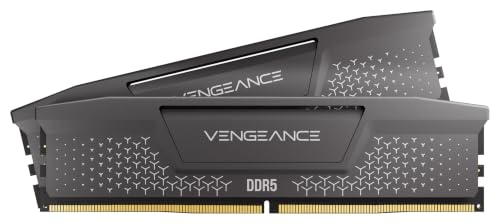
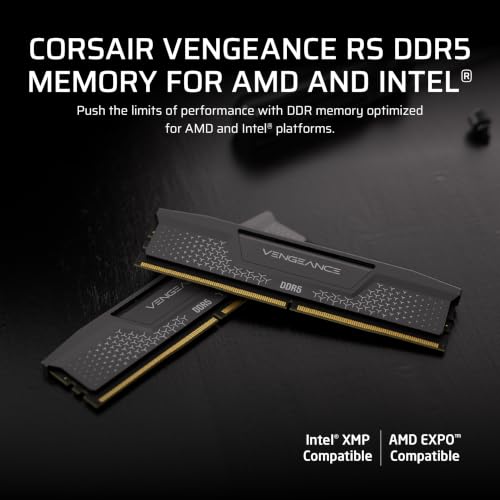
A Corsair Vengeance RS DDR5 32GB kit illustrates that layout. It comes with two 16GB desktop DIMMs. Check the exact kit model against your board’s memory support list before buying and use the two slots specified in the manual.
Quad channel with four independent connections
A quad-channel system can distribute memory traffic across four platform channels. The module count can look identical to a fully populated gaming motherboard, but the wiring is different. On a four-slot, dual-channel desktop, A1 and A2 share channel A, and B1 and B2 share channel B. On a workstation that supports quad channel, the manual identifies which slots belong to each of the four channels.
What the extra bandwidth changes
At 5,600 MT/s, a 64-bit path moves up to 44.8 GB/s on paper. Multiply 5.6 billion transfers per second by eight bytes per transfer. Two channels give a ceiling of 89.6 GB/s, and four give 179.2 GB/s if they run at the same rate. Quad channel can double the theoretical bandwidth of dual channel. A game or application only benefits to the extent that it was waiting for memory transfers.
Integrated graphics are a case where that distinction matters. A processor such as the AMD Ryzen 7 8700G with Radeon 780M graphics gives the CPU and GPU access to system memory. The two share its bandwidth, so a pair of DIMMs can be a more meaningful upgrade here than on a machine with a discrete GPU and its own video memory. For a desktop with a dedicated card, the benefit depends on what limits the game. See how dual-channel RAM affects gaming for that specific decision.
Quad channel is easier to justify in a workstation that repeatedly streams large arrays through many CPU cores. Think of a simulation solver stepping through a large mesh. Four channels can feed more data to the cores when memory throughput is the constraint. A task that fits largely in cache or spends most of its time waiting on a GPU may gain little. If your working set spills out of RAM, solve the capacity problem first.
Why four DDR5 sticks don’t make a gaming PC quad channel
Start with the CPU spec. AMD lists two DDR5 memory channels for the Ryzen 7 9800X3D. That remains true with four DIMMs. In fact, AMD lists DDR5-5600 for two single- or dual-rank modules and DDR5-3600 for four modules in either rank configuration. Those are AMD’s published supported rates for that CPU. Your exact memory kit, board and settings determine what the system actually runs.
A Threadripper workstation on TRX50 supports four channels of registered DDR5 memory. AMD lists eight channels for WRX90 with compatible Threadripper PRO processors. Both use socket sTR5, so even a shared socket name can hide a different memory layout. The TRX50 example also uses registered DIMMs, or RDIMMs. Check the board’s supported memory type before you order the modules.
DDR5 has a naming wrinkle. Micron describes two independent channels per DDR5 DIMM. On a typical desktop module, those are two 32-bit subchannels. They divide the module’s 64-bit data path into independently usable halves. A diagnostic readout that counts four 32-bit paths across two DDR5 sticks can therefore describe a normal two-channel desktop. Use the processor’s platform channel count when comparing it with a workstation.
Which slots to use and what to check first
Open your board’s manual to its memory population chart. ASUS’s illustrated example calls for A2 with a single DIMM and A2 plus B2 with a pair. Follow the chart for your exact board, especially on a workstation where the slot labels may differ. After the first boot, check that the firmware detects every module and reports the expected total capacity. Here’s how to confirm dual-channel operation on your PC if you’re checking an existing build.
XMP and EXPO are memory profiles that apply settings such as transfer rate and timings. Where the sticks are installed determines which channels the controller can use. Sort out the slot layout before changing a profile. If you’re weighing a larger pair against adding sticks to the two you own, our two-stick versus four-stick comparison covers that trade-off on mainstream boards.
Which configuration should you use?
- Gaming or general desktop use. Choose a matching pair with enough capacity for your applications. If you already have a single stick, check your board’s manual and the exact part number before deciding whether to add a module or replace it with a matched kit.
- More capacity on the same dual-channel board. Check whether your board supports the capacity you want in two slots. A supported 2x32GB kit can deliver the same 64GB capacity as 4x16GB while leaving two slots open. A larger pair. The same two channels.
- A bandwidth-heavy CPU workstation. Consider quad channel when your applications benefit from sustained memory throughput and the platform’s cost fits the work. Budget for a compatible CPU, board and the right DIMMs together, and check the recommended four-module layout before buying.
The Crucial Pro DDR5 64GB desktop kit is an example of the larger-pair option. It uses two 32GB unbuffered modules. If you’re buying for a Ryzen 9000 desktop, compare the capacity and compatibility notes in our DDR5 kit guide for Ryzen 9000.

For a mainstream build, pick enough RAM, then populate both channels. For a workstation, compare the memory requirements of your actual workload with the platform’s supported channel count. That’s the number to use when the board has more slots than channels.
Frequently asked questions
Does dual-rank RAM give me another memory channel?
A rank is a group of chips on a module that the controller can address together. A dual-rank DIMM adds another group of chips on the same module connection. You can have one active channel with a dual-rank DIMM or two active channels with a pair of single-rank DIMMs.
Can you compare bandwidth if the systems run at different speeds?
Yes. Multiply the number of active channels by the data width per channel in bytes and the actual transfer rate. For instance, two channels at DDR5-3600 give a theoretical 57.6 GB/s, while two at DDR5-5600 give 89.6 GB/s. Both layouts are dual channel. For software that depends on memory throughput, the rate you can run matters alongside the slot layout.

































Write Your Review
No reviews yet. Be the first to share your experience!