

A mini PC is a full computer shrunk into a box that fits in your palm or hides behind a monitor, usually running laptop-class parts to keep the heat and size down. The question “is it worth it” comes up because these little machines cost real money while looking like toys, and the honest answer depends entirely on what you’re doing with it. For a media center, an office desktop, or a home server, a mini PC is often a genuinely smart buy. For serious gaming, the math gets harder.
We’ll walk through where mini PCs shine, where they fall short, and what to check before spending. If you’re leaning toward one for a specific job, our guides to the best mini PCs for office work and mini PCs for a home server get specific. One disclosure up front: the two systems we reference below are compact prebuilt towers, not true mini PCs, so we’re using them to frame the budget-prebuilt alternative rather than as pocket-size examples.
The short answer
Yes, a mini PC is worth it if your workload is light to moderate and you value space, silence, and low power draw. For web browsing, office apps, media streaming, and always-on server duties, a mini PC does the job in a fraction of the space and wattage of a tower. It’s not worth it if you need serious gaming performance or heavy upgradability, because the small chassis limits cooling, the GPU, and future part swaps.
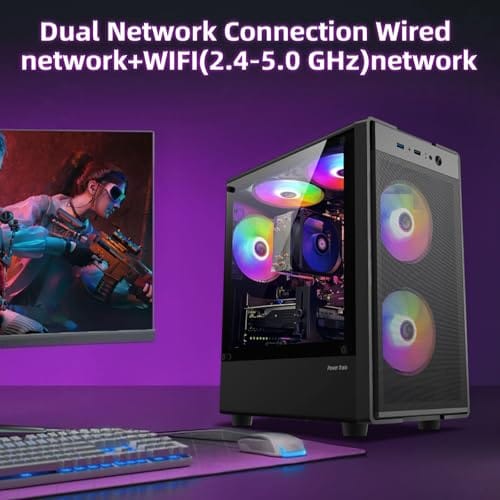
If your budget points toward that gaming or upgrade path instead, a compact prebuilt tower is the honest alternative, and it’s where these two systems fit. The abytespark Prebuilt Gaming PC at $499.99, rated 4.4, is an Intel Core i7 business-and-office tower that trades the tiny footprint for room to grow. It’s not a mini PC, but it’s the budget desktop many mini-PC shoppers actually end up wanting.
Pros
- 512GB SSD bot drive avoids the HDD bottleneck common in budget prebuilts
- RX 590 8GB VRAM buffer handles 1080p textures better than 4GB budget cards
- Complete bundle with RGB peripherals means no extra spend to start using
- Genuine Windows 11 Home 64-bit preinstalled, no activation hassle out of box
Cons
- Limited owner feedback at time of writing, verify seller reputation before purchase
- Core i7-4770 is Haswell era LGA150, no upgrade path and weak IPC versus modern CPUs
- Windows 11 on 4th-gen Intel is unsupported by Microsoft and may miss feature updates
- No CD/DVD-ROM support and RAM/GPU generation limits future workload headroom
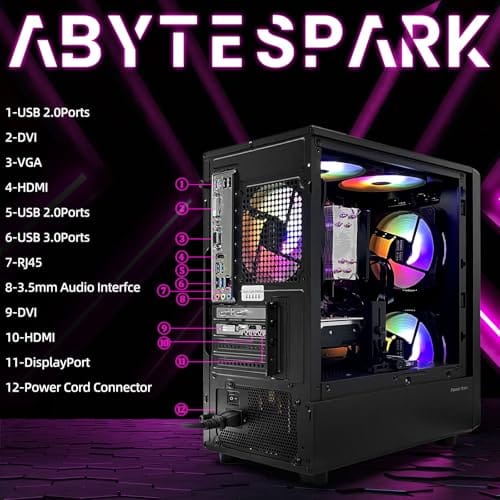
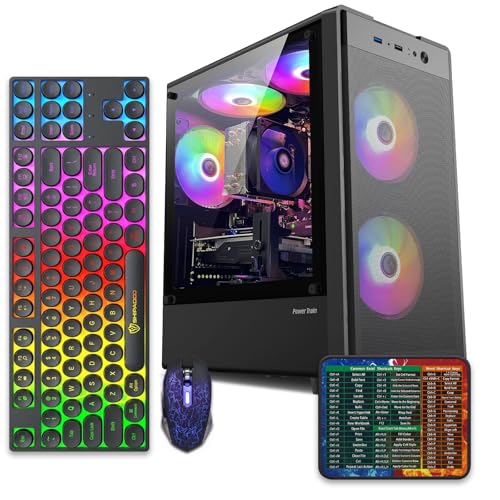
This is an entry-tier prebuilt tower built around an Intel Core i7-4770 Haswell CPU, 16GB RAM, a 512GB SSD, and an AMD Radeon RX 590 8GB GDDR5 GPU. It targets budget buyers who need a working office and light gaming PC with peripherals bundled, not enthusiasts chasing current-gen performance.
The defining feature is the RX 590 8GB paired with a 512GB SSD, an uncommon combo at this price band. Cards in this class typically handle 1080p esports titles at 60+ FPS on medium to high, matching the vendor claim for CS:GO, League of Legends, Apex, and Overwatch. Newer AA titles will need lowered settings.
Trade-offs are significant. The i7-4770 launched in 2013, so IPC, single-thread performance, and platform features like NVMe bot, PCIe Gen4, and modern USB are limited. Windows 11 runs here but sits outside Microsoft's official supported CPU list. There is no realistic CPU or socket upgrade path on LGA1150.
Buy this if you need a plug-and-play 1080p esports and office tower with keyboard, mouse, and RGB included at a low outlay. Skip this if you want current-gen platform support, sustained AA 1440p gaming, or a build with a meaningful upgrade runway.
GPU class: The AMD Radeon RX 590 8GB GDDR5 is a Polaris-refresh card roughly equivalent to a GTX 1060 6GB tier. Expect 1080p 60+ FPS in esports titles like CS:GO, Overwatch, Apex, League, and Fortnite on medium settings, matching the listing's claims.
AAA and modern titles: The vendor lists GTA V, Warzone, Hogwarts Legacy, and The Division 2. Realistically, these run at 1080p low to medium with FSR upscaling where suported.Ray tracing is unsupported on RX 590. No DLSS, no frame gen, no AV1 encode.
CPU bottleneck: The Core i7-4770 quad-core with 8threads at up to 3.9GHz will bottleneck the RX 590 in CPU-heavy titles like Warzone and Escape from Tarkov. Expect frame time inconsistency in large team fights even when average FPS looks aceptable.
Storage and RAM fit: 512GB SSD holds Windows plus 3 to 5 modern game installs before space pressure. 16GB DR3-era RAM is adequate for current esports but leaves no headroom for heavy streaming, browser tabs, and OBS NVENC alongside a game session.
The longer explanation
Mini PCs pack a mobile or low-power desktop CPU, integrated or modest graphics, RAM, and an M.2 SSD into a case that’s often under a liter in volume. That density is the whole appeal. They sip power, run quiet or fanless, and disappear behind a monitor or under a TV. Most handle 4K video playback, dozens of browser tabs, and office suites without breaking a sweat, which covers what the majority of people actually do on a computer.
The compromises come from physics. A small box can’t cool a high-end CPU or a discrete GPU the way a tower can, so sustained heavy loads throttle. Upgrades are limited to RAM and the SSD on most models, with the CPU soldered down. There’s rarely room for a dedicated graphics card. So a mini PC is excellent at light and steady work and poor at bursty, heavy, GPU-bound tasks like modern gaming or 3D rendering.
How it works
A mini PC borrows the efficiency-first design of a laptop without the screen and battery. The CPU runs at a lower power target, often 15W to 65W, which keeps the machine cool and quiet but caps peak performance. Integrated graphics share system memory instead of having their own, so gaming performance leans on that iGPU and rarely clears 1080p at high settings in demanding titles. For 2D work and video, none of that matters.
Storage and memory usually sit on standard M.2 and SO-DIMM slots, so you can add capacity even when the CPU is fixed. Connectivity is a strong point: modern units pack Wi-Fi 6, multiple USB ports, and often dual video outputs for a multi-monitor desk. That combination of low power, quiet operation, and solid I/O is exactly why mini PCs became the default for home servers, HTPCs, and tidy office setups.
Why it works this way
The design choices all trace back to heat. Every watt a chip draws becomes heat the case has to shed, and a one-liter box has almost no room for a big heatsink or airflow. So manufacturers pick efficient, lower-power parts that stay cool in that space. That’s why you don’t see a mini PC with an RTX 5080. The chassis physically can’t remove that much heat, and cramming it in would throttle instantly.
The upside of that same constraint is efficiency. A mini PC pulling 15W to 45W at idle costs pennies to run around the clock, which is why they dominate the always-on home-server niche. A tower with a discrete GPU might idle at 60W or more. So the small size isn’t just about desk space. It’s a whole philosophy of doing enough work for the least power and noise.
When you’d want this
Reach for a mini PC when the job is light and constant: a Plex or media server that runs 24/7, an office machine for documents and video calls, an HTPC under the TV, or a second computer for a bedroom or kitchen. In all of those, the space savings, silence, and low power bill are real wins, and the modest performance is more than enough. A mini PC also travels well and mounts behind a monitor for a clean setup.
If your real goal is gaming or you want to add a graphics card later, a budget tower serves you better, and that’s where the WIWB Prebuilt Gaming PC at $569.99, rated 4.7, comes in. It’s a compact tower with a Ryzen 5 boosting up to 4.1GHz, an RX 560 4G graphics card, 16GB of DDR4, a 512GB SSD, and Wi-Fi 6. That discrete GPU and the tower’s upgrade room are exactly what a mini PC can’t give you, at a price close to a decent mini PC.

Pros
- Ryzen 5 3500X 6-core CPU bosts to 4.1GHz for smooth 1080p esports CPU load.
- Discrete RX 560 4GB handles DirectX 12 and Vulkan esports titles better than integrated graphics.
- 512GB SSD as bot drive keps Windows load times and app launches snappy out of box.
Cons
- Limited owner feedback at time of writing, no verified reviews to validate build quality.
- RX 560 is a legacy entry-tier GPU, skip if you want modern AAA at 1080p high.
- Ryzen 5 3500X sits on aging AM4, upgrade path is caped at Zen 3 with a BIOS update.
The WIWB is a budget prebuilt tower built around a Ryzen 5 3500X, RX 560 4GB, 16GB DDR4, and a 512GB SSD. It targets students, home office users, and casual gamers who want a plug-and-play box for esports at 1080p rather than a rig for current AAA titles.
The defining pairing here is the 3500X and RX 560. The 6-core, 6-thread CPU bosting to 4.1GHz is still competent for League, CS2, Valorant, and Overwatch, and typically pushes well above 100FPS at 1080p low-to-medium when paired with this GPU class. The RX 560 4GB is the bottleneck for anything heavier.
Trade-offs are typical at this tier. The RX 560 predates FSR frame generation and struggles with modern UE5 titles even at 1080p low. AM4 with a 3500X caps future CPU upgrades at Zen 3, and the case, PSU wattage, VRM phases, and included cooler are not specified, so headroom for a stronger GPU later is unclear.
Buy this if you need a cheap, pre-assembled Windows tower for schoolwork, browsing, and light esports at 1080p. Skip this if you plan to play current AAA releases, stream at 1080p60, or want a platform with a real multi-year upgrade path.
CPU workload: The Ryzen 5 3500X is a 6-core, 6-thread Zen 2 part with a 3.6GHz base and 4.1GHz boost. It stays viable for 1080p esports and light productivity like image editing and IDE work, but lacks SMT, which hurts streaming and modern CPU-bound AA titles.
GPU class and resolution fit: The RX 560 4GB GDDR5 is an entry esports card. Expect high frame rates in CS2, League, and Overwatch at 1080p low-to-medium, and playable frame rates in older AAA titles at 1080p low. 1440p and modern AA at medium are outside its envelope.
Memory and storage: 16GB DDR4 is the current baseline for gaming and multitasking, and the 512GB SSD covers Windows plus roughly 3 to 5 modern game installs. Exact DDR4 speed, dual-channel status, and SSD interface (SATA vs NVMe) are not specified.
Connectivity and upgrade path: WiFi 6 is included, and the board exposes an M.2 slot plus spare DDR4 slots for later expansion. PSU wattage, connector layout, case clearance, and waranty length beyond the stated 1-year coverage are not specified, so plan GPU upgrades cautiously.
What to look for in a mini PC
Start with the CPU class and match it to the job. An efficient recent chip handles office and media easily, while heavier multitasking wants more cores. Check RAM: 16GB is the comfortable target, and confirm the slots are user-accessible so you can add more. Storage should be M.2 NVMe, and a free second slot is a bonus for a server. Wi-Fi 6, plenty of USB, and dual display outputs round out a machine that’ll age well.
Be realistic about graphics. Most mini PCs rely on integrated graphics, so if you see one claiming serious gaming, read closely, because the small chassis caps what’s possible. If gaming matters, that’s your signal to look at a tower like the WIWB unit with its dedicated RX 560 instead. Match the machine to the workload, and a mini PC rewards you. Force it to game hard, and it’ll disappoint.
Common misconceptions
The biggest myth is that a mini PC is underpowered for everything. It isn’t. For the tasks most people run daily, it’s plenty, and the “slow” reputation comes from people expecting tower gaming performance from a palm-sized box. The second myth is that they can’t be upgraded at all. Most let you swap RAM and add storage. What you usually can’t change is the soldered CPU and the lack of a GPU slot.
Another misconception is that a mini PC always saves money. It often costs as much as a budget tower with more performance, because miniaturization carries a premium. A $500 mini PC and the $499.99 abytespark tower occupy similar price territory, yet the tower offers more room and upgrade paths. So “worth it” isn’t about raw dollars. It’s about whether you value the size and silence over the flexibility.
Frequently asked
Can a mini PC handle gaming?
Light gaming and older titles, yes, thanks to integrated graphics, usually at 1080p on lower settings. Demanding modern games at high settings, no, because there’s no room for a strong discrete GPU. If gaming is the point, a budget tower like the WIWB unit with an RX 560 will serve you far better for similar money.
Is a mini PC good for a home server?
It’s one of the best uses for one. Low power draw, quiet operation, and a small footprint make a mini PC ideal for an always-on Plex, file, or home-automation server. It’ll cost pennies a day to run compared to a full tower, which matters for a machine that never turns off.
How much RAM does a mini PC need?
16GB is the comfortable target for general use and light multitasking, matching what the compact towers here ship with. 8GB works for a basic media box or server, and 32GB helps only for heavier workloads. Confirm the RAM is user-accessible so you can upgrade, since most mini PCs let you swap the memory.
Mini PC or a budget tower, which should I buy?
Pick the mini PC if space, silence, and low power matter most and the work is light. Pick a tower like the $499.99 abytespark or the $569.99 WIWB if you want gaming, a discrete GPU, or room to upgrade. They often cost about the same, so it’s a size-versus-flexibility choice, not purely a price one.
Do mini PCs run quietly?
Generally yes. Their low-power parts produce little heat, so many run near-silent or even fanless. Under sustained heavy load a small fan can spin up and get audible, but for office, media, and server tasks they stay quiet. That silence is a big part of why people put them in living rooms and bedrooms.


































Write Your Review
No reviews yet. Be the first to share your experience!