

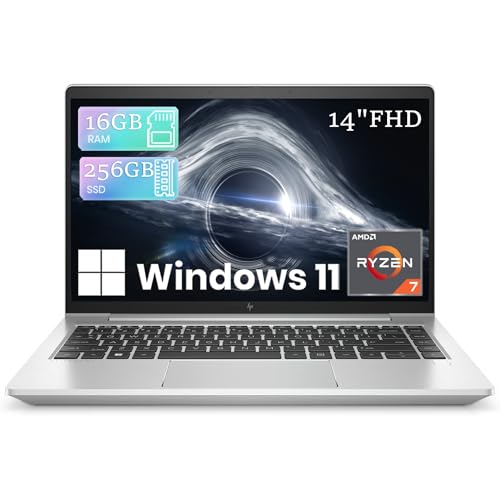
The HP EliteBook 845 G9 (Renewed) is our first pick for gaming under $500. This configuration pairs Radeon 660M graphics with 16GB of memory and a 512GB SSD. It suits someone who needs one laptop for work or school and wants to play lighter games after hours. If you’d rather buy new, start with the NIMO N153 or Acer Aspire 3.
At this price, decide what you want to play before you shop. Competitive games with modest requirements and older single-player releases are reasonable places to start. If your main game calls for a dedicated GPU with its own video memory, save your money for a sale or a higher budget. Low settings. A short install list. That’s the kind of compromise that makes this price tier work.
Every configuration below was in stock below $500 in our November 25, 2026 U.S. price check. Prices are before tax and shipping and can change. Three picks are renewed and two are new. We may earn a commission through the Amazon links.



Gaming Laptops Under $500 at a Glance
| Laptop and condition | Graphics | Price checked | Best for | Main trade-off |
|---|---|---|---|---|
| HP EliteBook 845 G9 (Renewed) | Radeon 660M | $445.90 | Best balance for light gaming | Battery condition varies by unit |
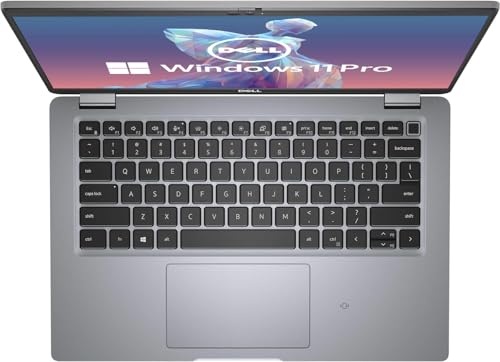
| Dell Latitude 5420 (Renewed) | Core i7-1165G7 integrated graphics | $336.49 | Lowest upfront cost | 256GB SSD |
| NIMO N153 (New) | Radeon 660M | $493.99 | New 15.6-inch Radeon option | 8GB RAM and 256GB SSD |
| HP EliteBook 645 G9 (Renewed) | Ryzen 7 PRO 5875U integrated Radeon | $364.99 | Mixed work and casual play | 256GB SSD and older graphics platform |
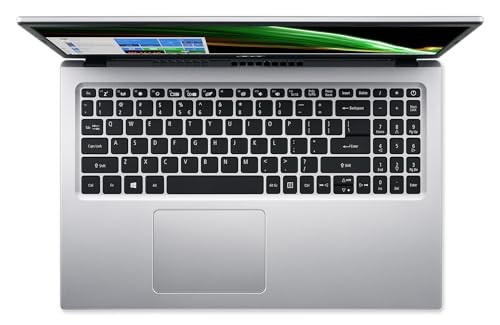
| Acer Aspire 3 A315-58-74KE (New) | Intel Iris Xe | $479.99 | New laptop with more room for installs | 8GB RAM as listed |
1. HP EliteBook 845 G9 (Renewed) | Best Overall
Buy the configuration with the Ryzen 5 PRO 6650U, 16GB of DDR5 and a 512GB SSD. The 6650U includes AMD’s Radeon 660M. There’s enough storage to keep a few installs alongside school or work files, and 16GB gives Windows, the game and the shared graphics memory more room than the 8GB options here.
The listed 14-inch display is 1920 × 1200. That extra vertical space is handy for documents. In a game, you can start at 1920 × 1200 with low settings and move down to 1280 × 800 if you need more headroom and the game offers it. Both resolutions keep the screen’s 16:10 shape. HP documents two DDR5 memory slots, but the seller’s 16GB figure alone doesn’t tell you whether both slots are filled.
Buy this one when the renewed condition and return terms work for you. You’ll be paying for the combination of graphics, memory and storage. If you mostly play one small game and want the lowest checkout price, the Dell frees up more of the budget.
2. Dell Latitude 5420 (Renewed) | Lowest Upfront Cost
The Dell gets you a 14-inch 1920 × 1080 screen, a Core i7-1165G7, 16GB of DDR4 and a 256GB SSD. That layout makes the most sense for someone who already knows which small games they want installed. With the money saved, you can replace a worn accessory or leave room in the budget for storage later. There’s no need to spend the full $500 if a cheaper configuration fits your library.
Intel lists Iris Xe graphics eligibility for this processor. Memory configuration matters, so ask whether the unit ships with two modules if that information isn’t in the listing. An older i7 label says little about what a modern game can render. Use Intel’s integrated graphics as the reference when you compare the machine against the publisher’s GPU requirement.
The 256GB drive is the main reason to move up. Subtract the space already used by Windows before looking at what your launcher asks for. A drive that fits one large game today still needs headroom when a patch arrives. For a buyer who plays a few small titles in rotation, that’s easier to work around.
3. NIMO N153 (New) | Best New Radeon Option
The N153 puts a Ryzen 5 6600H and Radeon 660M graphics in a 15.6-inch 1080p laptop. Choose it if you want a new unit, prefer that larger screen and mostly play lighter games. At the checked price, this specific listing gives you 8GB of DDR5 and a 256GB SSD. The roomier N153 configurations are separate purchases with their own prices.
Plan your first game before opening your wallet. An 8GB system shares memory with the graphics processor. If a game’s minimum calls for 8GB, a browser with a stack of open tabs takes away some of that margin. Close background apps when you play and leave enough free SSD space for the launcher to unpack updates. Start with a small library and see whether you actually need more room.
The HP 845 G9 offers more memory and storage at its checked price. The NIMO earns its place for buyers who want a new 15.6-inch laptop and specifically want the Radeon 660M. Compare the exact capacities at checkout since the product name appears across several configurations.
4. HP EliteBook 645 G9 (Renewed) | Best for Work and Casual Play
The EliteBook 645 G9 uses a Ryzen 7 PRO 5875U with integrated Radeon graphics. Its listed 16GB of DDR4 and 14-inch 1080p screen suit a shared work and play routine. The processor has eight cores. That can matter when other work piles up, but a game limited by the integrated GPU won’t gain the same benefit just because the CPU says Ryzen 7.
HP documents two accessible DDR4 memory slots. That gives you more flexibility if you want to inspect or change the memory configuration later. The limit you’ll notice sooner may be the 256GB SSD, especially if you keep large work files on the same machine. If gaming is the main reason for buying and the 845 G9 stays within budget, the 660M and larger drive are the reasons to choose it.
Consider the 645 G9 if you can use the savings and your gaming library stays small. The built-in Ethernet port is useful if the laptop gets most of its game time at a desk near the router.
5. Acer Aspire 3 A315-58-74KE (New) | Best New Pick With a 512GB SSD
This Aspire 3 is the A315-58-74KE, with a Core i7-1165G7, Intel Iris Xe graphics, 8GB of DDR4 and a 512GB SSD. The 15.6-inch screen has a 1920 × 1080 resolution and a 60Hz refresh rate. The exact suffix matters because the Aspire 3 name covers multiple machines. Compare the CPU and the storage on the selected listing before paying.
The Acer has twice the listed storage of the NIMO. That’s useful if the laptop has to carry school projects and a few games and you want to avoid moving files every time you install another title. It still gives Windows and integrated graphics 8GB of RAM to share. For a game with modest graphics requirements but a large install, that mix makes more sense than buying the same amount of RAM with a smaller drive.
Choose the NIMO if your priority is the Radeon 660M and you can live with the smaller drive. Choose the Acer if you want a new 15.6-inch machine and storage is the constraint you can identify today. With either one, count the cost of any immediate upgrade against your $500 limit.
How We Evaluated These Gaming Laptops
We compared exact in-stock U.S. configurations under $500 and used manufacturer specifications to confirm processor graphics, display details and memory options where documented. We kept each configuration’s memory and storage separate from the processor name because listings for the same chassis vary. Renewed offers are marked throughout. Our recommendations draw on published specifications and game requirements.
We looked for enough memory and storage to get started, and a graphics configuration that we could identify and compare against the requirements for lighter games. We also considered how much the seller tells you about the unit. A mystery CPU, an unclear panel or an offer that needs an immediate upgrade is a poor way to use a hard cap.
What to Look For in a Gaming Laptop Under $500
Start with your hardest game
Open the publisher’s requirements for the one game you’d be most disappointed to miss. For example, Riot’s VALORANT requirements distinguish Intel HD 4000 at the 30 FPS minimum tier from GeForce GT 730 or Radeon R7 240 at the 60 FPS tier. Those are Riot’s hardware targets. Your frame rate will depend on the laptop and its settings. Check the operating-system requirements too, including Riot’s Windows 11 TPM 2.0 and Secure Boot requirements.
Epic’s Fortnite requirements list 8GB of RAM at minimum. The recommended tier asks for 16GB and lists a GTX 960, Radeon R9 280 or equivalent DX11 GPU. That distinction helps set expectations for a shared-memory system. Play with a low graphics preset before buying extras for the laptop.
Check the settings a game actually exposes. A render-scale slider can leave the menus readable at the screen’s native resolution while drawing the 3D scene at a lower resolution. If the picture gets too soft, restore the scale and lower a setting you can live without, such as shadows or reflections. Change one setting at a time so you can tell which trade-off helped.
Budget memory and storage separately
Prioritize 16GB if your game runs alongside voice chat or a browser. Ask whether the advertised capacity is one module or two and check the maker’s documentation before ordering a second stick. Our guide to laptop SO-DIMM memory explains what the small laptop module looks like and why matching the memory generation matters.
For storage, add up the installed size of your games, then allow space for Windows, personal files and updates. A 512GB SSD is worth paying for if you’ll use the capacity from day one. If a seller offers a bundle with more storage at checkout, check its total cost before assuming the upgrade keeps the laptop under budget.
Ask what renewed means for the unit you’ll receive
Read the return window and look for a stated battery condition, an included charger and a working, activated copy of Windows. A good model name gives you a chassis and a processor family. It doesn’t tell you how much capacity remains in the particular battery. If the listing is vague and you need a full day away from a desk, contact the seller or choose a new unit with clear terms.
When the laptop arrives, compare the delivered CPU, RAM and drive against your order and pull a Windows battery report. Our laptop battery cycle guide explains how to read wear information alongside capacity. Do this during the return window so you have time to resolve a mismatch.
If a used unit is headed to school with you, open and close the lid, check the keyboard everywhere you normally type, and plug in your headset and charger during the return window. Look for a loose charge port or a screen that flickers when the hinge moves. A higher-spec machine is a poor bargain when the parts you use every day need replacing.
Frequently Asked Questions
Can I get a dedicated NVIDIA GPU for under $500?
A used gaming laptop or short sale may bring one into range. Every pick here uses integrated graphics. If you find an exception, check the exact laptop GPU, video-memory capacity and condition against the game you care about. If you can wait or spend more, the under-$1,000 gaming laptop guide covers models built around dedicated graphics.
Should I play at 1080p on a $500 laptop?
Start at the panel’s native resolution and use a low preset. If motion feels uneven, lower shadows or reduce resolution one step. On a 16:9 screen, 1280 × 720 keeps the native shape, though the picture can look softer. Treat 1080p as a starting point. The right setting is the one that keeps movement responsive in the part of the game you actually play.
Is it worth buying a laptop if I only play at a desk?
Compare your complete costs. A laptop includes a display and keyboard and packs away when you’re done. If you already have those essentials and there’s no reason to carry the machine, our guide to affordable gaming desktops gives you another way to compare the trade-offs. Include shipping and anything else you’d have to buy in both totals.
Bottom Line
Pick the renewed HP EliteBook 845 G9 with the Ryzen 5 PRO 6650U, 16GB of memory and 512GB SSD if your game list is light and the seller’s condition policy works for you. Buy the Dell Latitude 5420 to spend less, the NIMO N153 for a new Radeon option or the Acer Aspire 3 for more storage in a new machine. If your must-play game needs dedicated graphics, keep the $500 available and wait for a deal on hardware that meets its requirements.


























Write Your Review
No reviews yet. Be the first to share your experience!