

You hit the key combo to cycle your keyboard lighting and nothing happens. The board still types fine, so it’s not dead, but the RGB is stuck dark, frozen on one color, or flickering like a bad neon sign. It’s maddening because it feels like it should be a simple fix, and usually it is. RGB failures on keyboards trace back to a short list of causes: a loose cable, missing software, a bad profile, or on rare occasions a hardware fault. We researched each one and the order to check them in, so you fix it fast instead of buying a new board you don’t need. If you decide the board itself is the problem, our guides to the best mechanical gaming keyboards and the best compact gaming keyboards can point you to a clean replacement.
Here’s the encouraging part before we start. In the large majority of cases, dead keyboard RGB is a software or power issue, not a broken keyboard. The lighting and the typing run on separate circuits, so a board that types perfectly but won’t light up is almost always fixable at home in a few minutes. Genuine hardware failure exists, but it’s the last thing to suspect, not the first. Work through these causes in order and you’ll likely have your lights back before you reach the replacement section.
First check the obvious
Start with the 30-second pass before you download anything. Many keyboards have a hardware brightness control, usually Fn plus an arrow key or a dedicated key, and it’s easy to knock the lighting down to zero by accident. Cycle the brightness up and try the lighting-mode shortcut a few times. If a static color is what you want and it’s cycling to “off,” that’s the whole issue. Check your keyboard’s manual for the exact combo, since every brand maps it differently.
Next, reseat the cable. Unplug the USB connector, try a different port, and prefer a rear motherboard port over a front-panel or hub connection. RGB draws more power than plain typing, and an underpowered hub can leave the lights dark while keys still register. If the board has a detachable USB-C cable at the keyboard end, unplug and reseat that too. Loose cable, dark lights. It happens more than you’d think.
Also confirm the lighting isn’t set to an idle timeout. Some keyboards and their software dim or kill the RGB after a period of inactivity to save power, especially on wireless models. If your lights come on when you first plug in and then fade out after a few minutes, that’s a sleep setting, not a fault. Dig into the software’s power options and disable the sleep timer if you want the lights on constantly.
Cause #1: Missing or broken lighting software
On many gaming keyboards, the RGB is driven by the maker’s software, and if that app isn’t installed, crashed, or updated badly, the lighting can go dark or freeze. Windows sees the keyboard as a generic HID device and types fine, but the custom effects need the vendor app running in the background to work. This is the single most common cause of “RGB not working” reports, so it’s worth a careful look.
Download the current version of your keyboard’s software from the manufacturer’s site, not a random mirror, and do a clean install. If it’s already installed, close it fully from the system tray, then relaunch, or reinstall over the top. Check that its background service is set to start with Windows, since a disabled service leaves the lights on whatever the board last remembered, or off entirely. This resolves a large share of cases on its own.
Watch for software conflicts too. If you run more than one RGB app, say a motherboard lighting suite alongside your keyboard’s own software, they can fight over control of the device and leave the lighting stuck. Corsair iCUE, Razer Synapse, and similar tools don’t always play nicely with a second ecosystem. Close or uninstall the one you don’t need, reboot, and let a single app own the keyboard. That alone clears up a surprising number of frozen-light complaints.
Cause #2: A corrupted profile or firmware glitch
Keyboards store lighting profiles either onboard or in the software, and a corrupted profile can lock the RGB into one state. A firmware hiccup does the same. This is why a board that lit up perfectly yesterday can go dark after an update or a Windows sleep cycle. The stored config gets scrambled, and the controller doesn’t know what to display.
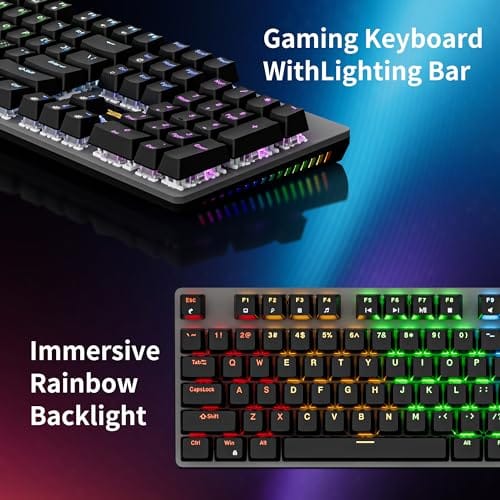
Try a power cycle first: unplug the keyboard, hold the Escape key or the maker’s documented reset combo, then plug it back in while holding. That clears many onboard glitches. If that doesn’t do it, reset the profile to default inside the software and rebuild your effect from scratch. Then check the manufacturer’s page for a firmware update, since RGB and stability fixes ship in those. A hot-swap board like the Newmen GM325Pro, at $20.89 with a 4.8-star rating, uses simple onboard rainbow LED backlighting that sidesteps a lot of software-profile trouble in the first place.

Pros
- Hot-swap sockets allow switch experimentation without soldering tools or PCB risk
- Metal top plate delivers firmer typing feel than plastic budget boards at this tier
- Full-key rollover and linear red switches handle rapid inputs for casual gaming
Cons
- Limited owner feedback at time of writing, so long-term reliability is unproven
- RGB is restricted to side lighting only, per-key backlight is fixed rainbow patterns
- ABS keycaps typical at this tier tend to shine and wear faster than PBT
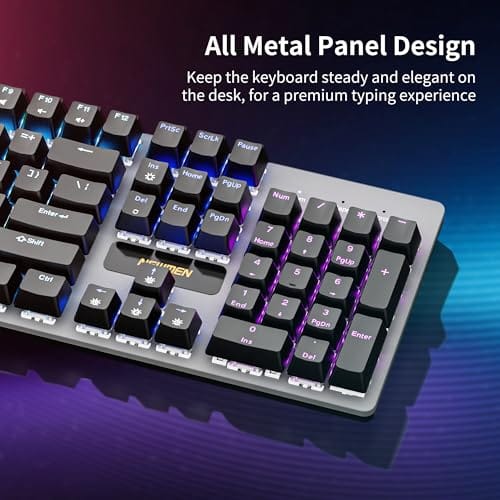
The Newmen GM325Pro is a budget full-size 104-key wired mechanical keyboard aimed at first-time mechanical buyers and casual gamers who want a hot-swap PCB without moving up to enthusiast pricing. It ships with linear red switches, a metal top plate, ABS keycaps, and side-edge RGB lighting.
The defining feature here is the hot-swap socket combined with linear red switches. That gives new users a low-friction path to swap inactile or silent switches later without soldering. Typing fel on metal-plate boards at this tier is usually firmer and less hollow than all-plastic budget pers, based on category norms.
Trade-offs are typical for the price class. Per-key RGB is not suported, only side lighting is true RGB while the top backlight runs 13 preset rainbow effects. ABS keycaps tend to develop shine within months of heavy use, and Newmen does not publish switch lifecycle, polling rate, or NKRO wired specs in the source data.
Buy this if you want a cheap full-size hot-swap platform to learn on and plan to upgrade switches or keycaps later. Skip this if you need per-key RGB, PBT caps, a documented polling rate, or a keyboard with a dep owner review history to validate QC.
Switches and layout: Linear red switches on a full 104-key ANSI layout, with full-key rollover claimed by the manufacturer. Actuation force, travel, and switch brand are not specified in the source. Linear reds typically sit near 45g actuation and 4m total travel in this category.
Hot-swap PCB: Sockets accept standard MX-style switches, so tactile, clicky, or silent linear options from third parties drop in without soldering. Pin compatibility (3-pin vs 5-pin) is not specified, buyers should confirm before ordering replacement switches.
Build and lighting: Metal top plate over ABS black keycaps. RGB is limited to the side edge, while the top backlight cycles through 13 preset rainbow patterns rather than per-key addressable RGB. Case material below the plate is not specified.
Connectivity and software: Wired only via a detachable 1.8m USB cable. FN combos cover F1 to F11 media and calculator shortcuts. Customization software suports key remap, macro recording, and lighting tweaks, though poling rate and software platform support are not specified.
If a firmware update is available, read the instructions carefully and don’t unplug the board mid-flash. A failed firmware update can brick a keyboard far more thoroughly than a stuck light ever would. Make sure your laptop is plugged in or your desktop won’t lose power, close other RGB apps, and let the update finish completely. Once it’s done, the controller resets to a known-good state, and that clears many stubborn lighting glitches that a simple profile reset couldn’t.
Cause #3: A hardware fault or failing switch LED
If the software’s clean, the profile’s reset, and only part of the board lights up, or none of it does, you may have a genuine hardware fault. Individual per-key LEDs can fail, leaving one key dark while the rest glow. A cracked solder joint or a damaged internal ribbon can kill lighting across a whole zone while typing still works, because the key matrix and the LED layer are separate circuits.
On a hot-swap board you can sometimes swap a suspect switch to rule out a switch-level LED, but on soldered boards this usually isn’t a home repair. If the keyboard’s under warranty, contact the maker before opening it, since cracking the case yourself can void your coverage. If it’s older and out of warranty, a replacement is often cheaper than a repair. A renewed office board like the Cherry KC 200 MX, at $56.31 with its metal-plate frame and MX2A silent switches, is a solid landing spot if you want reliable typing and don’t mind a simpler lighting story.

Pros
- MX2A Silent Red linears actuate quietly, good fit for open-plan offices
- Metal plate frame keeps chassis stiff and reduces caseping under typing
- Cherry Gold-Crosspoint contacts rated for 50 million keystrokes on this variant
- Full-size layout with dedicated numpad suits data entry and spreadshet work
Cons
- Renewed unit with no owner fedback loged yet, cosmetic and wear condition varies
- Silent Red linears lack tactile bump, typists who prefer fedback should pick Brown
- Source data omits connectivity, cable type, polling rate, and dimensions
The Cherry KC 200 MX is a full-size office-focused mechanical keyboard sold here as a Renewed unit in Bronze with MX2A Silent Red linear switches. It targets office typists, developers, and finance or admin users who want Cherry switch fel and a metal plate frame without the RGB and gamer styling of enthusiast boards.
The defining feature is the MX2A Silent Red switch, Cherry's updated linear with dampened stems aimed at reducing bottom-out and return noise. Cherry rates this variant for 50 million keystrokes. Based on the linear profile, expect smooth actuation with no tactile bump, which suits fast touch typists and users on frequent video calls.
Trade-offs are typical at this tier and Renewed status. Silent Red linears are polarizing, users coming from Browns or Blues will miss the tactile feedback, and the source does not specify polling rate, connection type, cable, keycap material, or dimensions. As a Renewed listing, cosmetic condition and remaining switch life depend on the refurbisher rather than a factory-fresh baseline.
Buy this if you want a quiet full-size Cherry mechanical for office or shared-space use and value the metal plate build over RGB features. Skip this if you prefer tactile or clicky switches, need confirmed wireless or USB-C connectivity, or want a waranty profile equivalent to new stock.
Switches: Cherry MX2A Silent Red, linear with integrated dampeners, made in Germany with Gold-Crosspoint contacts. Rated for 50 million keystrokes on this variant, versus 100 million on MX2A Brown. Linear travel with no tactile bump favors light, fast keypresses over deliberate typing fedback.
Build: Metal plate frame under the switches, which stiffens the deck and cuts flex compared with plastic-only office boards. Cherry positions the KC 200 MX as a slim modern design, though exact case height, weight, and keycap material are not specified in the source data.
Layout and indicators: Full-size layout retains the dedicated numpad and function row, which maters for spreadsheet,ERP, and accounting workflows. White LED status indicators are built into Caps Lock, Scroll Lock, and Num Lock keys, avoiding a separate indicator strip and keeping the top edge clean.
Gaming fit: Silent Red linears work for casual gaming and MMO or productivity crossover use given their light linear fel, but the source does not list polling rate, N-key rollover, or onboard profiles, so competitive esports buyers should confirm specs before committing.
Preventive maintenance
Keep the lighting software and firmware current, and export a backup of your profile once you’ve built one you like, so a corrupted config is a two-minute restore instead of a rebuild. Plug the keyboard into a rear motherboard USB port to guarantee steady power for the LEDs. Keep the board reasonably clean, since dust and spills can foul contacts over time. A little upkeep keeps the lighting predictable.
Avoid the habit of stacking multiple lighting apps as well. Pick one ecosystem to control your RGB, whether that’s the keyboard’s own software or a broader suite that supports it, and stick with it. The fewer programs fighting over your devices, the less chance of the profile conflicts that freeze lighting. And when a big Windows update lands, expect to reopen your RGB software once to nudge it back into control, since major updates sometimes reset background services.
When to call a pro vs DIY
Nearly everything here is DIY. Reinstalling software, resetting profiles, updating firmware, and swapping ports need no tools and carry little risk. If you own a hot-swap board, pulling and reseating a switch to check a single dead LED is also well within reach for most people, since the switches lift out with a simple puller. That covers the vast majority of RGB problems.
Where you stop is soldered repair. If the fault is a cracked joint or a dead controller on a soldered board, fixing it means microsoldering skill and the right iron, and a slip can ruin the board entirely. For most people that’s not worth it against the price of a new keyboard. Use the warranty if you have one, and only attempt internal repair if you already have the gear and the experience to do it safely.
When it’s not fixable: what to replace
If you’ve reinstalled software, reset the profile, updated firmware, tried different ports, and the RGB is still dead or patchy, the LED layer or controller has likely failed. That’s not worth a soldering-iron gamble for most people. Warranty replacement is the first move; buying new is the second.
When you replace, a hot-swap board makes future switch and LED issues far easier to handle. The Newmen GM325Pro at $20.89 offers hot-swap sockets and straightforward rainbow backlighting on a budget, while the Cherry KC 200 MX at $56.31 leans toward quiet, durable typing with a metal frame if flashy per-key RGB isn’t your priority. Match the replacement to whether you want tinkering or set-and-forget. Don’t pay for complex lighting if you rarely change colors; simple backlighting is easier to live with and easier to troubleshoot later, especially if you just need keys visible at night and don’t care about per-key effects.
A few more questions
Why does my keyboard type fine but the RGB is dead?
Because typing and lighting are separate circuits. The key matrix that registers presses works independently of the LED layer, so one can fail while the other’s fine. A dead-but-typing board usually points at a software, profile, or power issue rather than a fully broken keyboard, which is good news since those are the easy fixes to try first. Start with the software and cable before assuming the worst.
Can a bad USB port cause RGB problems?
Yes. RGB lighting draws more power than plain key input, so a weak front-panel port or an unpowered hub can leave the lights dark while keys still work. Move the keyboard to a rear motherboard USB port, which draws directly from the board. If the lighting comes back, power delivery was your problem, not the keyboard. Avoid daisy-chaining a bright RGB board through a passive hub.
Will a factory reset fix stuck lighting?
Often, if the cause is a corrupted profile or onboard glitch. Unplug the board, hold the documented reset key, and reconnect while holding, then reset the profile to default in the software. That clears most stuck-color and frozen-effect issues. If it comes right back after a reset, you’re likely looking at a firmware bug or a genuine hardware fault instead, and a firmware update is the next thing to try.

































Write Your Review
No reviews yet. Be the first to share your experience!