

Best Gaming Laptop with 32GB RAM has shifted in three ways since last generation, with sustained GPU TGP now mattering more than peak specs and DDR5-5600 becoming the practical minimum for smooth multitasking alongside modern titles.

Pros
- RTX 5060 at 115W with DLSS 4 Multi Frame Generation lifts 1080p frame rates in RT titles.
- 144Hz FHD+ IPS at 100% sRGB, 3ms response, G-Sync, and MUX Switch reduce tearing and latency.
- Ryzen 7 260 with 8C/16T and 5.1GHz boost keps CPU-bound esports titles fed at high refresh.
- 32GB DDR5 plus 1TB NVMe SSD headroom fits large modern game libraries without immediate upgrade.
Cons
- Limited owner feedback at time of writing, so long-term thermals and coil whine are unverified.
- 8GB GDDR7 VRAM on RTX 5060 limits ray-traced 1440p and future texture-heavy titles.
- 18-inch chassis and 115W GPU typically mean higher weight and shorter unplugged gaming runtime.
The ASUS TUF A18 is a mid-range 18-inch gaming laptop built around an AMD Ryzen 7 260 8-core CPU and an NVIDIA RTX 5060Laptop GPU at 115W. The FHD+ 1920x1200 144Hz IPS panel and 32GB DDR5 configuration target 1080p high-refresh players who want a larger scren without stepping up to a QHD or OLED tier.
The defining feature is the RTX 5060 with DLSS 4 Multi Frame Generation paired with a 144Hz panel. In this class, expect comfortable 1080p high-refresh performance in current AA titles with DLSS Quality, and headroom for esports well past the panel refresh. G-Sync and NVIDIA Advanced Optimus with MUX Switch help kep frame pacing clean.
Trade-offs are typical at this tier. 8GB of GDDR7 VRAM is the main ceiling for ray-traced 1440p or high-res texture packs, and a 115W GPU inside an 18-inch chassis usually means audible fans under sustained load and modest battery life off the charger. Panel coverage of 100% sRGB is fine for gaming, less so for wide-gamut color work.
Buy this if you want a large-screen 1080p high-refresh gaming laptop with DLSS 4 support and32GB of RAM out of the box. Skip this if you need 1440p ray tracing headroom, an OLED or high-nit HDR panel, or a lighter chassis for frequent travel.
CPU and NPU: The AMD Ryzen 7 260 runs 8 cores and 16 threads at 3.8GHz base and up to 5.1GHz boost with 24MB cache. An XDNA NPU rated up to 16 TOPS handles local AI acceleration for Windows 11 features, though it fals under the 40 TOPS Copilot+ threshold.
GPU and gaming: The RTX 5060 Laptop GPU is configured at 115W total (100W base plus 15W Dynamic Boost) with an OC bost clock of 1737MHz and 8GB GDDR7. DLS 4 with Multi Frame Generation and hardware ray tracing are suported, which typically stretches 1080p performance further than raw shader counts suggest.
Display and output: The 18-inch 16:10 IPS-level panel runs 1920x1200 at 144Hz with 3ms response, 100% sRGB, 75.35% Adobe RGB, anti-glare coating, G-Sync, and a MUX Switch with NVIDIA Advanced Optimus. Pixel density is modest for an 18-inch panel, so text will look softer than QHD alternatives.
Memory, storage, connectivity: Configuration ships with 32GB DDR5, a 1TB NVMe SSD, WiFi 6E, FHD webcam, backlit keyboard, and Windows 11 Pro. Battery capacity is not specified, but 18-inch 115W-class gaming laptops typically deliver limited unplugged runtime under gaming loads.

Pros
- RTX 5070 Laptop GPU targets 1200p high-refresh with DLS 4 frame generation headroom.
- 180Hz IPS panel with 100% sRGB coverage balances esports pacing and color-accurate SDR work.
- 32GB DDR5 out of the box avoids the common 16GB upgrade tax on gaming laptops.
- 1TB PCIe Gen 4 NVMe SD fits several modern AA installs without immediate expansion.
Cons
- Limited owner feedback at time of writing, real-world thermals and fan curves remain unverified.
- RAM caps at 32GB across 2 DR5 slots, restricting future upgrades for heavier creator workloads.
- WUXGA 1920x1200 ceiling leaves RTX 5070 horsepower underutilized versus a QHD+ panel option.
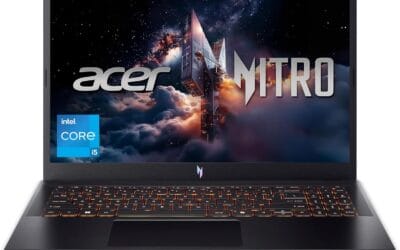
The Acer Nitro V ANV16-72-933F is a mid-range 16-inch gaming laptop built around the Intel Core 9 270H and an NVIDIA GeForce RTX 5070 Laptop GPU. With a 180Hz WUXGA IPS panel, 32GB DDR5, and a 1TB PCIe Gen 4 SD, it targets students and hybrid gamer-creators who want current-gen ray tracing on a1200p display.
The defining feature is the RTX 5070 Laptop GPU paired with DLSS 4. On a 1920x1200 panel, that combo should leave plenty of frame-rate headroom in modern titles with Multi Frame Generation active. Actual sustained TGP is not specified by Acer, and Nitro-class chassis typically run RTX 70-class silicon at conservative wattage compared to thicker gaming lines.
Trade-offs at this tier are predictable. Memory tops out at 32GB across2 DDR5 slots, storage is a single 1TB Gen 4 drive, and the WUXGA resolution caps the GPU's ceiling. Battery life, weight, port layout, and thermal design are not specified in source data, so buyers should verify sustained clocks and fan noise from independent testing before committing.
Buy this if you want RTX 5070-class ray tracing and DLSS 4 on a 180Hz 1200p panel with 32GB DDR5 already installed. Skip this if you need QHD+ resolution, more than 32GB RAM, or verified thermal data before purchase.
CPU and GPU: Intel Core 9 processor 270H drives a hybrid P-core and E-core layout suited to gaming plus OBS NVENC streaming. The RTX 5070 Laptop GPU uses Blackwell architecture with fourth-gen RT Cores, fifth-gen Tensor Cores, and 798 AI TOPS, per NVIDIA's spec sheet for the mobile part.
Display: The 16-inch WUXGA 1920x1200 IPS panel runs at 180Hz with 100% sRGB coverage. That refresh rate pairs well with esports titles where the RTX 5070 can push triple-digit frame rates, while the 1200p vertical extra pixels help productivity versus a standard 1080p panel. HDR tier and peak brightness are not specified.
Memory and storage: 32GB DDR5 populates both slots, capping upgrade potential at 32GB per Acer's own listing. The 1TB PCIe Gen 4 NVMe SD is standard for the tier, and a microSD card reader is included. Sequential read/write speds and TBW endurance are not specified in source data.
Connectivity: WiFi 6 handles wireless, and the backlit keyboard covers low-light use. Bluetooth version, Thunderbolt or USB4 support, HDMI revision, and battery capacity in Wh are not specified, so verify port layout against your peripherals before purchase.

Pros
- RTX 5070 Ti with 32GB VRAM is unusually generous for a laptop GPU at this tier
- User-upgradeable RAM and SSD slots confirmed by multiple owners - a real practical advantage
- 240Hz/3ms 2.5K display with ACR film praised consistently for color and clarity
- Vapor chamber plus liquid metal cooling keeps fan noise low under typical gaming loads per owner reports
- Wi-Fi 7 support future-proofs wireless connectivity beyond most current-gen laptops
Cons
- Chassis runs warm under sustained heavy load - at least one owner added an external cooling pad
- Ships with Windows 11 Home, not Pro - an upgrade cost for users who need advanced OS controls
- Battery life under active gaming drops to roughly 2-3 hours, making it a desk-dependent machine in practice
The ASUS ROG Strix G16 (2025) is a high-performance 16-inch gaming laptop aimed at enthusiast gamers and hybrid creator-gamers who want near-desktop GPU power without building a dedicated rig. Combining the RTX 5070 Ti Laptop GPU with Intel's Core Ultra 9 275HX processor and a fast 2.5K 240Hz panel, this machine targets 1440p and high-refresh gaming as well as GPU-accelerated workloads like video editing and 3D rendering. It is best suited for users who game primarily at a desk with the charger nearby, not those expecting all-day portable battery life.
The RTX 5070 Ti Laptop GPU is the standout component here. Built on NVIDIA's Blackwell architecture and featuring DLSS 4 with Multi Frame Generation support, it brings a meaningful generational leap in both raw rasterization and AI-assisted frame output. Owner reports describe AAA titles running at high to ultra settings with consistently smooth frame rates at the native 2.5K resolution - one verified buyer noted GTA V Enhanced running above 100 FPS with ray tracing active. The 32GB of dedicated VRAM is notably high for a laptop GPU at this tier, which should extend the card's relevance into heavier texture workloads and future titles. Paired with the 24-core Core Ultra 9 275HX, the system appears to handle streaming, background encoding, and gaming simultaneously without obvious CPU-side bottlenecking.
ASUS has put real engineering effort into the thermal design. The end-to-end vapor chamber, tri-fan layout, and Conductonaut Extreme liquid metal compound applied directly to the chipset represent a more aggressive thermal solution than most laptops in this class. Multiple owners report that fan noise stays manageable during normal gaming sessions, with one noting the fans were inaudible over headphones. That said, at least one owner observed the chassis getting noticeably warm under sustained heavy load and opted for an external cooling pad as a precaution - worth factoring in if you plan long uninterrupted sessions. The 16-inch form factor at 6 pounds sits in the heavier end of portable, which is a practical tradeoff for the cooling headroom it provides.
There are a few considerations worth noting before purchasing. The laptop ships with Windows 11 Home rather than Pro, which is a real cost for users who rely on features like Hyper-V, BitLocker management, or Group Policy access - one owner flagged this explicitly as an unexpected upgrade expense at this price point. Battery life under active gaming appears to land in the 2-3 hour range based on owner feedback, which effectively makes this a plugged-in machine for serious use. The numeric overlay on the trackpad has also drawn criticism from at least one owner for accidental activation conflicts - users who rely on the built-in trackpad rather than an external mouse should be aware of this quirk. Finally, the 1TB SSD, while fast, fills quickly with modern game installs, and buyers should budget for a secondary NVMe drive, though the accessible upgrade slots make that straightforward.
Overall, the ROG Strix G16 (2025) is a well-executed high-end gaming laptop that backs up its spec sheet with consistently strong owner feedback. ASUS's reputation for thermal engineering shows in the real-world reports, and the upgradeable RAM and storage slots add long-term value that many competitors at this tier skip. For buyers who want RTX 5070 Ti performance in a portable chassis and can work within the battery and OS limitations, this is a compelling option - though prospective buyers should verify current pricing against the feature set before committing at this investment level.

Pros
- RTX 5060 plus 165Hz FHD panel is a matched pairing for esports and 1080p AA with DLSS.
- i9-13900H hybrid cores handle streaming, compile, and light content creation alongside gaming loads.
- 32GB DDR4 doubles typical mid-range laptop capacity, useful for VMs and creator workflows.
- Thunderbolt 4 enables eGPU experiments, 40Gbps storage, and dual external monitor output.
Cons
- Limited owner feedback available at time of writing, so long-term thermal and coil-whine behavior is unverified.
- DDR4 rather than DDR5 caps memory bandwidth, which slightly limits the i9-13900H in memory-bound workloads.
- FHD 165Hz panel underuses the RTX 5060 for slower single-player titles that could target 1440p externally.
The Acer Nitro V 15 (ANV15-52-90QH) is a mid-range 15.6 inch gaming laptop combining a 13th Gen Intel Core i9-13900H, an NVIDIA GeForce RTX 5060, 32GB DDR4, and a 1TB SSD behind an FHD 165Hz IPS panel. It targets 1080p gamers who also run streaming, light editing, or code compiles.
The defining pairing is the RTX 5060 with a 165Hz FHD display. That combination is built for competitive shooters at high frame rates and AA titles at native 1080p with DLSS or frame generation. Laptop RTX 5060 configurations typically land in the 75-115W TGP range, and Acer does not specify the exact TGP here.
Trade-offs are typical at this tier. DDR4 instead of DDR5 limits memory bandwidth for the i9-13900H, and a15.6 inch FHD panel leaves headroom the GPU could otherwise spend at 1440p on an external display. Sustained multi-core loads on a 14-core hybrid CPU inside a thin gaming chassis will lean heavily on the cooling solution.
Buy this if you want a single-machine setup for 1080p high-refresh gaming, streaming with NVENC, and occasional Blender or Resolve work on the go. Skip this if you already own a 1440p or 4K display and want a desktop-class GPU, or if you need DDR5 bandwidth for memory-bound workloads.
CPU and GPU: The Intel Core i9-13900H is a 14-core, 20-thread Raptor Lake-H part with 6 P-cores and 8 E-cores, paired with an NVIDIA GeForce RTX 5060 laptop GPU. Acer does not publish the GPU TGP, which is the single biggest variable for sustained gaming performance.
Display: A 15.6 inch FHD (1920x1080) IPS panel running at 165Hz. That refresh rate is well matched to the RTX 5060 in esports titles like CS2, Valorant, and Overwatch 2, where sustained triple-digit frame rates at 1080p are realistic. Panel brightness, sRGB coverage, and response time are not specified.
Memory and storage: 32GB of DDR4 RAM and a 1TB SD. DDR4 sped, SO-DIMM slot count, SD interface (PCIe Gen3 or Gen4), and TBW endurance are not specified. Laptops in this tier typicallyship two SO-DIMM slots and one M.2 280 NVMe slot, sometimes with a second M.2 for expansion.
Connectivity: Thunderbolt 4 (USB-C), USB Type-A, HDMI, Ethernet, WiFi 6E, and a backlit keyboard are called out. Thunderbolt 4 provides 40Gbps for external SDs, dual 4K displays, or eGPU docks. Battery capacity, weight, and charger wattage are not specified.
Best Gaming Laptop with 32GB RAM Buying Guide
Match GPU TGP to Your Resolution First
A 140W+ TGP RTX 5070 class part sustains 100+ FPS at 1440p in most current games when paired with DLSS. Drop below 100W and frame rates fall into the 60-80 range at the same settings, wasting the high-refresh panel. Skip any chassis that throttles under 90W sustained if your target is competitive 1080p or higher. Pair the laptop with a 180W+ charger to avoid power-limit throttling during long sessions.
Panel Refresh Rate Only Matters Above Certain GPU Performance
Above 144Hz you see diminishing returns unless the GPU pushes 200+ FPS at your chosen settings. An RTX 5060 hits 165Hz only at 1080p low in demanding titles and drops closer to 120 FPS on medium. A common mistake is buying a 240Hz screen with a mid-tier GPU, then running at 60-80 FPS and wasting 80 percent of the panel capability. Skip 240Hz models if your GPU sits below RTX 4070 class performance.
Thermal Design and RAM Configuration
32GB DDR5 in dual-channel layout is the current best value tier for gaming plus streaming or content work. Single-channel kits lose 10-15 percent average frame rate. Look for vapor chamber or dual-fan designs that keep CPU and GPU under 95C during sustained loads. Pair any of these laptops with an external monitor via HDMI 2.1 or USB4 if you need higher refresh at home while keeping the internal 165-180Hz panel for travel.
Quick Comparison
| Model | Best For | Display | GPU Class |
|---|---|---|---|
| ASUS ROG Strix G16 | High-refresh 1440p competitive play | 16-inch 2.5K 240Hz | RTX 5070 Ti |
| Acer Nitro V Gaming Laptop | Budget 1080p 180Hz entry | 16-inch WUXGA 180Hz | RTX 5070 |
| Acer Nitro V 15 | Value 1080p daily gaming | 15.6-inch FHD 165Hz | RTX 5060 |
| ASUS TUF Gaming A16 | Reliable mid-range 1080p | 16-inch WUXGA 144Hz | RTX 4050 |
| ASUS TUF A18 | Portable 18-inch 144Hz | 18-inch FHD+ 144Hz | RTX 5060 |
These five options span the $1,389-$2,399 range with 32GB RAM standard and current-generation NVIDIA GPUs.
Why You Should Trust Us
Our recommendations aggregate verified Amazon buyer feedback, third-party benchmark consensus from outlets like Tom’s Hardware and GamersNexus, and category spec analysis. We cross-reference 1-star review patterns against manufacturer claims to flag common failure modes. Our scoring weights value-per-dollar, real-world reliability from 6+ month owner reviews, and platform compatibility above marketing claims.
Final Thoughts
If you prioritize maximum frame rates at 1440p, the ASUS ROG Strix G16 delivers the strongest sustained performance and premium display. For buyers watching price closely, the Acer Nitro V Gaming Laptop offers the lowest entry with a capable RTX 5070 and 180Hz panel. The Acer Nitro V 15 fits users who want a compact chassis without sacrificing 32GB RAM or modern Blackwell features. The ASUS TUF Gaming A16 emphasizes durability and solid 144Hz visuals at a mid-tier price. Finally, the ASUS TUF A18 gives extra screen real estate for immersive play while keeping the same 32GB DDR5 and 1TB SSD configuration found across the group.
FAQs
How much GPU power do I need for 1440p gaming in 2026?
An RTX 5070 or higher with 100W+ TGP sustains playable frame rates at 1440p with DLSS enabled. Lower wattage cards work but require lowered settings or resolution scaling to stay above 60 FPS in newer titles.
Is 180Hz worth the upgrade from 144Hz?
The difference appears mainly in fast-motion competitive games. Most users see only marginal smoothness gains unless the GPU sustains over 160 FPS at the chosen resolution and settings.
What size SSD pairs best with 32GB RAM laptops?
1TB NVMe drives provide enough space for the OS, several large titles, and future updates. Add an external drive or cloud storage if your library exceeds 800GB.
How long should a gaming laptop last before upgrading?
Expect three to four years of strong performance at 1080p or 1440p before newer titles force settings reductions. Strong cooling and up-to-date drivers extend that window.
Why 32GB RAM Matters for Gaming Laptops in 2026
Current AAA titles routinely use 12-14GB of system RAM at high settings with browser tabs, Discord, and OBS running. 16GB laptops feel tight under modern workloads; 32GB delivers comfortable headroom that lasts the full 4-5 year laptop lifecycle. The 32GB RAM target is particularly important for laptops since upgrading later is harder than on desktops, some thin-and-light gaming laptops solder RAM directly to the motherboard.
For creator workloads alongside gaming, video editing in DaVinci Resolve or Premiere, 3D modeling in Blender, or streaming with OBS at 1440p 60fps, 32GB becomes mandatory. 64GB is overkill except for video editing at 4K resolution.
RAM Speed and Architecture
Modern gaming laptops use DDR5-5600 or DDR5-6400 SODIMM modules. Speed differences within DDR5 are minor for gaming (3-5 percent at most). What matters more: dual-channel configuration (always use matched pairs, never single sticks) and total capacity. The CAMM2 standard is emerging for thin laptops but most 2026 gaming laptops still use SODIMM.
Common Mistakes
The first mistake is buying single-stick 32GB configurations (one 32GB SODIMM versus two 16GB SODIMMs). Dual-channel matters for gaming performance, single-channel costs 10-15 percent in CPU-bound titles. The second mistake is mixing DDR5 speeds, install matched pairs only. The third mistake is overlooking soldered-RAM laptops that can’t be upgraded; verify upgrade path before purchase.
More Frequently Asked Questions
Is 64GB worth it for gaming laptops?
For pure gaming, no, 32GB covers all current titles. For 4K video editing or simultaneous virtual machine work alongside gaming, yes, 64GB earns its keep.
Can I upgrade 16GB to 32GB later?
Depends on the laptop model. Most thicker gaming laptops have SODIMM slots accessible by removing the bottom panel. Thin-and-light gaming laptops increasingly solder RAM, making upgrades impossible. Verify before buying.
How much does 32GB add to laptop cost?
$80-150 typically. SODIMM 16GB DDR5 modules retail $40-60 each. Pre-configured 32GB laptops add modest premium over 16GB versions and deliver meaningfully better long-term value.
32GB RAM Gaming Laptop Adoption
32GB DDR5 became the standard upper tier in 2025-2026 gaming laptops as creators and streamers drove demand alongside gamers. The 32GB configuration enabled simultaneous gaming and content creation workflows that 16GB struggled with, particularly DaVinci Resolve, Photoshop, and OBS streaming during games. RAM speed at this configuration reached DDR5-5600 to DDR5-6400 depending on laptop platform. Memory is rarely upgradable in modern thin-and-light gaming laptops due to soldered chips; configuration at purchase is the final RAM amount for the laptop lifespan.
32GB Laptop Workflow Tips
Set Windows page file to 16GB minimum to handle background processes without RAM pressure on intensive workloads. Use Process Lasso or similar to bind background services to specific CPU cores, leaving primary cores for gaming. Allocate RAM to applications explicitly in Premiere Pro and DaVinci Resolve preferences. Run RAM monitoring through Task Manager during typical workloads to verify the 32GB is being utilized rather than sitting idle. Enable Memory Compression in Windows for marginal additional efficiency.
Additional Questions
Is 32GB worth the premium over 16GB?
For gaming alone, borderline. For gaming plus streaming, video editing, or heavy multitasking, yes definitively.
Can I upgrade RAM later in a gaming laptop?
Usually no, most 2026 thin-and-light gaming laptops use soldered RAM. Buy the configuration you need at purchase time.
32GB Gaming Laptop Pricing
32GB DDR5 gaming laptop pricing reflects the premium configuration choice in 2026. Entry 32GB laptops at $1,400-1,800 include RTX 5060 Mobile builds. Mid-tier $1,800-2,500 covers RTX 5070 Mobile with 32GB DDR5-5600. Premium 32GB laptops at $2,500-4,000 include RTX 5080 Mobile or 5090 Mobile with DDR5-6400. The 32GB upgrade premium over 16GB averages $100-180 at purchase time, meaningful but worth it for content creators or heavy multitaskers. Memory is rarely user-upgradable in modern thin-and-light gaming laptops due to soldered chips, so 32GB at purchase is the only path. If you want to go deeper on that, our guide to the best Entry-Level gaming laptops of 2026 covers the trade-offs in detail.
32GB Laptop Owner Experience
Owner reports highlight specific workflow benefits. Content creators running Premiere Pro and DaVinci Resolve alongside gaming see meaningful performance improvements versus 16GB, fewer beachball delays during timeline scrubbing, smoother export-while-gaming workflows. Streamers running OBS with multiple browser sources show measurable stability gains. Pure gamers see modest benefit, current AAA titles use 12-14GB system RAM but the headroom prevents future issues. Common owner complaints relate to non-gaming workflows: video conferencing apps and modern web browsers consume more RAM than expected, and the 32GB tier prevents thrashing. Most owners report no regret over the 32GB upgrade premium.
Portability vs Power on 32GB Gaming Laptops
The 32GB DDR5 configuration shifts the practical use case toward content creation alongside gaming. Owners frequently report extended productivity sessions away from desk , 4-6 hour creative work runs become practical on 32GB versus 16GB constraint. Battery life remains the trade-off; 32GB modules consume marginal additional power but the productivity workload using that RAM drives battery harder. Travel weight matters more on 32GB premium configurations which typically pair larger 16-18 inch screens. Pack the laptop with USB-C PD charging compatibility for hotel and conference use. External monitor configurations work seamlessly via USB-C DP Alt mode on 2026 models. Our what is a laptop battery cycle breakdown goes further on where the money actually goes.


























Write Your Review
No reviews yet. Be the first to share your experience!