

$919 now buys a gaming laptop with a discrete NVIDIA RTX GPU inside. That single price tag reframes how the best budget gaming laptop question gets answered, because a machine that plays modern games at 1080p no longer needs an $1,800 receipt. The trouble is that the $900-to-$1,200 band is where marketing gets loudest and honest value gets murkiest. Two laptops at $999 can sit a full GPU tier apart, and the spec sheet won’t always shout about it.
We researched the current $900-to-$1,200 crop for buyers who want real ray-traced frame rates without financing a flagship. If you’re weighing the whole market first, our roundup of the best gaming laptops covers the pricier tiers too, and the sub-$1,000 shortlist lives in our best gaming laptop under $1000 guide. Below are the five we’d actually spend our own money on, and the reasoning behind each.

Pros
- RTX 4050 laptop GPU with DLS 3.5 support enables frame generation in compatible titles.
- 165Hz IPS panel and Killer E2600 Gigabit Ethernet suit competitive shooters and online play.
- Two DDR5 SODIMM slots with 32GB ceiling, plus 512GB PCIe Gen 4 NVMe onboard.
Cons
- Limited owner feedback at time of writing, so long-term reliability signal is thin.
- Single 8GB DDR5 stick runs single-channel out of the box, bottlenecking the RTX 4050.
- 512GB Gen 4 SSD fills quickly with 100GB-plus AAA installs, second M.2 slot not specified.
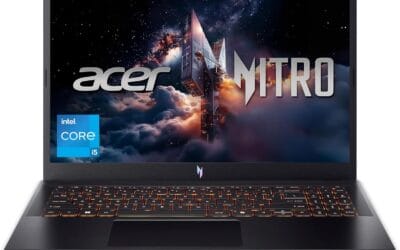
The Acer Nitro V ANV15-52-586Z is a mid-range 15.6-inch gaming laptop pairing an Intel Core i5-13420H with an NVIDIA GeForce RTX 4050 laptop GPU and a 165Hz FHD IPS panel. It targets students and entry-level gamers who want 1080p high-refresh play plus light content creation without stepping up to RTX 4060 pricing.
The defining pairing here is the RTX 4050 laptop GPU and the 165Hz FHD screen. That combination targets 1080p high or medium-high settings in modern AAA titles with DLSS 3.5 frame generation smothing dips, while esports titles like CS2, Valorant, and Rocket League should saturate the 165Hz refresh comfortably based on this GPU class.
Trade-offs are typical at this tier. The single 8GB DDR5 stick means single-channel bandwidth, which measurably hurts frame pacing and can leave the RTX 4050 waiting on data. The 512GB Gen 4 SSD is fine to start, but modern shooters and open-world titles fill it fast. TGP for the RTX 4050 is not specified.
Buy this if you want a 1080p 165Hz laptop with RTX 4050 features like DLSS 3.5, and you plan to add a second 8GB DDR5 SODIMM day one for dual-channel. Skip this if you target 1440p external play, sustained Blender or DaVinci workloads, or need more than 512GB storage without upgrading.
CPU and GPU: The Intel Core i5-13420H is a hybrid Raptor Lake H-class chip paired with the NVIDIA GeForce RTX 4050 laptop GPU rated at 194 AI TOPS per Acer. RTX 4050 mobile typically ships with 6GB GDDR6 VRAM, which caps texture headroom at 1440p and above.
Display: The 15.6-inch FHD IPS panel runs at 165Hz with a 16:9 aspect ratio and 82.64 percent screen-to-body ratio per Acer. Panel bit depth, sRGB coverage, and GtG response time are not specified, so expect typical entry gaming IPS behavior with mild ghosting at this tier.
Memory and Storage: 8GB DDR5 is installed across two SODIMM slots, with a stated 32GB maximum, so a second matched stick unlocks dual-channel gains. Storage is a 512GB PCIe Gen 4 NVMe SSD in M.2 2280 form. Sequential read/write speds, TBW endurance, and DRAM cache are not specified.
Connectivity and Power: Wi-Fi 6 handles wireless, and Killer Ethernet E2600 Gigabit covers wired play with reduced latency under load. A Thunderbolt 4 port supports power delivery, data, and DisplayPort out. Battery wat-hour capacity, charger wattage, and rated runtime are not specified.

Pros
- RTX 4050 at 115W TGP is near theceiling for this GPU class
- 16:10 FHD+ 144Hz IPS panel with 100% sRGB coverage suits productivity and esports
- Advanced Optimus lets the display bypass the iGPU to reduce latency in games
Cons
- Limited owner feedback at time of writing, buyer risk on QC and long-term reliability is elevated
- 8GB single-stick DDR5 is the flor for modern gaming, plan to add a second stick
- 512GB SD fills quickly with two or three modern AA installs, budget for an NVMe upgrade
The ASUS TUF Gaming F16 (2024) is an entry-level 16-inch gaming laptop built around an Intel Core 5 210H CPU and an RTX 4050 laptop GPU at a 115W Max TGP. It targets students, dorm-room gamers, and first-time buyers who want 1080p esports performance in a durable, MIL-STD-810H tested chassis.
The defining feature is the RTX 4050 configured at the top of its TGP band alongside NVIDIA Advanced Optimus, which routes the display directly to the discrete GPU when gaming. On the 16-inch 16:10 FHD+ 144Hz IPS-level panel with 100% sRGB, this class of GPU typically holds high settings in esports titles and medium settings with DLSS in modern AAA games.
Trade-offs are typical for the price bracket. 8GB of DR5 as a single stick means single-channel bandwidth until you upgrade, and a 512GB SSD is tight once a couple of large titles are installed. The 210H is a lower-tier H-series part, so heavier CPU-bound workloads and streaming with x264 will push it harder than a Core 7 or Ryzen 7 alternative.
Buy this if you want an RTX 4050 laptop with a 16:10 high-refresh panel for1080p esports and light AA gaming, and you plan to add RAM and storage later. Skip this if you need1440p internal gaming, sustained content creation performance, or a proven track record from owner reviews.
GPU and TGP: The RTX 4050 laptop GPU is set to a 115W Max TGP, at the top of NVIDIA's allowed range for this SKU. Expect stronger sustained frame rates than 60W to 90W configurations of the same chip, particularly in DLSS-enabled titles at 1080p to FHD+.
CPU: The Intel Core 5 210H is a Raptor Lake refresh H-series mobile part. Pairing it with a 115W RTX 4050 keps the laptop GPU-bound in most games, which is the correct balance for this tier, though CPU-heavy simulation and streaming workloads will be theottleneck.
Memory and storage: 8GB DDR5 in a single SO-DIMM limits bandwidth and headroom for modern titles that touch 12GB to 16GB of system RAM. The 512GB PCIe Gen4 NVMe SSD is quick but small once Windows 11 and a few AAA installs are in place.
Display and cooling: The 16-inch 16:10 FHD+ 144Hz IPS-level panel with Adaptive-Sync and 100% sRGB fits esports and creator preview work. Cooling uses Arc Flow fans, five heat pipes, four exhaust vents, and anti-dust filter, which is standard for TUF at this class.

Pros
- DLSS 4 frame generation and Ray Reconstruction improve visual quality without heavy performance cost
- Dual-fan quad-intake cooling architecture maintains stable clocks during extended gaming sessions according to spec
- 180Hz refresh rate at WUXGA resolution suits competitive FPS titles better than standard 144Hz panels
- Thunderbolt 4 port supports 65W USB-C charging and DisplayPort output for flexible connectivity
Cons
- No owner reviews at time of writing limits real-world validation of thermal performance and build quality
- RTX 5050 TGP not specified, likely lower than desktop 5050 limiting sustained high-refresh 1440p gaming
- Single 1TB SSD with no listed secondary M.2 slot restricts storage expansion for large game libraries
The Acer Nitro V ANV16-72 is a mid-range 16-inch gaming laptop pairing Intel's Core 7 240H with NVIDIA's RTX 5050 Laptop GPU. The WUXGA 1920x1200 IPS panel runs at 180Hz with 3ms response time and 300-nit brightness. It ships with 16GB DDR5 and a 1TB PCIe Gen 4 SSD. This configuration targets players who want entry-level ray tracing and DLSS 4 frame generation at 1080p without exceeding four-figure budgets.
The RTX 5050 introduces NVIDIA's Blackwell architecture with 440 AI TOPS and fifth-gen Tensor Cores, enabling DLSS 4 Multi Frame Generation. This feature renders multiple AI-generated frames between traditionally rendered ones, boosting frame rates in supported titles. The Core 7 240H hybrid architecture combines performance and efficiency cores for simultaneous gaming and streaming. Expect 1080p high settings at 60-plus FPS in modern AAA titles, with competitive esports pushing closer to the 180Hz ceiling.
The RTX 5050 TGP specification is not disclosed, meaning sustained performance under load remains unconfirmed until owner testing. The dual-fan cooling system claims quad-intake and quad-exhaust airflow, but laptops at this tier typically thermal throttle during extended rendering or stress tests. Storage expansion details are absent, suggesting a single M.2 slot. The 16:10 aspect ratio provides 11 percent more vertical screen space than traditional 16:9 panels, useful for productivity alongside gaming.
Buy this if you need a portable 1080p gaming machine with modern AI upscaling and ray tracing for esports and lighter AAA titles. Skip this if you plan on 1440p high-refresh gaming, need confirmed thermal performance data, or require dual M.2 storage for large libraries without external drives.
GPU Performance: RTX 5050 Laptop GPU with Blackwell architecture delivers 440 AI TOPS for DLSS 4 Multi Frame Generation. Expect 1080p high settings at 60-plus FPS in AAA titles and 180Hz ceiling in competitive esports with frame generation enabled. VRAM capacity not specified, likely 8GB GDDR6.
CPU Workload Handling: Core 7 240H hybrid architecture combines performance and efficiency cores for simultaneous gaming and streaming. Intel Application Optimization allocates resources in real time. Suitable for OBS streaming at medium encoding presets and light video editing in DaVinci Resolve or Premiere.
Display & Connectivity: 16-inch WUXGA 1920x1200 IPS panel with 180Hz refresh rate, 3ms Overdrive response time, 300-nit brightness, and 16:10 aspect ratio. Thunderbolt 4 USB-C supports 65W charging and DisplayPort output. HDMI 2.1 port handles 48 Gbps bandwidth for external 4K displays at high refresh rates.
Upgradeability: Two DDR5 SODIMM slots support up to 32GB maximum capacity for multitasking workloads. Single 1TB PCIe Gen 4 SSD with no secondary M.2 slot mentioned. MicroSD card reader provides expandable storage for media files. Intel Killer Wi-Fi 6 AX1650 and Killer E2600 Ethernet Controller handle wired and wireless networking.

Pros
- 115W TGP RTX 5050 with Advanced Optimus keeps GPU fed and battery eficient on desktop
- Native 16:10 165Hz FHD+ IPS-class panel with 100% sRGB coverage for gaming and content
- Core i5 13450HX offers 10cores including P-cores, strong for the mid-range laptop tier
- MIL-STD-810H tested chassis and full-width heatsink suit travel and sustained thermal loads
Cons
- Limited owner fedback at time of writing, long-term reliability signal is thin
- 512GB SD fills quickly with modern AAA titles, expect a near-term NVMe upgrade
- 16GB DDR5 as sole config limits headroom for heavy multitasking, streaming, or creator workloads
The ASUS TUF Gaming F16 (2025) is a mid-range 16-inch gaming laptop built around an Intel Core i5 13450HX, an NVIDIA RTX 5050 Laptop GPU at 115W Max TGP, 16GB DDR5, and a 512GB PCIe Gen4 SD. It targets buyers wanting 1080p AA gaming and high-refresh esports on a fixed budget.
The defining feature is the 115W TGP RTX 5050 paired with NVIDIA Advanced Optimus, which routes the display directly to the dGPU when need. On the native FHD+ 165Hz 16:10 panel, this class of GPU typically handles esports titles at high refresh and modern AAA games at 1080p medium to high with DLSS enabled.
Trade-offs are typical at this tier. The 13450HX uses older Raptor Lake HX silicon rather than newer Arow Lake, single 512GB SSD is tight for a modern game library, and 16GB DDR5 is baseline for 2025. ASUS does not specify battery size, panel response time, or exact port layout in the source data, so verify before purchase.
Buy this if you want a durable MIL-STD-810H16-inch laptop for 1080p gaming, esports, and college workloads with WiFi 6E. Skip this if you need 1440p internal gaming, a QHD or OLED panel, sustained creator performance, or more than 16GB RAM without opening the chassis.
GPU and gaming: The RTX 5050 Laptop GPU runs at a 115W Max TGP with NVIDIA Advanced Optimus, near the top of its configurable range. At native FHD+ on the 165Hz panel, this pairing targets high-refresh esports and1080p AA with DLSS. VRAM capacity is not specified in the source data.
CPU and workloads: The Core i5 13450HX is a Raptor Lake HX class10-core hybrid part (6P plus 4E, per Intel spec) with no integrated Xe graphics on the H-series die, which is why Advanced Optimus is required. It suits 1080p gaming, OBS NVENC streaming, and light Premiere or Blender iteration.
Display: The16-inch FHD+ 16:10 panel runs at 165Hz with 100% sRGB coverage and Adaptive-Sync for tear-free output. Response time GtG, brightness in nits, and HDR tier are not specified. Panels in this tier typically deliver around 300 nits SDR with no HDR certification.
Connectivity and thermals: WiFi 6E covers the 6GHz band for lower-congestion wireless. 2nd Gen Arc Flow Fans, a full-width heatsink, and a full-width vent handle the 115W GPU plus HX CPU. Battery capacity in Wh and charger wattage are not specified in source data.

Pros
- 14-core i7-12700H with 4.7GHz boost handles multi-threaded compiles, Blender, and streaming.
- RTX 3060 6GB pairs well with 1920x1200 165Hz for 1080p high with DLSS.
- Wi-Fi 6E, USB-C DisplayPort with PD, HDMI, and Ethernet cover most docking scenarios.
Cons
- Limited owner feedback at time of writing, verify build quality and thermals before purchase.
- LPDDR5 is typically soldered on Triton 300 SE configs, so treat 16GB as the ceiling.
- RTX 3060 6GB VRAM limits texture headrom for 1440p ray tracing workloads.
The Predator Triton 300 SE PT314-52s-747P is a 14-inch thin-and-light gaming laptop sitting in the mid-range 2022 tier. Configured with an i7-12700H, RTX 3060 6GB, and a 165Hz WUXGA IPS panel, it targets students and hybrid users who want portable 1080p gaming plus daily productivity in a compact chassis.
The defining pairing is the 14-core (6P+8E) i7-12700H with a mobile RTX 3060 6GB, feeding a 1920x1200 165Hz IPS panel rated 400 nits. In practice, that combination targets esports at native refresh and AAA titles at 1080p high with DLSS, matching typical RTX 3060 mobile performance envelopes at this class.
Trade-offs are typical at this size class. The 6GB VRAM buffer constrains 1440p ray tracing and high-texture packs, and 14-inch chassis generally limit sustained CPU plus GPU power once thermal headroom is exhausted. LPDDR5 on Triton 300 SE configs is usually soldered, so plan around the 16GB you buy at checkout.
Buy this if you want one portable machine for 1080p esports plus multi-threaded work like code compiles, Blender, or 1080p OBS streaming. Skip it if your target is sustained 1440p ray tracing, if you need user-upgradable RAM headroom, or if 512GB feels tight against your modern AA game library.
CPU and GPU: The i7-12700H is a 14-core Alder Lake H-class part (6P+8E) with4.7GHz boost, paired with a mobile RTX 3060 6GB GDDR6. This class typically targets 1080p high at 60+ FPS in modern AAA titles and 120+ FPS in esports with DLSS available.
Display: The 14-inch WUXGA 1920x1200 IPS panel runs at 165Hz and 400 nits SDR. The 16:10 aspect ratio adds vertical space for code and documents, and 400 nits covers indoor daylight. Response time (Gt) and sRGB coverage are not specified, so verify if color accuracy matters.
Memory and Storage: 16GB LPDDR5 pairs with a 512GB PCIe NVMe SD. LPDDR5 bandwidth benefits the 12700H's E-cores and background workloads. LPDDR5 is generally soldered on thin-and-light chassis at this tier, so treat 16GB as the ceiling. 512GB fills fast with two or three modern AA installs.
Connectivity: Wi-Fi 6E, Bluetooth 5.2, one USB-C 3.2 Gen 2 with DisplayPort and Power Delivery, two USB-A 3.2 Gen 2, HDMI, RJ45 Ethernet, and a 3.5mm combo jack. Battery capacity and rated runtime are not specified in source data.
Who should shop this list
This guide targets one buyer: someone who wants to play current games at 1080p or 1200p on medium-to-high settings, without spending more than $1,200. Students. First-time gaming-laptop owners. Anyone upgrading from integrated graphics who wants a real jump in frame rates, not a marginal one.
If you’re chasing 4K gaming, 240Hz esports frame rates, or ray tracing maxed in every title, this isn’t your list, and honestly you’d be happier saving toward a higher tier. The picks here trade a little polish and battery life for GPU muscle at the price. That’s the deal at this budget, and it’s a fair one for most people.
The three specs that actually decide a budget laptop’s gaming life
The GPU matters more than anything else on the sticker. A budget gaming laptop lives or dies on which RTX chip sits inside, since that’s what renders frames and what unlocks features like DLSS upscaling and hardware ray tracing, both detailed on NVIDIA’s GeForce RTX lineup page. A faster CPU can’t rescue a weak GPU in games. Prioritize accordingly.
Screen and memory round out the short list. Aim for a 144Hz or faster panel, since anything above 60Hz makes fast motion noticeably cleaner. Sixteen gigabytes of DDR5 is the floor for comfortable multitasking with a game open, and a 16:10 panel gives you more vertical room than the old 16:9 screens budget laptops used to ship. Storage you can add later. RAM and the panel you’re mostly stuck with, so get those two right on day one.
How we picked these five
We researched more than two dozen laptops selling between $900 and $1,200, then cut anything with a last-gen GPU, a 60Hz panel, or a chassis that owner reports flag for thermal throttling. Value carried the most weight. A $1,079 laptop has to justify the extra dollars over a $919 one with something real, not just a shinier lid.
Frame-rate potential we cross-checked against independent rankings like Tom’s Hardware’s GPU hierarchy, which sorts chips by measured performance rather than model-number marketing. We didn’t run these laptops on a bench ourselves. We leaned on published reviews, owner feedback, and manufacturer specs, and we weighted consistent complaints heavily.
[Check Price on Amazon]
The five we’d actually buy
Best Budget: Acer Nitro V (Core i5-13420H)
At $919, the Acer Nitro V is the cheapest way onto this list with a genuine discrete RTX GPU, and that’s the whole pitch. The Intel Core i5-13420H handles game logic and background apps without choking, and paired with an entry RTX card it’ll run most current titles at 1080p on medium-to-high settings. For a first gaming laptop, or a student who games between classes, it clears the bar cleanly.
Where it gives ground is polish. The Nitro V line is known for a plasticky chassis and a display that’s fine rather than dazzling, and battery life away from a wall outlet is short once you’re gaming. Owner reports also mention fan noise ramping up under load, which is normal at this price but worth knowing if you game near sleeping roommates. Most Nitro V configurations let you add RAM and storage later, so a lean starting spec isn’t a dead end. None of that changes the core value: you’re paying $919 for RTX-class 1080p gaming, and very little competes below a grand.
Best Overall Value: ASUS TUF Gaming F16 (2024)
Thirty dollars more than the Nitro V buys a lot here. The 2024 ASUS TUF Gaming F16 runs $949 and holds a 4.9 buyer rating, which is rare air for a laptop in this bracket. Its calling card is the 16-inch FHD+ 144Hz IPS-level panel: more vertical screen than a 15.6-inch 16:9, a refresh rate high enough for competitive shooters, and IPS-level color that beats the cheap panels budget laptops once shipped. TUF chassis also carry a durability reputation that matters for a machine living in a backpack.
The tradeoff is weight and looks. The F16 is a chunky, understated slab, not a thin showpiece, and it leans on ASUS software that some owners find bloated. Battery life is average for the class. But the fundamentals are hard to argue with at $949, and a 4.9 rating tells you most buyers made peace with the heft. If you want the safest all-round pick on this list, it’s this one.
Best for Heavy Multitasking: Acer Nitro V (Core 7 240H)
The second Acer Nitro V here costs $999.99 and swaps in a newer, faster processor: the Intel Core 7 240H. That chip belongs to Intel’s current-generation mobile lineup, which you can trace through the list of Intel Core processors, and it brings more cores and higher clocks than the i5 in the $919 model. For someone who streams while gaming, keeps thirty browser tabs open, or edits video between matches, that extra CPU headroom pays off.
Here’s the honest question this laptop forces: is the CPU jump worth $80 over the cheaper Nitro V? If you only game, probably not, because the GPU class does the heavy lifting in most titles and the two share a family design. If you multitask hard or run CPU-bound apps, yes. Same plastic-forward build, same average battery, same fan behavior as its cheaper sibling, so the decision rests on how you’ll actually use it. Buy this one for the processor, not for a better screen or nicer chassis, because those don’t change much between the two.
Best Display: ASUS TUF Gaming F16 (2025)
The 2025 refresh of the ASUS TUF Gaming F16 lands at $1,079.99 with a 4.5 rating, and its upgrade over the 2024 model is the screen. You get a 16-inch FHD+ panel at 165Hz in a true 16:10 aspect ratio, so more pixels top-to-bottom and a faster refresh than the older 144Hz version. That jump from 144Hz to 165Hz is smaller than the spec gap suggests, and it helps to understand what refresh rate actually does for motion clarity, which RTINGS breaks down in its refresh-rate explainer. Fast-motion games look a touch smoother, and the taller canvas is genuinely nicer for spreadsheets and code.
Whether that’s worth $130 over the 2024 F16 depends on how much you value the panel, since the rest of the platform is close. The 4.5 rating sits a hair below the 2024 model’s 4.9, which usually reflects normal variance across a newer, higher-volume run rather than a real quality drop. It’s still a durable, capable 16-inch machine. If the display is the thing you stare at for hours and you want the best panel here without leaving the budget tier, the 2025 F16 earns its spot.
Best Thin-and-Light: Acer Predator Triton 300 SE (14-inch)
At $1,171 with a 4.9 rating, the Acer Predator Triton 300 SE is the outlier here, and the most tempting if portability matters to you. This is a 14-inch machine with a WUXGA 1920×1200 display at 165Hz, an Intel Core i7, and a 512GB SSD, packed into a thin-and-light chassis that weighs far less than the 16-inch bricks above it. It’s the one laptop on this list you’d happily carry all day and still game on at night. Premium build, premium feel, priced right at the top of the budget window.
The compromises are physics. A 14-inch thin chassis has less room for cooling, so sustained performance can dip below what a chunkier laptop delivers, and owner reports mention the fans working hard under load. The 512GB SSD is the only storage figure any of these titles confirms, and 512GB fills up fast with modern games that eat 100GB each, so plan on managing space or upgrading. But if you want budget-tier gaming in a body that doesn’t scream gamer and doesn’t wreck your shoulder, the Triton 300 SE is the pick. It’s the premium choice that still counts as budget.
Where budget buyers waste money
The most expensive mistake is chasing the highest number on the box. A laptop marketed on its i7 while hiding an underpowered GPU will disappoint in games. Every time. The GPU decides frame rates, so read that spec first, and treat the CPU as secondary unless you do heavy CPU work.
The second trap is skimping on memory. Sixteen gigabytes of DDR5 is the real floor now, and the DDR5 standard itself is published by JEDEC in its JESD79-5 specification, which is why newer laptops moved to it for the bandwidth. Buying 8GB to save $50 means stutter the moment a game and a browser fight over RAM. Storage is the opposite lesson: a 512GB SSD sounds tight, but it’s cheap and easy to expand later, so don’t overpay for a bigger drive up front when you can add one for less. Pay for the parts you can’t swap. Skip the premiums on the parts you can.
The short version
For most people the $949 ASUS TUF Gaming F16 (2024) is the one to buy. It carries a 4.9 rating, a 144Hz 16-inch panel, and TUF durability, at a price that undercuts nearly everything with comparable specs. It’s the safe default.
Two exceptions. If $919 is your ceiling, the Acer Nitro V gets you real RTX gaming for the least money, no shame in it. If you’ll carry the thing daily, the $1,171 Predator Triton 300 SE trades some sustained performance for a 14-inch body you’ll actually want to travel with. Everything between those poles is a matter of how much you value a faster CPU or a nicer screen. Pick the spec you can’t upgrade later, and let the rest go.
[Check Price on Amazon]
Questions buyers keep asking
Can a budget gaming laptop really run modern games well?
Yes, at 1080p. Every pick here has a discrete RTX GPU, which handles current titles at medium-to-high settings and often uses DLSS upscaling to lift frame rates. You won’t max out ray tracing at 4K, and you shouldn’t expect to at this price. For 1080p and 1200p gaming, though, these machines are more than enough for most libraries.
Is the newer ASUS TUF F16 worth $130 over the 2024 model?
Only if the display sells you. The 2025 version bumps the panel to 165Hz in 16:10, but the 2024 model’s 144Hz screen is already smooth, and it’s the cheaper buy at $949 versus $1,079.99 with a higher 4.9 rating. If you stare at the screen for hours or want the taller aspect ratio for work, pay up. If you mostly game, the 2024 F16 saves you money for near-identical gaming.
How much RAM do I need for gaming in 2026?
Sixteen gigabytes is the floor, and it’s what we’d insist on for any laptop on this list. Modern games plus a browser and a chat app will push past 8GB fast, causing stutter. If a configuration offers 32GB for a small premium and you multitask heavily, it’s worth considering, but 16GB of DDR5 covers most gamers comfortably. Check whether the RAM is upgradeable before you buy.
Do these laptops have good battery life?
Not really, and that’s the honest answer for the whole class. Gaming laptops prioritize performance, and the GPU and high-refresh screen drain a battery quickly, especially while gaming. Expect a few hours of light use and far less under load. If unplugged runtime is your priority, a gaming laptop of any budget isn’t the right tool. Keep the charger close.
16-inch or 14-inch for a budget build?
It depends on how you move. The 16-inch ASUS TUF models give you more screen and usually better sustained cooling for the money, which suits a desk-bound setup. The 14-inch Predator Triton 300 SE is far more portable but runs warmer under sustained load in its thinner body. If the laptop mostly sits on a desk, go 16-inch. If it lives in a bag, the 14-inch is worth the tradeoff, and our best 14-inch gaming laptop guide digs deeper into the compact options.

























Write Your Review
No reviews yet. Be the first to share your experience!