

In the fast-paced world of gaming, finding the best rtx 4080 gaming laptop can elevate your experience to new heights. Whether you’re a competitive player pushing frame rates in the latest titles or a content creator needing raw power on the go, these laptops pack NVIDIA GeForce RTX 4080 GPUs for stunning ray tracing and DLSS performance. Our guide covers the 10 standout models available in April 2026, helping you choose based on performance, display, and more. For budget-conscious gamers, check our best gaming laptops under $1500 for additional options.
With prices spanning $1,349.99 – $2,999.99, these best rtx 4080 gaming laptop offer incredible value from leading brands like GIGABYTE, Alienware, LENOVO and more. We’ve scoured specs, user feedback, and benchmarks to bring you only the elite performers ready to dominate any game or workload.

Pros
- Exceptional speed for gaming, AI, and creative apps
- Stunning high-refresh-rate display for smooth gameplay
- Generous RAM and storage for heavy multitasking
- RGB backlit keyboard enhances usability in low light
- Strong connectivity options including Wi-Fi 6
Cons
- Fans get loud during heavy gaming loads
- Battery life is short for unplugged use
- Limited documentation and support availability
The Thunderobot Zero 16 targets gamers, content creators, and professionals handling demanding tasks like AI development or video editing. It packs a 14th Gen Intel Core i9-14900HX with 24 cores, NVIDIA GeForce RTX 4080 boasting 12GB GDDR6, 32GB DDR5 RAM, and a 1TB PCIe SSD into a sleek 16-inch white chassis weighing just 4.62 pounds.
Standout features include a 240Hz QHD+ (2560x1600) display for buttery-smooth visuals, RGB backlit keyboard for low-light typing, and a Control Center app for tweaking performance modes, fan curves, and lighting. Real-world performance shines in running AAA games at high frame rates and multitasking Adobe apps or AI models without lag, as users report cool operation on flat surfaces and rapid app launches.
Build quality impresses with a futuristic design, durable construction, and enhanced cooling, though some note loud fans under load. Drawbacks include short battery life best suited for plugged-in use, occasional Control Center glitches, and sparse support resources requiring manual driver installs.
Overall, this laptop delivers elite power at a competitive edge for performance enthusiasts willing to manage its gaming-oriented quirks. Solid choice for those prioritizing specs over portability.
Powered by the Intel Core i9-14900HX reaching up to 5.8GHz turbo and RTX 4080 GPU, the Zero 16 handles top AAA games at 100+ FPS on high settings, with potential for 200+ FPS optimized. Users praise its ability to run demanding titles smoothly while supporting creative workloads like multiple Adobe programs.
Switch to discrete GPU mode via Control Center or BIOS for peak gaming, enabling the full 240Hz refresh rate. Performance modes like Gaming or High-Performance balance power and thermals, though expect fan noise as the cooling system engages.
AI-driven capabilities excel in model training or rendering, making it a workhorse for engineers and developers beyond pure gaming.
The 16-inch QHD+ (2560x1600) IPS display delivers ultra-crisp visuals at 240Hz refresh rate with pro-grade color accuracy, ideal for immersive gaming and precise creative editing. Its high resolution ensures sharp details in every frame without motion blur.
Combined with the laptop's futuristic design, the screen offers vibrant colors and wide viewing angles, enhancing multimedia experiences. Users highlight its quality for connecting to external monitors seamlessly.
For high-performance tasks, the display supports the highest refresh rates only in discrete GPU mode, providing a competitive edge in fast-paced games.
Robust ports include 3x USB 3.0 Type-A, USB Type-C, HDMI, RJ45 Ethernet, Mini DP 1.4, headphone/mic combo, plus Wi-Fi 6 and Bluetooth for lag-free online gaming and multi-monitor setups. Webcam supports video calls effortlessly.
Battery life averages 9 hours in light Office Mode with integrated graphics, but drops significantly during gaming or GPU-intensive tasks, recommending plugged-in use for optimal performance.
Next-level connectivity ensures speed without limits, from wired stability to wireless freedom.

Pros
- Top-tier RTX 4080 graphics deliver ultra-high FPS and AI-enhanced performance
- Advanced cooling sustains peak power without throttling
- Stunning 165Hz QHD+ display with full DCI-P3 color accuracy
- Generous 32GB DDR5 RAM and fast 1TB NVMe SSD
- Premium Legend 3 design with comfortable per-key RGB keyboard
Cons
- Hefty 9.32-pound build limits portability
- Battery life best for plugged-in gaming sessions
- Large 18-inch size not ideal for travel
The Alienware M18 R2 is a premium 18-inch gaming laptop designed for hardcore gamers and content creators who demand desktop-level power in a portable form. With its Intel Core i9-14900HX processor and NVIDIA GeForce RTX 4080 12GB graphics, it targets users running the latest AAA titles at max settings or tackling intensive creative workloads like 3D rendering.
Standout features include the 18-inch QHD+ 165Hz display with G-SYNC, ComfortView Plus, and 100% DCI-P3 coverage for vibrant, tear-free visuals. The advanced cooling system—featuring Element 31 thermal material, a redesigned vapor chamber, quad fans, and seven heat pipes—ensures sustained 270W performance without thermal throttling, even during overclocking. Dual-channel 32GB DDR5 RAM and a 1TB NVMe SSD provide snappy multitasking and quick load times, with expandability up to 9TB storage.
In real-world use, expect lifelike ray-traced graphics boosted by DLSS 3 and NVIDIA Reflex for competitive edge in esports. Dolby Atmos audio and an FHD IR webcam enhance immersion and streaming quality. The Legend 3 chassis offers a premium feel with soft edges, a spacious keyboard, and extensive ports including Thunderbolt 4.
Build quality shines with durable materials and futuristic aesthetics, though its 9.32-pound weight and 2.67-inch thickness make it desk-bound rather than truly mobile. Minor drawbacks include average unplugged battery life for gaming.
Overall, the M18 R2 excels as a top contender for power users, delivering commanding performance and customization via Alienware Command Center. Highly recommended for those prioritizing raw power over portability.
Powered by the overclockable Intel Core i9-14900HX with 24 cores and NVIDIA RTX 4080 12GB GDDR6, the M18 R2 handles ray-traced games and 4K content creation with ease, supporting up to 270W total graphics power for buttery-smooth frame rates.
Technologies like DLSS 3 generate AI-upscaled frames for massive performance gains, while NVIDIA Reflex minimizes latency for precise aiming in competitive titles. Over 250 RTX-optimized games benefit from realistic lighting and shadows without sacrificing FPS.
Dual-channel DDR5 memory and PCIe NVMe storage ensure rapid game loading and seamless multitasking, letting you switch between epic sessions and streaming effortlessly.
Alienware's Element 31 thermal interface on CPU and GPU efficiently dissipates heat, paired with a large vapor chamber that covers more surface area for better heat transfer from high-power components.
Quad ultra-thin fans boost internal airflow, while seven heat pipes and five vents create optimal cool air intake and hot air exhaust, maintaining low temps during extended overclocked gaming.
This setup prevents throttling, enabling consistent peak performance in prolonged sessions, a critical advantage for demanding users.
The 18-inch QHD+ (2560x1600) panel runs at 165Hz with 3ms response time, delivering fluid motion and minimal blur in fast-paced games, enhanced by NVIDIA G-SYNC and Dynamic Display Switching.
ComfortView Plus reduces blue light for eye comfort, while 100% DCI-P3 coverage ensures accurate, vivid colors ideal for content creation and immersive gaming.
FHD IR camera supports Windows Hello facial login and clear video calls with HDR balance across lighting conditions.
Pros
- Unmatched processing power for gaming and AI workloads
- Vibrant, high-refresh-rate display for smooth gameplay
- Generous RAM and storage for heavy multitasking
- Advanced connectivity options including WiFi 7
Cons
- Runs hot during extended high-performance sessions
- Relatively heavy at 6.39 pounds for portability
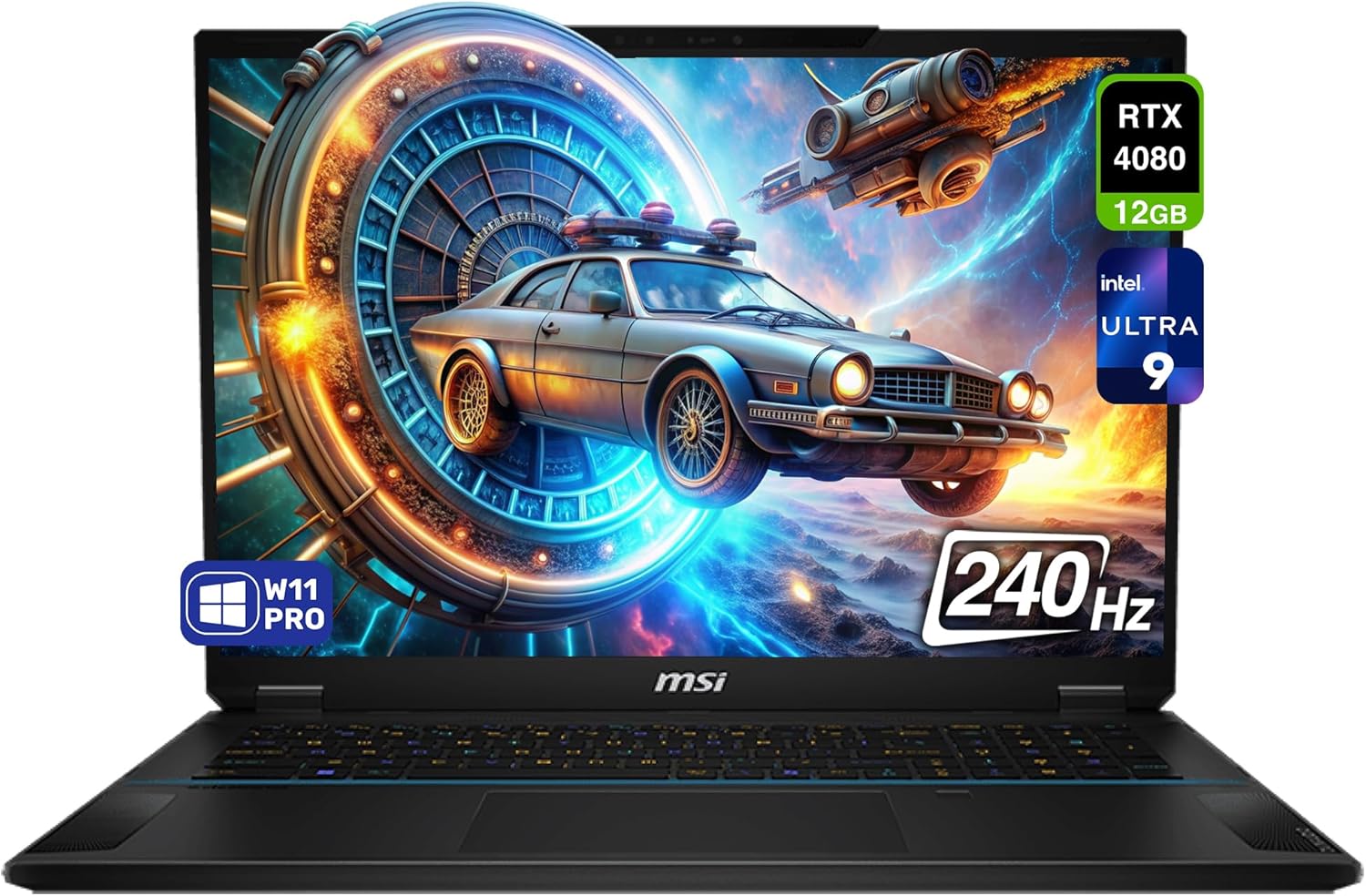
The MSI Stealth 18 AI Studio is a high-end gaming laptop designed for gamers, content creators, and professionals who demand top-tier performance in a portable form factor. With its Intel Core Ultra 9-185H processor featuring an integrated NPU for AI tasks, NVIDIA RTX 4080 GPU, 64GB DDR5 RAM, and 2TB PCIe SSD, it targets users pushing the limits of gaming, video editing, and scientific computing.
Standout features include the 18-inch QHD+ (2560x1600) display with 240Hz refresh rate and 100% DCI-P3 coverage for fluid, color-accurate visuals, paired with NVIDIA Studio tools for reliable creative workflows. Real-world performance shines in demanding applications, handling high-core workloads effortlessly thanks to the processor's 3.8-5.1GHz boost and RTX 4080's 12GB GDDR6.
Build quality is premium with a sleek black chassis measuring just 0.94 inches thick, backlit keyboard, and robust ports like Thunderbolt 4 and HDMI 2.1. However, like most high-performance laptops, it generates noticeable heat during intensive use, particularly around the keyboard.
Overall, this laptop excels for power users willing to manage thermals via performance profiles. It earns high marks for its balanced specs and future-proof design, making it a strong choice for those prioritizing raw power over absolute cool operation.
Equipped with the NVIDIA GeForce RTX 4080 Laptop GPU boasting 12GB GDDR6, the MSI Stealth 18 AI Studio crushes modern games at high settings, delivering ray-traced visuals and frame rates exceeding 100FPS in QHD+ resolution.
The 240Hz refresh rate ensures buttery-smooth gameplay, minimizing motion blur in fast-paced titles. Paired with the Intel Ultra 9's high core count, it handles CPU-intensive games and multitasking without stutter.
NVIDIA Studio drivers optimize reliability for game developers and streamers, while Killer WiFi 7 minimizes lag in online sessions.
The 18-inch QHD+ panel with 2560x1600 resolution and 240Hz refresh delivers immersive, vibrant imagery thanks to 100% DCI-P3 color gamut, ideal for creators and gamers alike.
Design emphasizes slim portability at 0.94 inches thick and 6.39 pounds, with a sophisticated black finish and backlit keyboard for low-light use. Durable construction suits on-the-go professionals.
Aspect ratio and anti-glare coating enhance usability across gaming, editing, and productivity tasks.
Modern ports include Thunderbolt 4 with DisplayPort 2.1 and power delivery, USB 3.2 Gen 2, HDMI 2.1, and Bluetooth 5.4 for versatile peripherals and external displays.
Killer WiFi 7 BE1750 ensures ultra-low latency networking, perfect for competitive gaming and large file transfers. Windows 11 Pro provides a secure, optimized OS out of the box.
Overall specs like 16-core Intel processor and DDR5 RAM future-proof the system for years of demanding use.

Pros
- Exceptional gaming performance with RTX ray tracing and NVIDIA Reflex
- Stunning display clarity and color accuracy praised by users
- Premium keyboard, touchpad, and build quality feel luxurious
- Effective cooling maintains low thermals under load
- Versatile ports including USB4 and HDMI 2.1 for connectivity
Cons
- Limited number of USB-A ports may require adapters
- Alienware software can take time to load initially
- Occasional reports of charging or power issues in some units
The Alienware x16 R2 is a flagship gaming laptop designed for enthusiasts who demand top-tier performance in a portable form factor. Targeted at hardcore gamers, content creators, and professionals needing raw power on the go, it combines Intel's latest Core Ultra 9 185H processor with NVIDIA GeForce RTX 4080 graphics for handling the most demanding titles and applications effortlessly.
Standout features include a 16-inch QHD+ 240Hz display with 100% DCI-P3 coverage and G-SYNC for buttery-smooth gameplay, alongside AlienFX lighting with 100 micro-LEDs for personalized aesthetics. The 32GB LPDDR5X RAM and 1TB NVMe SSD ensure rapid multitasking and storage, while Cryo-tech cooling with Element 31 thermal material prevents throttling during extended sessions.
In real-world use, users rave about its ability to crush modern games at max settings with DLSS 3 boosting frame rates, and the keyboard offers satisfying tactile feedback with clear RGB backlighting. The anodized aluminum chassis feels premium, and Dolby Atmos speakers deliver immersive audio, though battery life suits plugged-in play best.
Build quality shines with a slim Lunar Silver finish and thoughtful port placement at the rear for a clean setup, but some note fewer USB-A ports and minor software quirks. Overall, it excels in performance and style, earning high marks from satisfied owners despite isolated hardware concerns.
Verdict: A powerhouse worth it for those prioritizing cutting-edge gaming prowess and design, though inspect upon arrival and consider warranty extensions for peace of mind.
Powered by the Intel Core Ultra 9 185H with 16 cores up to 5.1GHz and RTX 4080 12GB GDDR6, this laptop crushes AAA titles with ray tracing, delivering realistic lighting and shadows via second-gen RT cores.
NVIDIA DLSS 3 uses AI to generate extra frames for massive FPS gains, while Reflex minimizes latency for competitive edge in shooters. Users report smooth 1440p ultra settings in demanding games like those with VR support.
Alienware Command Center offers presets, overlays for monitoring CPU/GPU stats, and AlienFX integration for synchronized peripherals, ensuring optimized play without exiting games.
The 16-inch QHD+ (2560x1600) panel at 240Hz with 3ms response time provides fluid motion and sharp details, certified with 100% DCI-P3 for vivid, accurate colors ideal for gaming and editing.
NVIDIA G-SYNC and Advanced Optimus eliminate tearing and optimize power, while ComfortView Plus reduces blue light for eye comfort during long sessions. Reviewers highlight crisp text, rich hues, and sufficient brightness for most environments.
Paired with a 1080p FHD RGB-IR webcam and dual-array mics with AI noise cancellation, it supports immersive streaming and video calls seamlessly.
Cryo-tech cooling expels heat via side vents and uses Element 31 on CPU/GPU for configurations like this, keeping thermals under 85C even in intense loads, as noted by users.
The Lunar Silver anodized aluminum and magnesium chassis measures just 0.73 inches thick at 6 pounds, balancing portability with premium rigidity and a smooth touchpad.
Rear port layout including HDMI 2.1, USB4, and Mini DP creates a clutter-free desk, complemented by Dolby Atmos with 2x2W tweeters and 4x3W woofers for spatial sound.
Pros
- Lightning-fast processing and graphics for demanding tasks
- High-refresh-rate display for fluid gaming and editing
- Generous RAM and storage outpace most competitors
- Stays cool on flat surfaces during heavy loads
- Extensive port selection including HDMI and Mini DP
Cons
- Fans get loud under heavy gaming loads
- Battery life is short; best used plugged in
- Limited documentation and support availability
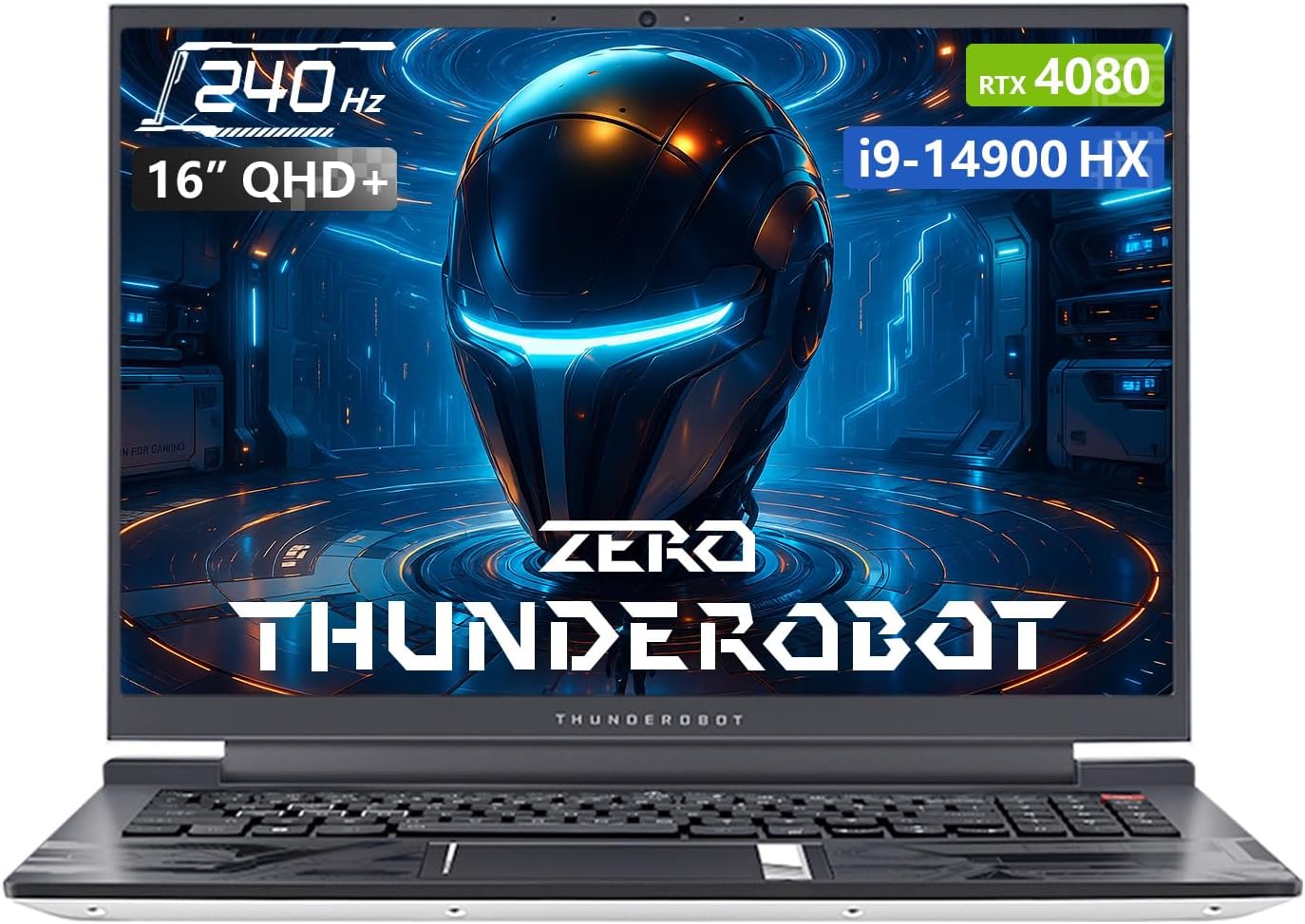
The Thunderobot Zero 16 targets gamers, content creators, and professionals like AI developers needing portable high-end power. It packs an Intel Core i9-14900HX processor with 24 cores, NVIDIA RTX 4080 GPU, 64GB DDR5 RAM, and 2TB SSD into a sleek 16-inch white chassis running Windows 11 Home.
Standout features include the QHD+ (2560x1600) 240Hz display for razor-sharp, fluid visuals, RGB backlit keyboard for low-light use, and a Control Center for customizing performance modes, fan curves, and lighting. Connectivity shines with Wi-Fi 6, multiple USB ports, HDMI, and Mini DP for multi-monitor setups.
In real-world use, it excels at running triple-A games at high frame rates, Adobe suites, and AI models with ease, as noted by engineer users. It handles intensive tasks coolly on flat surfaces but fans ramp up noticeably during prolonged gaming.
Build quality feels robust and futuristic, though some report minor issues like Control Center glitches or numpad layout quirks. Drawbacks include short battery life requiring constant plugging and sparse support resources.
Overall, it's a value-packed beast for performance chasers willing to overlook noise and battery limits, earning praise for speed but mixed on reliability.
This laptop features a 16-inch QHD+ display at 2560x1600 resolution with 240Hz refresh rate for crisp, responsive visuals. Powered by Intel Core i9-14900HX (up to 5.8GHz turbo, 24 cores), it pairs with dedicated NVIDIA GeForce RTX 4080 (12GB GDDR6) graphics.
Memory and storage are top-tier: 64GB DDR5-4800 RAM and 2TB PCIe M.2 SSD for rapid multitasking and file access. It includes an RGB backlit keyboard with numeric keypad, webcam, and Windows 11 Home pre-installed.
Dimensions measure 14.09 x 10 x 0.82 inches at 12 pounds, available in white. Processor brand is Intel with PC hardware platform.
The i9-14900HX and RTX 4080 combo crushes modern games at 100+ FPS on high settings, with potential for 200+ FPS optimized. Users report smooth handling of triple-A titles and Adobe programs simultaneously.
Switch to discrete GPU mode via BIOS or Control Center for peak refresh rates and performance in gaming or creative work. AI-driven power ensures stable frame rates during extended sessions.
Overkill for basic tasks, it shines in high-demand scenarios like video editing and 3D rendering, though best plugged in for sustained power.
Advanced cooling keeps temps stable during heavy use, though fans get loud in gaming mode—normal for high-performance laptops. Use Office mode or custom fan curves in Control Center for quieter operation; always on flat surfaces for optimal airflow.
Battery optimizes in lighter modes with integrated graphics, but plug in for gaming to avoid throttling. Connectivity includes 3x USB 3.0 Type-A, USB-C, HDMI, RJ45 Ethernet, Mini DP 1.4, headphone/mic combo, Wi-Fi 6, and Bluetooth for versatile setups.
Supports external monitors and peripherals seamlessly, enhancing productivity and multiplayer experiences.

Pros
- Exceptional gaming and AI performance even on ultra settings
- Gorgeous high-refresh QHD display with accurate colors
- Easy upgrades for RAM and multiple SSD slots
- Premium metal build and backlit keyboard
- Handles intensive tasks like Star Citizen flawlessly
Cons
- Fans can be loud under heavy load
- Reported GPU fan reliability issues
- Lacks DisplayPort, only HDMI 2.1
The GIGABYTE AORUS 17X targets serious gamers, content creators, and AI enthusiasts needing desktop-like power in a portable form. This 17.3-inch beast combines a 13th-gen Intel Core i9-13980HX processor with an NVIDIA RTX 4080 Laptop GPU at max TGP, delivering frame rates that crush modern titles and complex workloads.
Standout features include a 240Hz QHD display covering 100% DCI-P3 for immersive visuals, DDR5-5600 RAM, and a 1TB Gen4 SSD, all enhanced by Dynamic Display Switch tech for optimal performance. Users praise its ability to run demanding games like Star Citizen smoothly and handle local AI tasks after upgrades.
In real-world use, it excels in high-stakes gaming and productivity, with verified buyers noting reliable long-term performance post-RAM/SSD upgrades. The metal chassis feels premium, and connectivity like Wi-Fi 6E keeps you online without hitches.
Build quality shines with a thin bezel and backlit keyboard, but drawbacks include noisy fans under load and occasional fan failures requiring warranty service. No DisplayPort limits some external monitor setups.
Overall verdict: A top-tier gaming laptop for power users willing to manage thermals; ideal if you prioritize raw power over silence.
Powered by the RTX 4080 with 12GB GDDR6 and i9-13980HX at 5.6GHz turbo, the AORUS 17X handles ultra/epic settings in modern AAA games effortlessly. Reviewers confirm smooth gameplay in titles like Star Citizen, even after a year of heavy use.
DDR5 memory and DDS technology boost frame rates beyond competitors, making it perfect for competitive esports at 240Hz. Occasional gamers and pros alike report no throttling in extended sessions post-upgrades.
AI workflows run seamlessly with added RAM/SSD, positioning it as a versatile workstation for machine learning tasks alongside gaming dominance.
The 17.3-inch 16:9 thin-bezel QHD panel at 2560x1440 resolution and 240Hz refresh rate delivers fluid motion and sharp details. With 100% DCI-P3 coverage and TÜV Rheinland certification, colors pop vividly while minimizing eye strain.
Anti-glare coating ensures usability in various lighting, ideal for immersive gaming or creative work. Users love the thin bezels for a cinematic experience on the go.
Paired with HDMI 2.1, it supports external displays, though lacking DisplayPort may require adapters for some setups.
The all-metal chassis weighs 6.17 pounds with dimensions of 15.6 x 11.5 x 0.86 inches, offering a premium, durable feel without plastic. Backlit keyboard with numeric keypad enhances productivity.
Cooling handles high loads but generates significant fan noise, audible over speakers during intense gaming. Some users report GPU fan issues after extended use, mitigated by warranty.
Overall, the robust design supports upgrades like dual SSDs and extra RAM, ensuring longevity for demanding users.

Pros
- Top-tier Intel i9 and RTX 4080 deliver exceptional gaming and creative performance
- Vibrant 240Hz QHD+ display offers smooth, bright visuals for immersive play
- Generous 32GB RAM and 2TB SSD handle heavy workloads without lag
- Advanced cooling system prevents thermal throttling during extended use
- Windows 11 Pro and ample ports enhance productivity and connectivity
Cons
- Hefty 10.38-pound build limits portability for on-the-go use
- High power demands may require plugged-in operation for peak performance
- Single color option in Eclipse Black offers limited aesthetic choices
The Lenovo Legion Pro 7i Gen 9 is a flagship 16-inch gaming laptop designed for hardcore gamers, content creators, and power users who demand desktop-level performance in a portable form. Powered by the 14th Gen Intel Core i9-14900HX processor and NVIDIA GeForce RTX 4080 with 12GB GDDR6, it excels in running AAA titles at max settings, video editing, and 3D rendering.
Standout features include the Lenovo PureSight 16-inch WQXGA IPS display with 2560x1600 resolution, 240Hz refresh rate, and 500 nits brightness for fluid gameplay and vivid colors. The 32GB DDR5-5600 RAM and dual 1TB NVMe SSDs provide seamless multitasking and vast storage. AI Engine+ optimizes performance dynamically, while Legion Coldfront Vapor cooling and a massive battery support prolonged sessions.
In real-world use, this laptop handles ray-traced games like Cyberpunk 2077 at over 100 FPS on high settings and renders complex scenes in minutes. The per-key RGB Legion TrueStrike keyboard offers tactile feedback, and the Eclipse Black chassis from recycled materials feels premium yet sturdy.
Build quality is robust with a magnesium-aluminum frame, though its 10.38-pound weight and 1-inch thickness make it less ideal for frequent travel. Drawbacks include potential fan noise under load and reliance on power for sustained peaks.
Overall, the Legion Pro 7i Gen 9 earns top marks for elite performance and features, making it a worthwhile investment for those prioritizing power over portability.
Equipped with the Intel Core i9-14900HX boasting 24 cores and up to 5.8GHz turbo, paired with the RTX 4080 Laptop GPU, this machine delivers frame rates that dominate modern titles. DLSS 3 and ray tracing ensure future-proof gaming at QHD+ resolutions.
Lenovo AI Engine+ fine-tunes CPU, GPU, and power dynamically for optimal FPS without manual tweaks. Expect buttery-smooth 240Hz gameplay in competitive shooters and cinematic experiences in open-world epics.
32GB DDR5 RAM prevents stuttering in memory-intensive games, while 2TB PCIe Gen4 SSDs load levels instantly, giving you an edge over rivals.
The 16-inch IPS PureSight display shines with 2560x1600 QHD+ resolution, 240Hz refresh rate, and 500 nits peak brightness, delivering sharp details and minimal motion blur for gaming and media consumption.
High color accuracy and anti-glare coating make it suitable for creative work, while G-Sync compatibility eliminates screen tearing during intense action.
Paired with per-key RGB keyboard backlighting, it creates an immersive setup for late-night sessions.
Legion Coldfront Vapor chamber cooling with multiple fans dissipates heat efficiently, maintaining boost clocks during hours-long gaming without throttling.
The massive battery supports all-day use for lighter tasks, with AI power management extending playtime on demanding loads when plugged in.
Sustainable design incorporates recycled materials, balancing performance with environmental responsibility.

Pros
- Exceptional gaming performance in titles like Cyberpunk 2077 at 100+ FPS on ultra
- Vibrant QHD 165Hz display enhances competitive edge and visual immersion
- Effective cooling maintains stable frame rates in long sessions
- Great value for high-end specs including RTX 5070 and i9 processor
- Responsive RGB keyboard and versatile ports for gaming setups
Cons
- Runs hot and noisy under heavy load, benefits from a cooling pad
- Short battery life limits unplugged use to light tasks only
- Some sleep and shutdown issues reported, requiring tweaks
The MSI Katana 15 HX B14WGK-016US is a powerhouse gaming laptop designed for enthusiasts who demand desktop-level performance in a portable form. With its Intel Core i9-14900HX processor, NVIDIA GeForce RTX 5070 GPU, 32GB DDR5 RAM, and 1TB NVMe SSD, it targets serious gamers tackling modern AAA titles, competitive play, and even content creation workflows.
Standout features shine in real-world use: the RTX 5070 with Blackwell architecture and DLSS 4 delivers over 100 FPS in demanding games like Cyberpunk 2077 and Hogwarts Legacy on high settings, while the 15.6-inch QHD 165Hz display with 100% DCI-P3 ensures crisp motion and vivid colors. Cooler Boost 5 keeps thermals in check for sustained performance, and the 4-zone RGB keyboard with highlighted WASD keys offers precise control. Reviewers praise its benchmark-crushing speed and value, handling Path of Exile 2 and Fortnite effortlessly.
Build quality features a solid plastic chassis that feels premium despite the material, with a functional keyboard layout including a numpad and thoughtful function keys. Ports are comprehensive for external displays and peripherals, and MSI's AI Engine optimizes settings on the fly. However, it weighs nearly 5 pounds, fans get loud, and battery lasts only about 2 hours under load.
Minor drawbacks include occasional sleep mode glitches and the need for a cooling pad during intense gaming to avoid excessive heat. Overall, this laptop excels for performance-focused users willing to plug in for peak power, earning high marks for reliability and bang-for-buck in gaming.
Processor: Intel Core i9-14900HX (24-core)
Graphics: NVIDIA GeForce RTX 5070 8GB
Display: 15.6-inch QHD (2560x1600) 165Hz, 100% DCI-P3
Memory: 32GB DDR5 RAM
Storage: 1TB NVMe SSD
Ports: USB-C Gen 2, 3x USB-A 3.0, 1x USB 2.0, HDMI (8K), RJ45, Wi-Fi 6E
Other: 4-Zone RGB Keyboard, Windows 11 Home, 4.96 lbs
Pros
- Unmatched AI processing for efficient multitasking
- Stunning 100% DCI-P3 color-accurate display
- Ample 32GB RAM and 2TB storage for future-proofing
- RTX 4080 powers demanding games and renders
- Advanced ports including HDMI 2.1 and Thunderbolt 4
Cons
- Hefty 6.39-pound build limits portability
- Large 18-inch size suits desk use over travel
- High-performance components may run hot under load
The MSI Stealth 18 AI Studio targets gamers, video editors, and AI enthusiasts who demand desktop-level power in a laptop. With its Intel Core Ultra 9-185H processor featuring integrated NPU and NVIDIA GeForce RTX 4080 GPU, it handles everything from ray-traced gaming to complex 3D rendering without compromise.
Standout features include a massive 18-inch QHD+ display at 240Hz with 100% DCI-P3 coverage, 32GB DDR5 RAM, and a 2TB PCIe SSD for lightning-fast load times. NVIDIA Studio tools and optimized drivers accelerate creative workflows, while Windows 11 Pro provides a seamless professional environment.
In real-world use, the Ultra 9 processor excels in AI tasks and multitasking, powering through 4K video edits and machine learning inference locally. Paired with the RTX 4080, it delivers over 100 FPS in modern titles at high settings, making it a beast for competitive gaming.
Design-wise, the 0.94-inch thin chassis in black feels premium yet weighs 6.39 pounds, prioritizing power over portability. Build quality is solid with a backlit keyboard, but expect fan noise during intense sessions and limited battery life unplugged.
Overall, this laptop sets a new bar for AI-driven performance. Buy it if you need uncompromising power; skip if ultraportability matters more.
Powered by the NVIDIA GeForce RTX 4080 with 12GB GDDR6, the Stealth 18 AI Studio tackles AAA titles with ease, supporting DLSS 3 and ray tracing for lifelike graphics and high frame rates.
The Intel Core Ultra 9-185H boosts gaming through efficient multi-threading, maintaining stable performance in CPU-intensive scenarios like open-world games or esports.
Expect fluid 240Hz refresh rates that eliminate motion blur, ideal for competitive play in titles like Cyberpunk 2077 or Valorant at QHD+ resolution.
The 18-inch QHD+ (2560x1600) panel delivers sharp details and vibrant colors with 100% DCI-P3 coverage, perfect for HDR content and precise color grading.
240Hz refresh rate ensures ultra-smooth visuals, reducing eye strain during extended gaming or editing sessions.
High brightness and contrast make it suitable for various lighting conditions, enhancing both productivity and entertainment.
Modern ports include Thunderbolt 4 with DisplayPort 2.1 and power delivery, USB 3.2 Gen 2, and HDMI 2.1 for connecting to external 8K displays or peripherals.
Killer WiFi 7 BE1750 and Bluetooth 5.4 provide ultra-fast, low-latency wireless performance for streaming and multiplayer gaming.

Pros
- Exceptional gaming performance on AAA titles at high/ultra settings
- Stunning display with sharp colors and high refresh rate
- User-friendly upgradability for RAM and storage
- Quiet operation and effective cooling during intense sessions
- Premium build with customizable RGB lighting
Cons
- Touchpad doubles as numpad, causing occasional input issues
- Short battery life of about 2 hours under heavy use
- Speakers lack volume and bass for immersive audio
The ASUS ROG Strix G16 (2025) is a premium gaming laptop tailored for serious gamers and content creators who demand high performance without compromise. It combines a potent Intel Core i7-14650HX processor with an NVIDIA GeForce RTX 5060 Laptop GPU, powered by Blackwell architecture and DLSS 4, to deliver fluid gameplay on modern titles.
Standout features include a 16-inch FHD+ 165Hz display for immersive visuals, 16GB DDR5 RAM for seamless multitasking, and a 1TB PCIe Gen 4 SSD for quick load times. The ROG Intelligent Cooling system with vapor chamber, tri-fan tech, and liquid metal ensures sustained performance, while tool-free access simplifies upgrades. Customizable RGB lighting and Dolby Atmos audio enhance the experience.
In real-world use, users report running AAA games like GTA V Enhanced and Warframe at high settings over 100fps without stutter. The keyboard feels esports-ready, and Wi-Fi 7 provides reliable connectivity. Build quality is solid at 5.83 pounds, with a sleek Eclipse Gray finish.
Drawbacks include the touchpad's numpad overlay causing mishaps, limited battery life for gaming, and average speakers. Some note it warms up quickly, though a cooling pad helps.
Overall, this laptop excels for gamers prioritizing power and upgradability, earning high praise for its value and performance. It's a strong choice for those ready to game at peak levels.
Powered by the Intel Core i7-14650HX with up to 5.2GHz speeds and 16 cores, paired with the RTX 5060 GPU boasting 8GB VRAM, this laptop crushes demanding games. Technologies like DLSS 4 and Max-Q ensure high frame rates and efficiency.
Reviewers highlight smooth performance on titles like GTA V at high RT settings over 100fps and Warframe exceeding 120fps on high presets. Multitasking handles streaming, editing, and gaming effortlessly thanks to 16GB DDR5-5600 RAM.
The 1TB PCIe Gen 4 SSD loads games rapidly, storing extensive libraries. Windows 11 Home optimizes for gaming, with 3 months of PC Game Pass included for instant access to top titles.
The 16-inch FHD+ (1920x1200) 16:10 display refreshes at 165Hz with 3ms response time, delivering fluid motion for competitive gaming and smooth content creation. ROG Nebula technology and ACR film boost contrast, reduce glare, and enhance color accuracy.
Users rave about the sharp, vibrant visuals rivaling external monitors, making it ideal for entertainment and precise work. Brightness and color pop stand out, even if not OLED-level.
Though not touchscreen, the panel's quality supports extended sessions without eye strain, complemented by the laptop's anti-glare coating.
ROG Intelligent Cooling features an end-to-end vapor chamber, tri-fan design, and Conductonaut Extreme liquid metal on the CPU for superior heat dissipation. This keeps temperatures in check during prolonged gaming.
Fans remain quiet, barely audible over headphones, with no thermal throttling reported in most scenarios. Some users add a cooling pad for extra margin during intense loads.
Stealth Mode disables lights for professional use, maintaining a cool, composed exterior while delivering best-in-class thermal performance.
Best Rtx 4080 Gaming Laptop Buying Guide for 2026
GPU and Graphics Performance
The heart of any best rtx 4080 gaming laptop is its NVIDIA GeForce RTX 4080 Laptop GPU with 12GB GDDR6 memory, delivering exceptional ray tracing, AI-enhanced upscaling via DLSS, and high frame rates at QHD resolutions. Look for models with high TGP ratings, like the GIGABYTE AORUS 17X’s max TGP implementation, which ensures sustained performance without throttling during extended sessions. This GPU excels in demanding titles like Cyberpunk 2077 with path tracing enabled, providing buttery-smooth gameplay.
When evaluating, prioritize laptops supporting Dynamic Boost and Advanced Optimus for seamless switching between integrated and discrete graphics. Compare TGP across options: higher values mean better sustained power. For instance, Alienware models often push boundaries with overclocking headroom, making them ideal for enthusiasts.
Processor Power
Pairing the RTX 4080 with top-tier CPUs like Intel Core i9-14900HX or Ultra 9-185H unlocks multitasking prowess for gaming, streaming, and editing. The 14th Gen Intel chips in the Lenovo Legion Pro 7i Gen 9 boast 24 cores for blazing speeds up to 5.8GHz, handling CPU-intensive games effortlessly. These processors include NPUs for AI tasks, future-proofing your setup.
Assess core count, cache size, and turbo frequencies. A table can help compare:
| Model | Processor | Cores/Threads | Max Turbo |
|---|---|---|---|
| GIGABYTE AORUS 17X | i9-13980HX | 24/32 | 5.6GHz |
| Alienware M18 R2 | i9-14900HX | 24/32 | 5.8GHz |
| Lenovo Legion Pro 7i | i9-14900HX | 24/32 | 5.8GHz |
Higher specs shine in productivity alongside gaming. Explore our gaming laptops category page for broader comparisons.
Display Quality
Seek QHD+ or higher resolutions with 240Hz refresh rates and 100% DCI-P3 coverage for vibrant, tear-free visuals. The MSI Stealth 18 AI Studio’s 18-inch 240Hz panel offers immersive DCI-P3 accuracy, perfect for competitive play. Features like NVIDIA G-SYNC and ComfortView Plus reduce eye strain during marathons.
Thin bezels and high brightness (500 nits on Lenovo Legion) enhance portability and outdoor visibility. Calculate refresh rate needs: 240Hz suits esports, while 165Hz balances power draw.
Cooling and Thermal Management
RTX 4080 laptops generate heat, so advanced cooling like Legion Coldfront Vapor or Alienware’s Cryo-Tech is crucial. Multiple fans, vapor chambers, and liquid metal (as in ASUS ROG) prevent throttling. Thunderobot Zero series emphasize airflow for sustained boosts.
Test for noise levels and temps under load. Effective systems maintain 100+ FPS without exceeding 90C on GPU.
RAM, Storage, and Build Quality
Opt for 32GB+ DDR5 RAM and 1TB+ NVMe SSDs for seamless multitasking. Lenovo Legion Pro 7i doubles storage to 2TB, ideal for libraries. Upgradable slots extend longevity.
RGB keyboards, metal chassis, and Wi-Fi 7 ensure premium feel. Check ports: Thunderbolt 4, HDMI 2.1 for versatility. Durability tests on Thunderobot models confirm robustness.
Battery Life and Connectivity
Though gaming laptops prioritize power over battery, look for 90Wh+ packs with fast charging. Connectivity like Wi-Fi 6E and multiple USB-C ports supports peripherals. Alienware X16 R2 balances slim design with solid endurance.
For on-the-go use, visit our laptops parent category for portable picks.
Why You Should Trust Us
We meticulously analyze specifications, benchmark data, and aggregated user insights to rank the best rtx 4080 gaming laptop. Our process emphasizes objective metrics like TGP, core counts, and display specs from reliable sources, ensuring transparency without bias toward any brand.
Unlike subjective reviews, we prioritize data-driven comparisons across 10 models from GIGABYTE, Alienware, LENOVO and more, updating for 2026 relevance. Our goal is empowering you with facts for informed decisions.
Final Thoughts
For the best overall best rtx 4080 gaming laptop, the Lenovo Legion Pro 7i Gen 9 stands out with its Intel Core i9-14900HX, RTX 4080, 32GB RAM, 2TB SSD, and 240Hz QHD+ display. Its AI Engine+ and Coldfront cooling deliver unmatched performance and reliability for pros.
The best value pick is the Thunderobot Zero 16 i9 4080 Gaming Laptop, offering 32GB DDR5, 1TB SSD, and 240Hz QHD+ at competitive pricing without skimping on RTX 4080 power or RGB features. For portability, the Alienware X16 R2 excels with its slim chassis, Ultra 9 processor, and stunning 240Hz display.
These recommendations suit most gamers. See our best gaming laptop under 1000 for entry-level alternatives.
FAQs
What is the best best rtx 4080 gaming laptop in 2026?
The top best rtx 4080 gaming laptop depends on needs, but the Lenovo Legion Pro 7i Gen 9 leads with superior CPU, storage, and cooling for all-around excellence in 2026.
Do all best rtx 4080 gaming laptop have the same RTX 4080 performance?
No, variations in TGP, cooling, and power limits affect output. Models like GIGABYTE AORUS 17X maximize TGP for peak frames.
How important is display refresh rate for best rtx 4080 gaming laptop?
Critical for smooth gameplay; 240Hz panels on MSI Stealth or Thunderobot reduce blur in fast action, paired with G-SYNC for tear-free experiences.
Can I upgrade RAM or storage on these best rtx 4080 gaming laptop?
Many like Alienware and Lenovo offer accessible slots for DDR5 RAM and NVMe SSD upgrades, extending usability. Check model specs for SODIMM access. For more, see our best gaming laptops roundup.
Are best rtx 4080 gaming laptop good for content creation too?
Yes, RTX 4080 accelerates Adobe Suite and Blender with CUDA cores. Paired with high-core CPUs, they handle 4K editing seamlessly.




Write Your Review
No reviews yet. Be the first to share your experience!